Private Prescription Register Report
The Private Prescription Register enables you to replace a manual private prescription book with an electronic record.
To view the Private Prescription Register report:
- From Reports
 , select the Private Prescription Register report.
 - If required, double click to display Filters, tick and complete as appropriate:
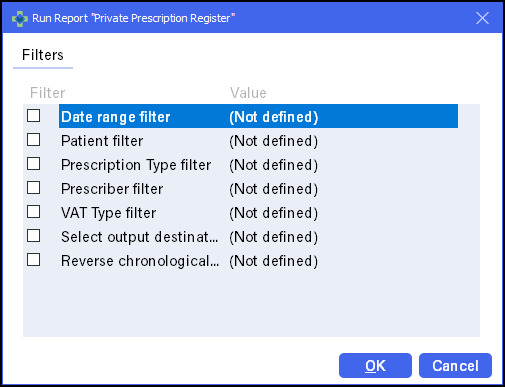
- Date Range filter - Set a Start and End date.
- Patient filter - Select a specific patient.
- Prescription Type filter - Tick type(s) of prescriptions required.
- Prescriber filter - Select a specific prescriber.
- VAT Type filter - Select Exempt or Inclusive:
Category VAT Exempt Including VAT Private prescription

Private CD prescription
Emergency supplies at patient's request
Private PGD
Ship's master
Midwife sale
Sales
Veterinary - professional, private and sale
Independent prescriber, for example, physiotherapist
- Select output destination - Select to print or save as a file.
- Reverse chronological order - Select to reverse the output order.
- Select Preview and the Private Prescription Register report displays.
- Select Print
 .
. - Select Close
 to exit the report.
Note - To comply with guidance from Medicines, Ethics and Practice (MEP), Pharmacy Manager now records an Emergency Request within the Private Prescription Register.
See Pharmacy Details - Dispensing tab for details on enabling.
The Private Prescription Register report displays:
- The item price for each prescribed medication
item on the prescription.

The reference number is created from yyyymmdd-nnn where:
- yyyymmdd is the dispense date.
- nnn is the number of the instance during
that day.Note - This option can be switched off in Print options.
-
A total item price for whatever filtered selection you request is also calculated.

Note - If an item is fully owed, it does not appear in the
private prescription register until some or all of the outstanding balance
is dispensed. If an item is partially owed,
the full cost displays regardless of the owing balance. When the balance is collected, it therefore displays as zero.

