Patient History Audit
To access the Patient History Audit screen, from the Patient Details - History screen, highlight a dispensed item and select Audit  .
.
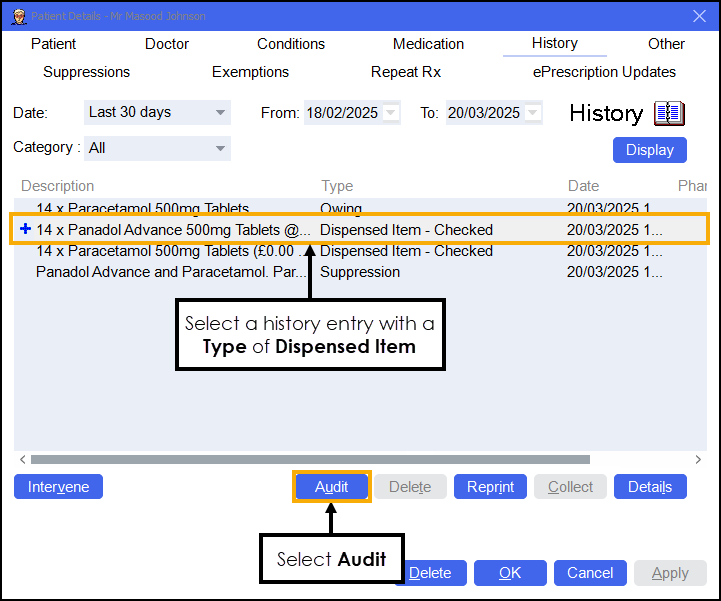
The Patient History Audit screen displays.
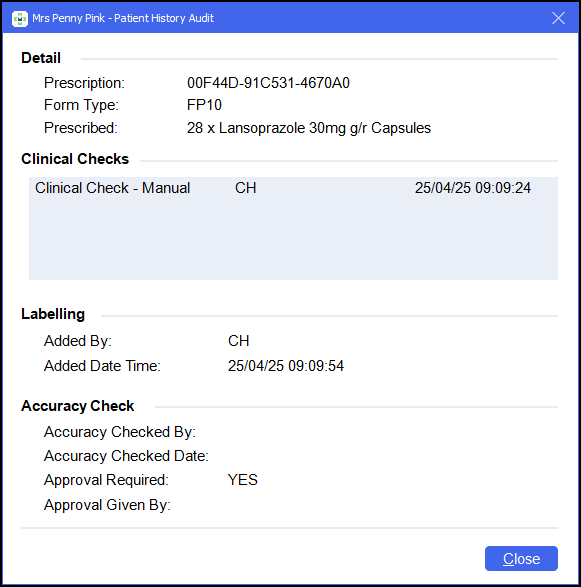
The following data displays:
-
Detail:
-
Prescription - The prescriptions Universally Unique Identifier (UUID).
-
Form Type - The prescriptions form type.
-
Prescribed - The item prescribed.
-
-
Clinical Checks - Clinical Checks lists all checks whether manual or auto against this item, this also lists whether a clinical check was reset.
-
Labelling:
-
Added By - The user name of the logged in user when the item was dispensed.
-
Added Date Time - The date and item the item was dispensed.
-
-
Accuracy Check:
-
Accuracy Checked By - The user name of the logged in user when the item was accuracy checked.
-
Accuracy Checked Date - The date and item the item was accuracy checked.
-
Approval Required - Displays YES if approval was required, otherwise displays NO.
-
Approval Given By - The text entered in Approval Required - Approved By.
-
 in the top right corner and follow the on-screen prompts.