Creating Device User Accounts
You must have an account set up in Pharmacy Manager before you can start using CRx Scan (Formerly Handout Manager).
Important - Each user must have their own separate account set up, see Adding a User for details .
Each Pharmacy Manager user is required to have their own access to CRx Scan (Formerly Handout Manager), to set this up:
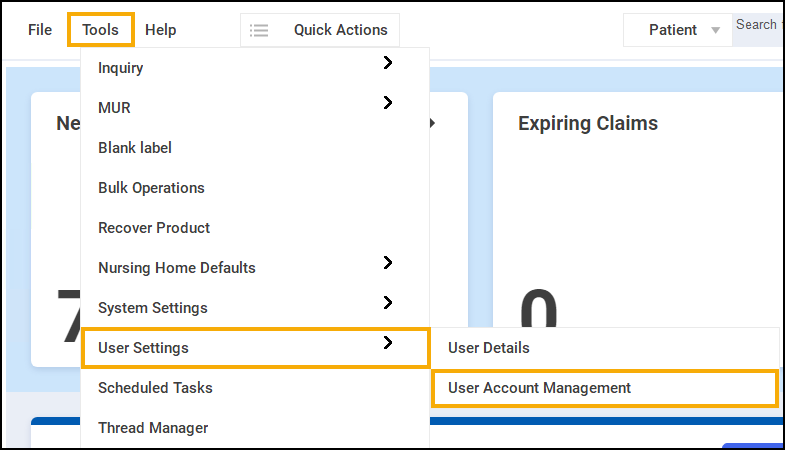
- From Pharmacy Manager, select Tools - User Settings - User Account Management.
- The User Management screen displays, highlight a user and select Details.
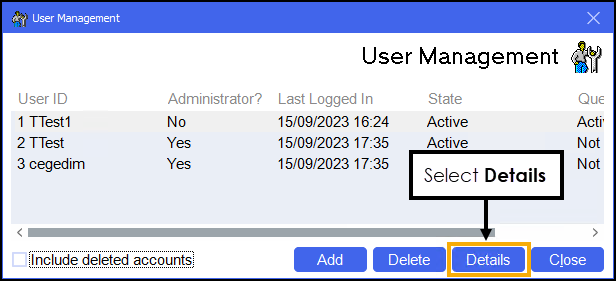
-
The User Details screen displays.
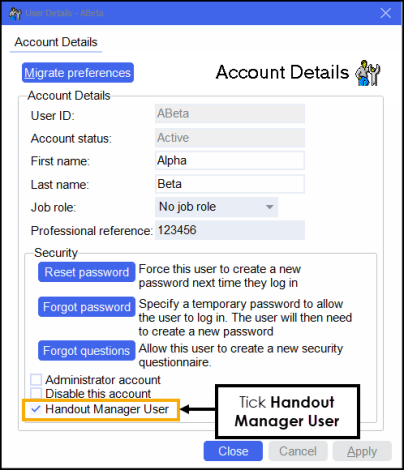
Tick Handout Manager User.
- Select OK to save. The user now displays on the Who's logging in screen of CRx Scan (Formerly Handout Manager).
See Signing in to CRx Scan (Formerly Handout Manager) for the First Time for details.
Note - To print this topic select Print  in the top right corner and follow the on-screen prompts.
in the top right corner and follow the on-screen prompts.