NMS - Adding Contact Attempts
When a patient is unreachable, you can record a failed contact attempt on either the Intervention or Follow Up session. Once three failed contact attempts have been recorded for a session, the New Medicine Service (NMS) episode can be formally closed.
To add a failed contact attempt to the NMS session:
-
From the New Medicine Service screen find the required episode and select OPEN
 .
. See Searching for, Sorting or Filtering NMS Episodes for more details.
 -
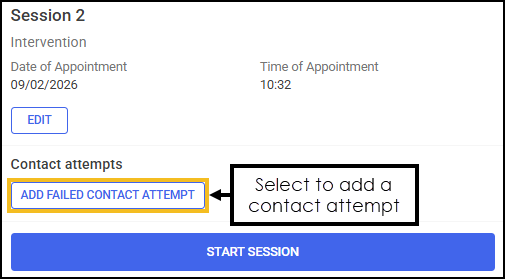
From the Intervention or Follow Up session, select ADD FAILED CONTACT ATTEMPT
 .
.
-
The Add Failed Contact Attempt screen displays.
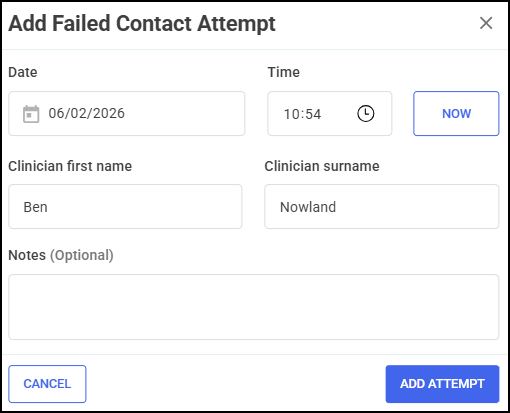
Complete the details of the failed contact attempt as appropriate.
-
Date - Select the Date section to open a calendar and select a date, or select NOW
 to add the current date and time.
 -
Time - Select Show time picker
 to enter the time of the contact attempt, or select NOW to add the current date and time.
 -
Clinician name - Enter the first name and surname of the clinician.
Training Tip - This section automatically populates with the logged in user's details. Update the details manually if required. -
Notes (Optional) - Enter any additional notes.
Training Tip - Free text entry section allows up to 250 characters.
-
-
Select ADD ATTEMPT
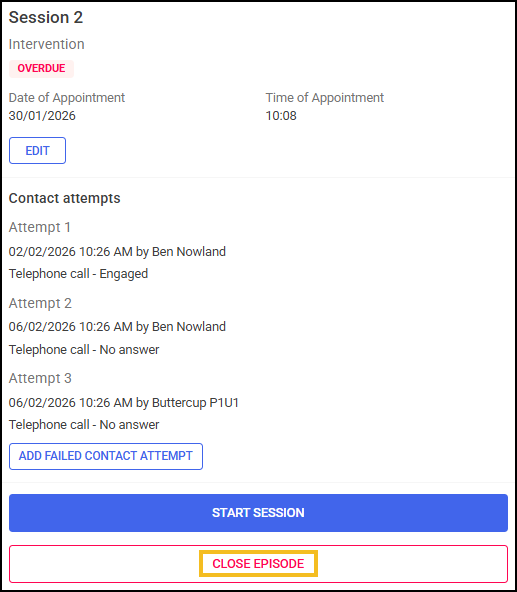
 . The attempt is recorded on the NMS session tile.Training Tip - A summary of up to 10 failed contact attempts can display on the session tile for quick reference. See Viewing NMS Episodes for details.
Closing an Episode After Three Failed Contact Attempts
Once three failed contact attempts have been recorded for a session, the NMS episode can be formally closed. To close an episode:
-
From the New Medicine Service screen find the required episode and select OPEN
.
See Searching for, Sorting or Filtering NMS Episodes for more details. -
From the Intervention or Follow Up session tile, select CLOSE EPISODE
 .
.
-
The Closure Confirmation screen displays.
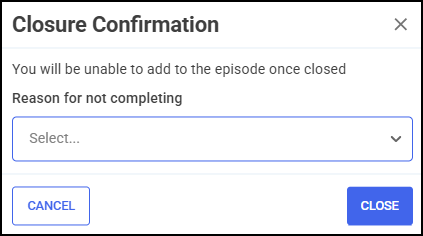
From the drop-down list, select a reason for not completing:
-
Patient has withdrawn consent for information sharing
-
Patient has withdrawn consent to receive the service
-
Patient could not be contacted
-
-
Select CLOSE
 . The NMS saves to the Completed Episodes tab.Note - Contact attempt details are recorded on the completed summary screen. See Viewing NMS Episodes for details.
 in the top right corner and follow the on-screen prompts.