Contraception Service (England only)
Within Pharmacy Manager you can easily identify patients that are suitable candidates for the Pharmacy Services - Contraception Service.
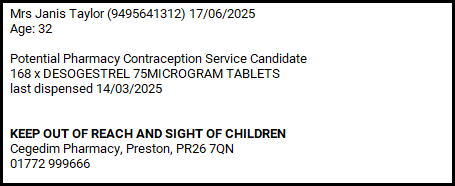
When dispensing medication to female patients, a check is performed to assess potential eligibility for a Pharmacy Contraception Service consultation. If eligible, an additional label displaying 'Potential Pharmacy Contraception Service Candidate' is automatically printed alongside the item labels. This label serves as a prompt to initiate a consultation - enabling you to discuss service availability, eligibility, and next steps.
Eligibility Criteria
A patient is eligible for a Pharmacy Contraception Service label if they are female, have a valid date of birth, and have a recorded history (including the current dispensing) of any valid contraception medication within the past 12 months. Eligibility is age-dependent:
-
For Progestogen-Only Pills (POP) - The patient must be under 55 years old.
-
For Combined Oral Contraceptives (COC) - The patient must be under 50 years old.
The system checks eligibility automatically at the point of dispensing. If all criteria are met, a label will print, indicating “Potential Pharmacy Contraception Service Candidate.” This label serves as a prompt to discuss contraception use and complete a Contraception Service in Pharmacy Services.
Pharmacy Manager Configuration
To configure Pharmacy Manager to print an additional label to promote the Contraception Service to suitable candidates:
-
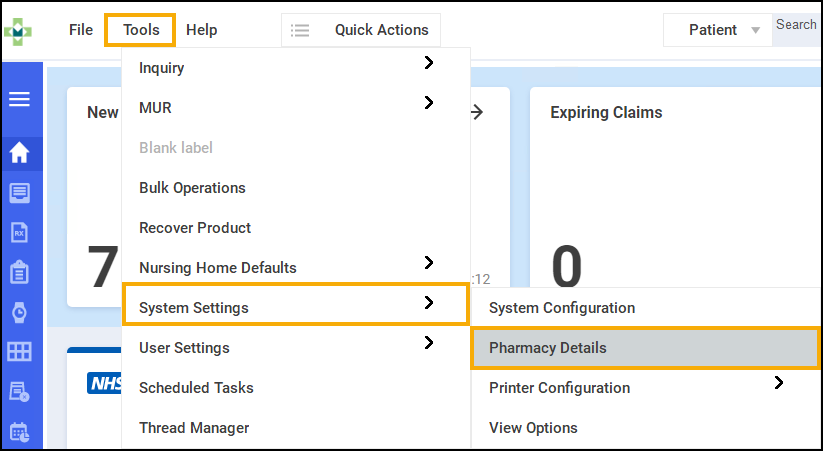
From the Pharmacy Manager Toolbar, select Tools - System Settings - Pharmacy Details.
-
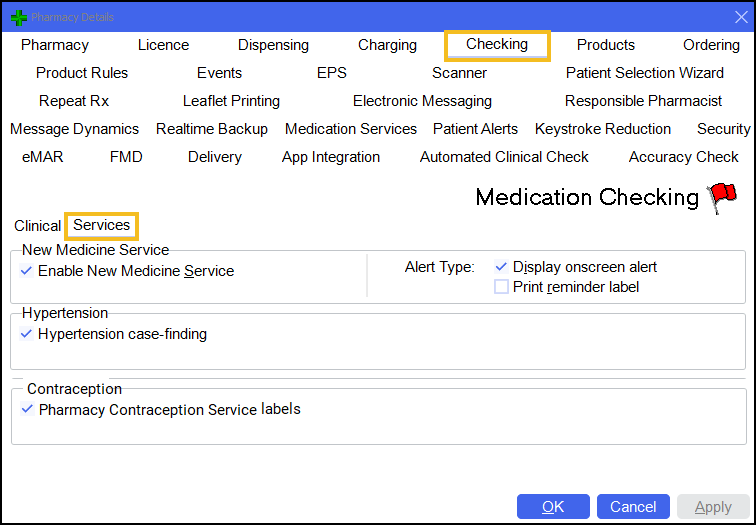
Select the Checking tab and then Services.
-
From Contraception select Pharmacy Contraception Service labels to enable the contraception labels.
When Pharmacy Contraception Service labels is enabled, at the point of labelling, the following contraception label prints in addition to the dispensing label(s).
Suspend Eligibility Labels
Should a patient no longer require a Contraception eligibility label printing, for example if the service has been delivered or the patient does not want it, you can easily suspend it in Patient Details.
To suspend the Contraception eligibility label printing:
-
From the Find Patient screen, find the patient and then select Details
 or press Alt + D on your keyboard.
 -
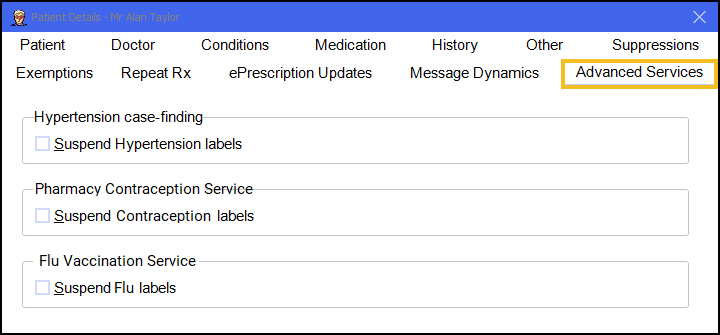
The Patient Details screen displays, select Advanced Services.
-
Tick in Suspend Contraception Labels.
The patient is no longer prompted for the Contraception Service.
 in the top right corner and follow the on-screen prompts.