SMS FAQs
Introduction to SMS Functionality
 What is SMS functionality?
SMS functionality allows pharmacies to automatically and manually send prescription collection reminders and notifications to patients directly from Pharmacy Manager.
Why is it being introduced?
To improve patient communication, reduce uncollected prescriptions, and streamline pharmacy workflows.
Where is it available?
Currently, SMS functionality is only available to pharmacies in England.
Getting Started
What are the pre-requisites for SMS functionality?
-
Pharmacy Manager version 17.2 or above.
-
Handout Manager enabled.
See An Introduction to Handout Manager for details. -
You must be based in England.
- You must have an active MHS connection.
How do I upgrade or activate SMS functionality for my pharmacy system?
If you meet the pre-requisites outlined above, please contact your Account Manager to express interest in implementing SMS services at your pharmacy.
You can reach us at: CRX-CustomerSuccess@cegedimrx.co.uk.
Our team will guide you through the next steps, including a demonstration of the SMS functionality, setup requirements, and activation timelines.
Configuring SMS Settings
How do I enable SMS in Pharmacy Manager?
How do I configure SMS settings?
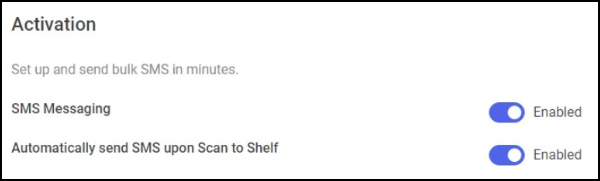
Go to Tools - Settings - SMS to access configuration options, including default and custom messaging hours.
Can I automatically send an SMS when scanning to shelf?
Yes, this option is enabled by default and can be configured in Tools - Settings - SMS.
Message Templates
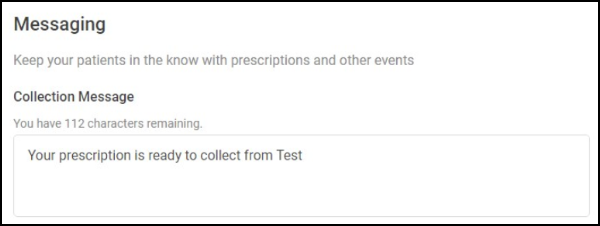
What content is sent in the Collection message?
By default, the message includes the pharmacy name and a notification that the prescription is ready to collect.
Patient Management
How are patients opted into SMS?
Patients are opted in by default, but can be opted out individually or in bulk using exclusion groups.
How do I opt out a patient?
Go to the patient's details and select Opt-Out under SMS options.
Are any groups excluded from SMS by default?
Yes, patients under 18, patients marked as deleted or deceased, and patients without a mobile number are excluded.
Sending SMS
How do I send an SMS via Scan to Shelf?
Using Handout Manager, once the final bag of a dispensary supply is assigned to a shelf and Send SMS on Scan to Shelf is enabled, an SMS is sent to the patient.
How do I send an SMS from the Uncollected Bags screen or Patient Ready View?
Use the Actions drop-down menu to select Send SMS.
What are the default hours for sending SMS messages and can I change them?
The default hours are Monday to Sunday, 9am to 5pm, but you can select Custom Hours to set your own schedule by choosing days and setting start/end times.
Message Status & History
How do I know if a message was successful?
A toast notification displays, and the SMS Sent Date columns update with the date and time.
Can I see a patient's SMS history?
Yes, go to Patient Details - History to view successful messages.
 in the top right corner and follow the on-screen prompts.