Viewing Contraception Service Episodes
To view active and completed Contraception service episodes:
Viewing Active Contraception Service Episodes
Your in progress Contraception service episodes display on the Active Episodes tab. To view your active services in Pharmacy Services:
-
From the Side Navigation Bar select Contraception Service
 . The Active Episodes tab displays by default and lists any episodes in progress.
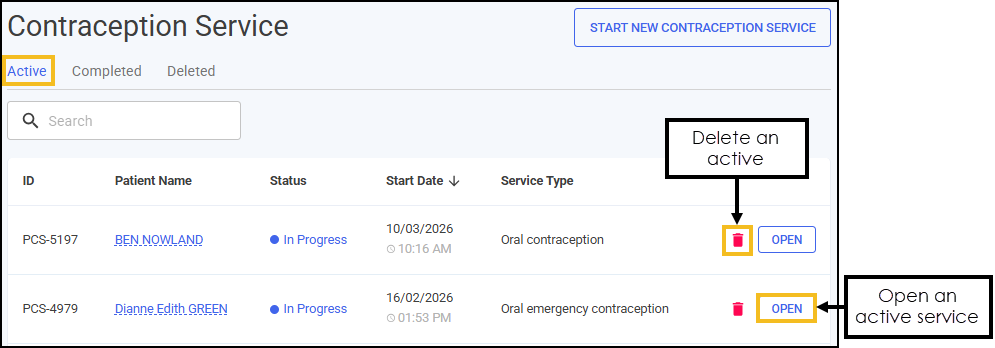 See Searching for and Sorting Contraception Service Episodes for details on how to sort your Contraception service episodes.
 -
Select OPEN
 to open an active episode. The episode opens on the screen where it was last saved.See Completing a Contraception Service and Completing an Emergency Contraception Service for details.
Viewing Completed Contraception Services
Your closed and completed Contraception services display on the Completed tab. To view your closed and completed episodes in Pharmacy Services:
-
From the Side Navigation Bar select Contraception Service
. -
Select the Completed tab, a summary of your completed claimable consultations and a list of closed and completed consultations displays.
See Searching for and Sorting Contraception Service Episodes for details on how to sort your Contraception services.
-
Select OPEN
next to the required episode. -
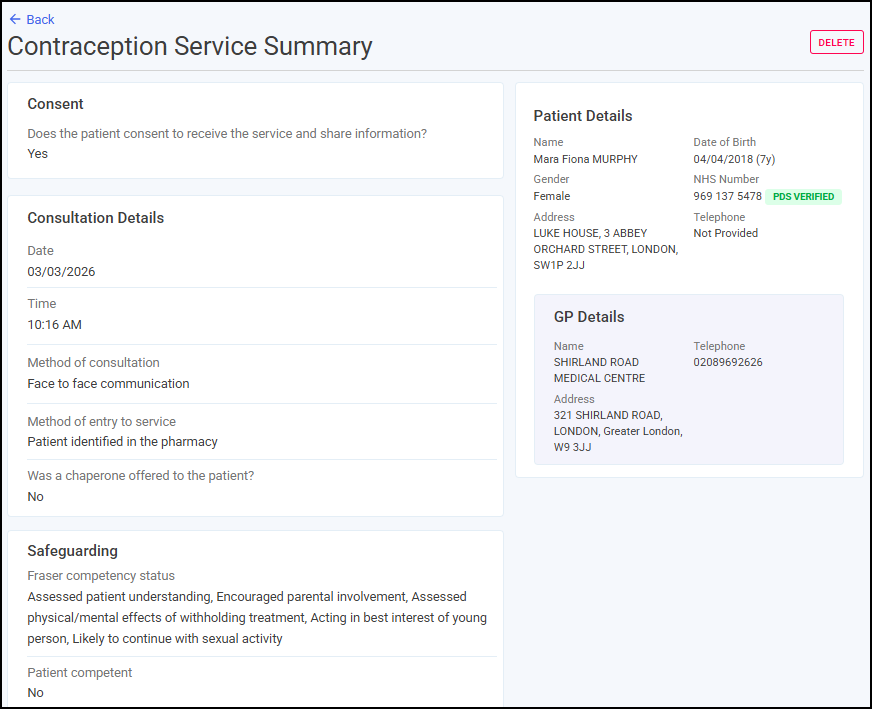
The Contraception Service screen displays the patient's details and a summary of the Contraception service episode.
-
Select Back
 to return to the Completed screen.
 in the top right corner and follow the on-screen prompts.