MMR - Adding Contact Attempts
To add a failed contact attempt to a South West London MMR Call/Recall Service:
-
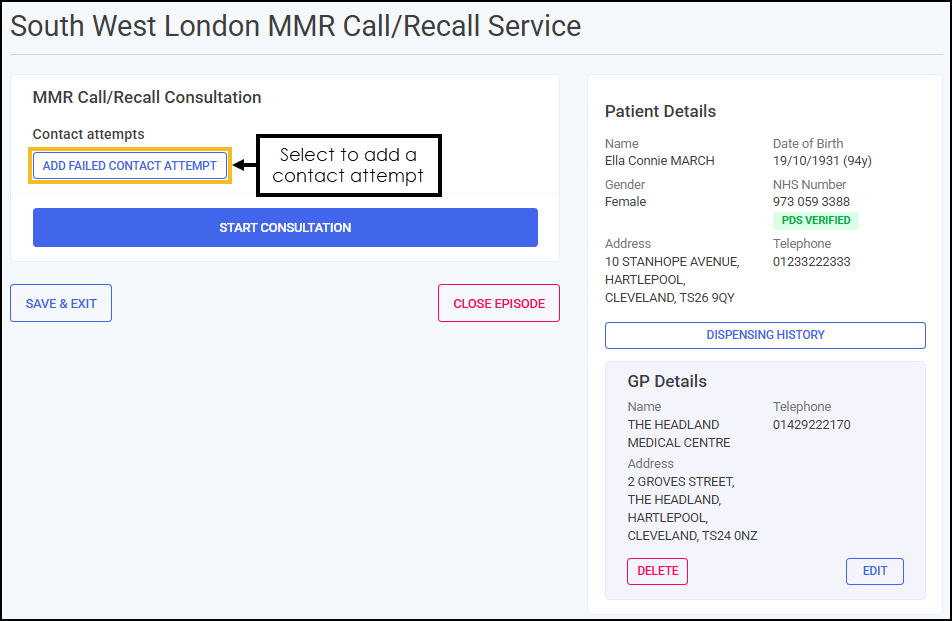
From the MMR Call/Recall Consultation section, select ADD FAILED CONTACT ATTEMPT
 .
.
-
The Add Failed Contact Attempt screen displays.
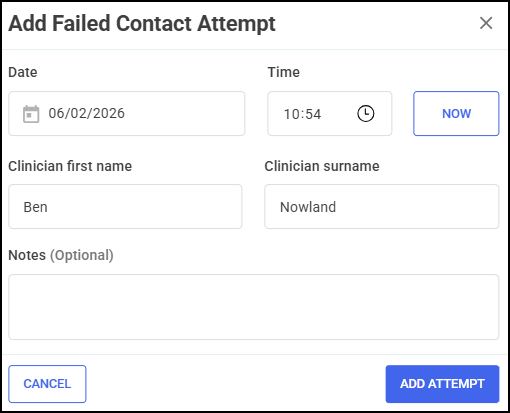
Complete the details of the failed contact attempt as appropriate.
-
Date - Select the Date section to open a calendar and select a date, or select NOW
 to add the current date and time.
 -
Time - Select Show time picker
 to enter the time of the contact attempt, or select NOW to add the current date and time.
 -
Clinician name - Enter the first name and surname of the clinician.
Training Tip - This section automatically populates with the logged in user's details. Update the details manually if required. -
Notes (Optional) - Enter any additional notes.
Training Tip - Free text entry section allows up to 250 characters.
-
-
Select ADD ATTEMPT
 . The attempt is recorded in the MMR Call/Recall Consultation section.
 in the top right corner and follow the on-screen prompts.