What's New?
Pharmacy Manager Release 17.3
Summary of Changes
Pharmacy Manager release 17.3 introduces the following features and improvements:
All Countries
-
Owings Enhancements - We have made the following improvements to the Owings screen:
-
You can now filter the Owings screen by patient or product name.
 See Owings Overview Screen for details.
-
Bulk Collect Prepared Owings (When Prescription is Collected) - To help save time on administrative tasks, we have added a new Remove prepared owings feature. Now, you can quickly clear multiple owings at once, providing the associated prescriptions have already been collected.
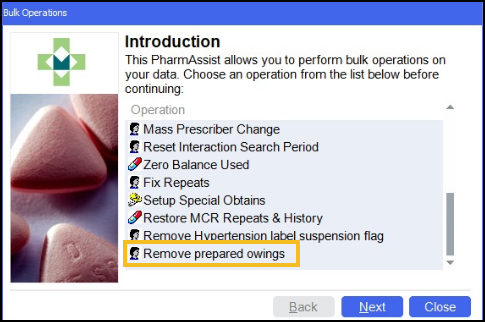
This feature automatically marks eligible owings as collected and removes them from the Owings screen, ensuring only active entries display.
See Bulk Operation - Remove Prepared Owings for details.
What this means for you:
-
Filter owings by patient or product name - find and manage owings faster than ever.
-
Clear multiple owings in seconds - only those with collected prescriptions are processed with no manual follow-up.
-
England Only
-
Accuracy Check - We have made the following improvements to the Accuracy Check module:
-
Medication Expiry Warnings - When performing an accuracy check, Pharmacy Manager now alerts you if a medication is nearing or has exceeded its expiry date:
-
Item Expiring Soon - If the expiry date of the medication is in the current or next month.
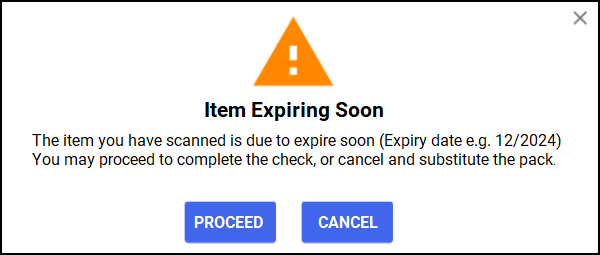
-
Item Expired - If the medication's expiry date has already passed.
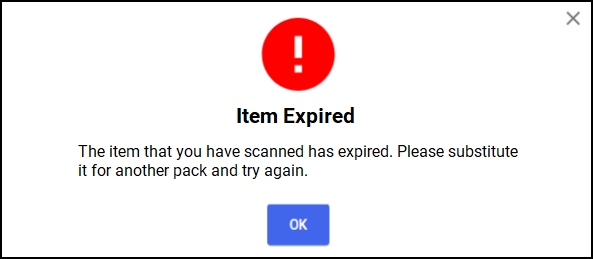
What this means for you:
By alerting you to expiring or expired medications, this helps you ensure that only valid medications are dispensed to your patients.
See Accuracy Checking Expiring or Expired Items for details. -
-
Record Batch Number and Expiry Date During Accuracy Check - When scanning a medication using its GTIN (Global Trade Item Number)barcode, Pharmacy Manager now automatically saves the batch number and expiry date. This information is retrieved from the barcode and stored in the patient’s history for better traceability and compliance. You can view this data in Patient Details - History - Item Details - Items Dispensed - Details, under each dispensed item.
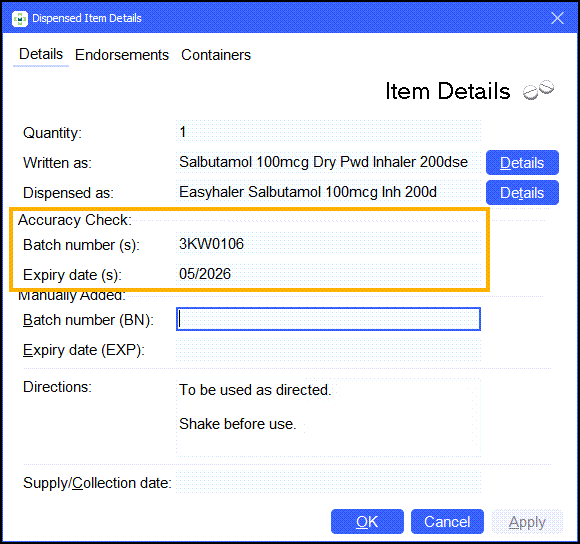
-
Filter by Batch Number in Dispensed Item Report - You can now filter the Dispensed Item Report by batch number, enabling quick identification of patients who received a specific medication batch - critical in the event of a drug recall.
See Dispensed Item Report for details. -
Clear Quantity When Editing Prescriptions - To prevent errors, the Quantity field is now cleared when editing a prescription and changing the dispensed or written item. This ensures you re-enter the correct quantity for the new item - especially important if the new item has different dispensing rules or quantities. The setting is found under Pharmacy Details - EPS - General as Remove QTY when editing (off by default). It applies to all prescription types: EPS (R1/R2), private, and manual.
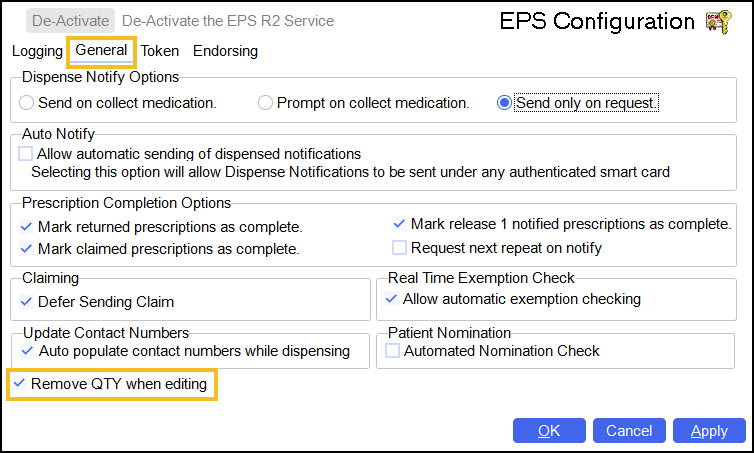 See Pharmacy Details - EPS for details.
 -
Restrict Pipcodes and Barcodes: Enhanced Control for Group Admins - New security controls in Pharmacy Details - Setup - General help prevent incorrect data entry and reduce ordering and accuracy checking errors. When enabled, users must enter an Admin Key to update supplier pipcodes or add product barcodes, ensuring these changes are made only by authorised users.
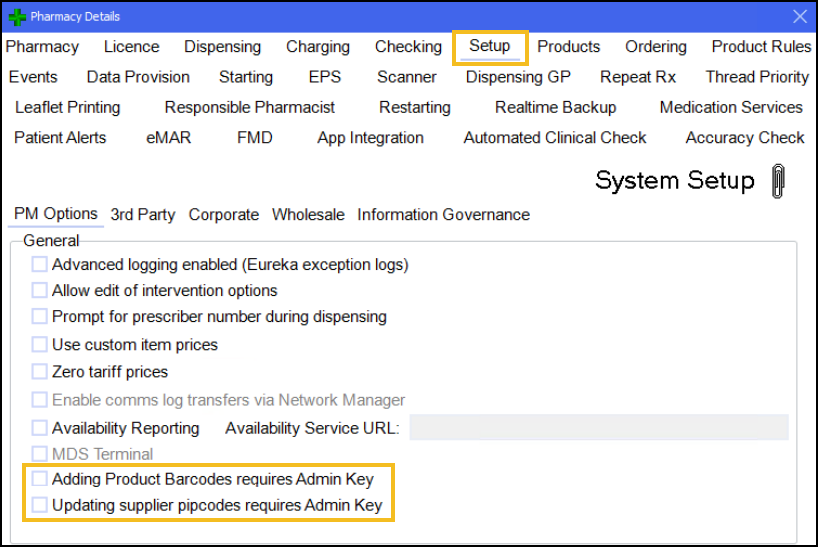 See Manually Adding Barcodes and Security Key for details.
-
England and Wales
-
Auto-populate Mobile Numbers From Electronic Prescriptions - When dispensing an EPS prescription - whether fast-labelled or not - Pharmacy Manager now helps you capture mobile numbers automatically:
-
Fast-labelled prescriptions: The system automatically fills in the patient’s mobile number (if available in the prescription data), reducing manual entry and errors.
See Fast Labelling for details.
-
Non-fast-labelled prescriptions: Use the Patient Selection Wizard to add or confirm a mobile number during dispensing - no extra steps needed.
This feature is enabled by default when SMS is activated at your pharmacy. If required, you can adjust the setting in Tools > System Settings > Pharmacy Details > EPS > General.
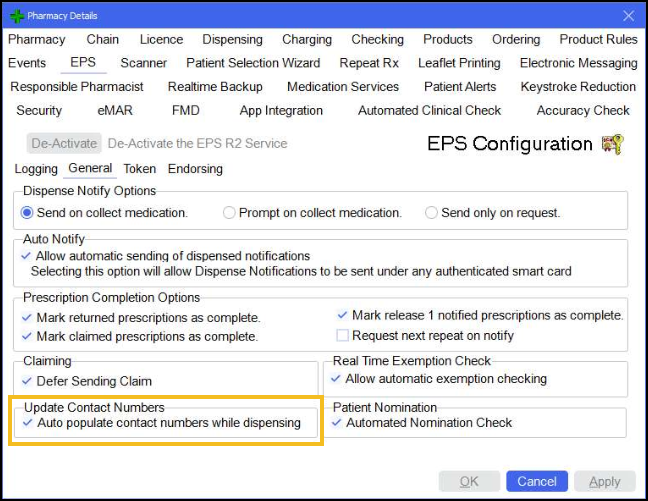 See Pharmacy Details - EPS for details.
What this means for you:
More complete contact details mean more patients receive SMS notifications when their prescription is ready to collect or deliver.See CRx Chat for details. -
-
Improved PDS Sync - Pharmacy Manager now includes patient mobile numbers in the synchronisation with the Personal Demographics Service (PDS).
What this means for you:
This feature keeps patient records up-to-date and accurate, ensuring mobile numbers are current and populated where missing - essential for sending prescription collection SMS notifications.
See CRx Chat for details.
Integrated Functionality
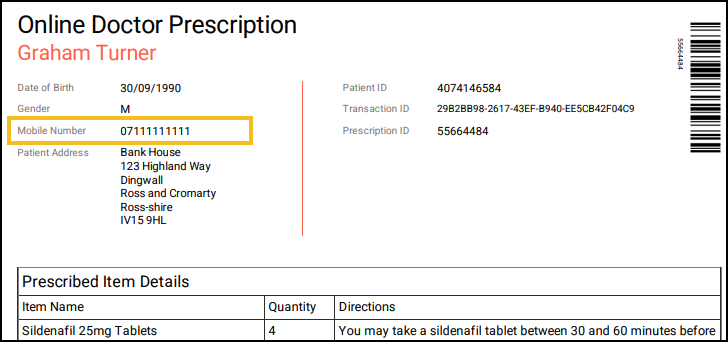
Online Doctor - When a mobile number is present on a patient's record, it now prints on Online Doctor prescriptions, enabling quick and easy contact without needing to access the patient’s record in Pharmacy Manager.
Beta Features - England and Wales
Beta features are released early for testing by a small number of users to gather feedback and improve them before a full rollout. You’ll be notified when a beta feature becomes available to you.
-
EPS Nominated Pharmacy - A new Automated Nomination Check option displays a patient's nomination status on the Dispensary screen when dispensing EPS prescriptions. With the patient’s consent, you can instantly update their nominated pharmacy in one click - if it’s not already set to your pharmacy.
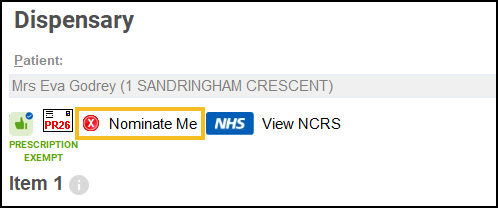
The following statuses are:
-
Nominate Me
 - When the patient is not currently nominated to your pharmacy. Select Nominate Me to update the patient's nominated pharmacy to your pharmacy.Important - You must check that the patient is happy to select your pharmacy as their nominated pharmacy for electronic prescriptions.
 -
Nominated
 - If the patient is already nominated at your pharmacy to receive their electronic prescriptions.
 -
Nomination Unknown
 - If the patient's current pharmacy nomination is not known, or there is a problem retrieving the details.
Important - User must be logged in with a smartcard configured with permissions to update EPS nominations.The Automated Nomination Check setting is enabled by default in Pharmacy Details - EPS - General.
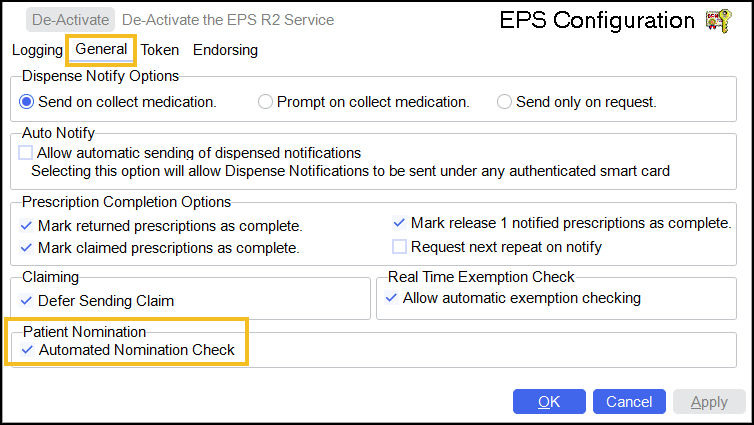 See Updating a Patient's Nominated Pharmacy for details.
 -
Beta Features - Golden Tote
Beta features are released early for testing by a small number of users to gather feedback and improve them before a full rollout. You’ll be notified when a beta feature becomes available to you.
-
Accuracy Checker Role for Golden Tote Approval - A new Accuracy Checker role is now available in Pharmacy Manager. Users with this role can now perform the final approval for Golden Tote orders, moving them to the External - Ready to Send screen. They cannot edit the clinically checked prescription items or directions - these actions remain exclusive to Pharmacists. The role matches the Dispenser role and permissions in all other areas.
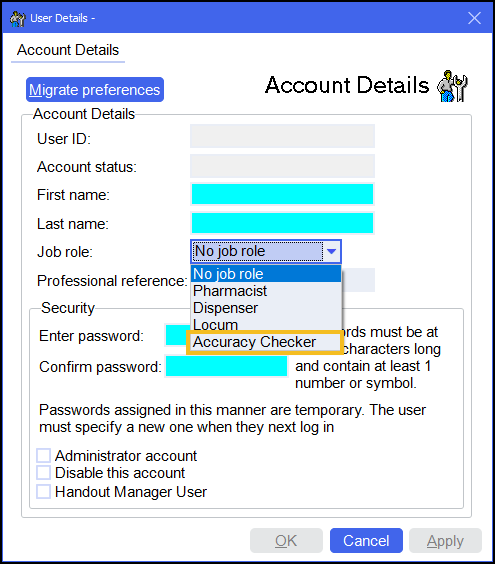
What this means for you:
Users with the Accuracy Checker role can now validate Golden Tote orders to send, without editing any clinical details. This enables trained non-pharmacists to validate orders safely, improving workflow efficiency while maintaining critical oversight and compliance.
See Adding a User and Golden Tote Accuracy Check for details. -
Automatic Bag Splitting for Fridge and CD Items - For sites using CRx Scan (Formerly Handout Manager) and Golden Tote, Pharmacy Manager now automatically separates fridge items and controlled drugs into dedicated bags labelled FRIDGE and CD respectively - when completing the final basket check on fully Golden Tote prescriptions.
Note - Reprints from the Patient Ready and Uncollected Bags screens also reflect the correct bag categories.What this means for you:
Fridge and CD items are now automatically bagged separately during handout, reducing manual sorting and helping ensure correct storage and handling at the point of collection.
Beta Features - Hub & Spoke
-
Split Packs in Hub & Spoke - You can now send split packs to the hub as part of the Hub and Spoke workflow. This update introduces new configuration options to support split pack handling, ensuring they are correctly suggested, processed, and transmitted.




Previous Releases
 Pharmacy Manager Release 17.2
Summary of Changes
Pharmacy Manager release 17.2 introduces the following features and improvements:
All Countries
-
Pharmacy Manager Dashboard - The Intelligent Dashboard is updated with the following tiles:
-
Bottom Left - A new tile detailing how to contact our Service Desk via WhatsApp for quick support.
See Contacting Us for Support for details. -
Bottom Right - A What's New tile with a link to the Pharmacy Manager Help Centre to learn more about the new features and enhancements included in this version of Pharmacy Manager.
-
England Only
-
New Prescriptions Workflow - Ready To Claim List - As the final step in the new Dispensing workflow, we have introduced the new To Claim screen, simplifying the process of identifying and managing electronic prescriptions that have been downloaded from the NHS Spine, checked for accuracy, collected by the patient and are now ready for claiming. The To Claim screen provides a clear overview of all claimable prescriptions, along with any required actions, all in one centralised location.

What this means for you:
-
Enhanced visibility - Clear visibility of exemption status, dispensing notifications, and endorsement details.
-
Effortless bulk claiming - Submit multiple claims directly from the screen with a single action.
-
End-of-day efficiency - No more scanning tokens or duplicating work - claim processing is now faster, simpler, and fully digital.
This update reduces manual steps, minimizes errors, and ensures a smoother, more efficient claiming process for your team.
-
-
New SMS Integration - This release introduces our new SMS integration for Pharmacy Manager. The new system, which can work alongside CRx Scan (Formerly Handout Manager), enables pharmacies to send real-time SMS notifications to patients, freeing up pharmacy staff for other business critical tasks and improving the overall patient experience and communication.

Key features in this release include:
-
A new Settings screen for managing SMS options, including patient exclusions, message content, and message send hours.
-
The ability to enable or disable SMS notifications triggered by the Scan to Shelf action.
-
Manual SMS sending from the Prescriptions - Patient Ready screen in the New Dispensing Workflow.
See Viewing Patient Ready Prescriptions (England) for details. -
Manual SMS sending from the Uncollected Bags screen in CRx Scan (Formerly Handout Manager).
See Uncollected Bags for details. -
Manual SMS sending from the Patient Details screen.
See Patient Details - Patient for details. -
The ability to 'opt-out' patients, with all patients opted in by default.
See CRx Chat and CRx Chat FAQs for details on activating SMS at your pharmacy. -
-
Accuracy Check - Work smarter with a more flexible and efficient Accuracy Check experience. These enhancements provide more flexibility and control over your accuracy check process, enabling you to work more efficiently and effectively:
-
Complete Accuracy Check - To ensure every accuracy check is properly completed, the SAVE AND CLOSE
 option is now disabled once all items are checked. This prevents tasks from being saved without formally marking the check as complete. Instead, you must click COMPLETE ACCURACY CHECK
  to finalise the task. This ensures no steps are missed and maintains the integrity of your workflow.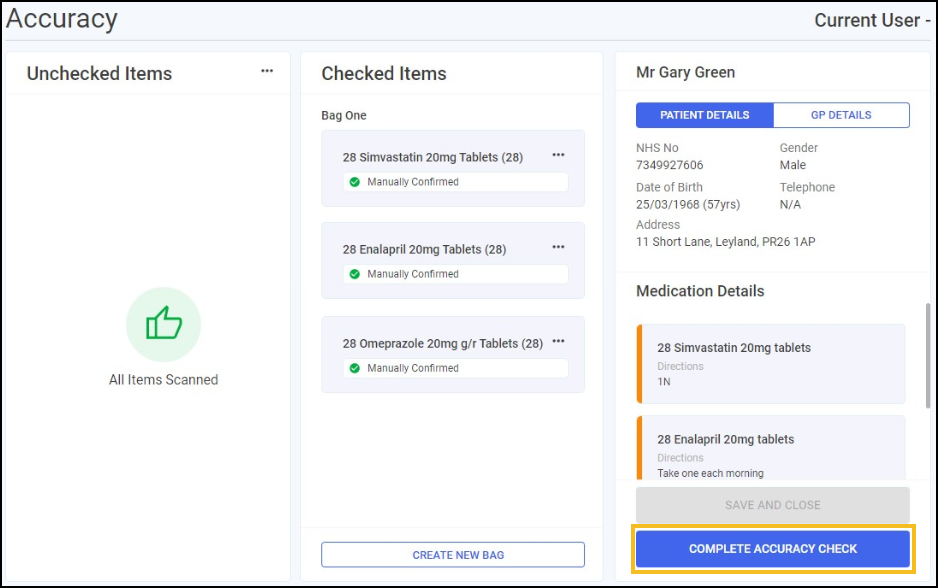
-
Keyboard Shortcuts - The Accuracy Checking module now supports keyboard navigation, allowing you to complete tasks more efficiently without using your mouse. You can use keyboard shortcuts to navigate through the module and complete tasks.
See Keyboard Shortcuts - Accuracy Check for details.
-
Patient History Audit Update - The Patient History Audit screen now includes a new field to record the reason for approval as part of an accuracy check. This enhancement provides a clear audit trail and improves transparency in the approval process.
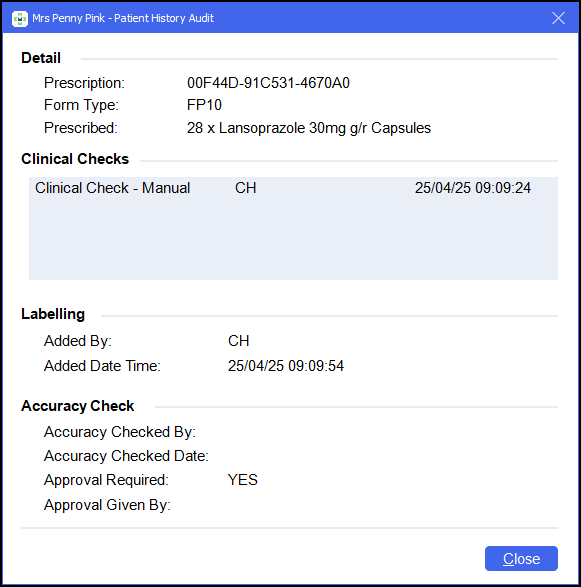 See Patient History Audit for details.
See -
-
Endorsement Confirmation Not Required For Tariffed Items - A new Skip Endorsement For Tariffed Items option is now available in the Pharmacy Details - EPS - Endorsing tab.
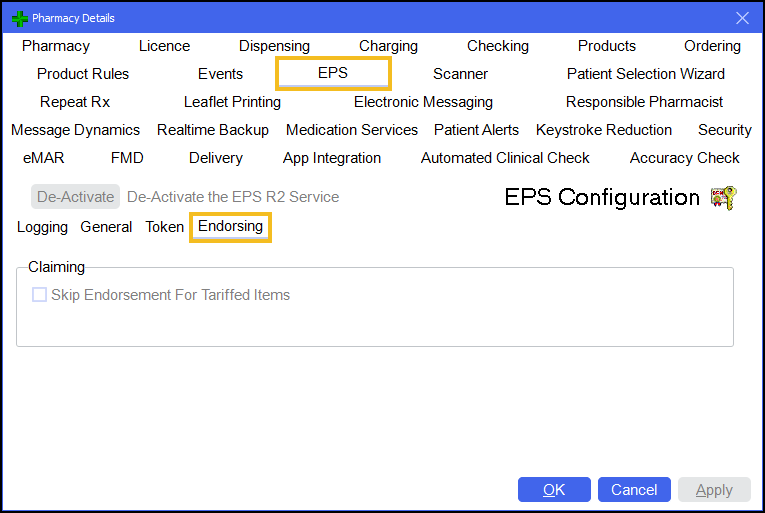
When enabled, this setting automatically skips endorsement confirmation prompts for EPS prescriptions where an endorsement is not required by the NHSBSA, and the exemption does not require additional confirmation, for example if the patient is age or RTEC exempt.
Note - All items on the prescription must be in tariff parts VIIIA, IXA, IXB, or IXC for the endorsement to be skipped.What this means for you:
Fewer interruptions, faster dispensing, and greater accuracy - endorsement confirmations are now skipped automatically for eligible tariffed prescriptions, reducing unnecessary steps without compromising compliance.
See -
Electronic Repeat Dispensing - Next Iteration Requests Now Automatic - With the new Request Next Repeat On Notify option in Pharmacy Details - EPS - General, your pharmacy can now automatically trigger the download of the next repeat prescription when an EPS repeat dispensing script is marked as collected.
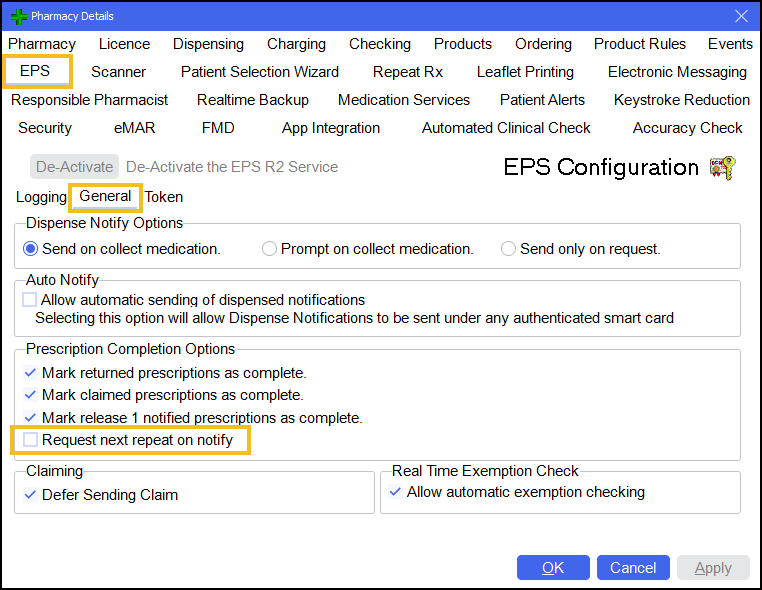 See Pharmacy Details - EPS and
-
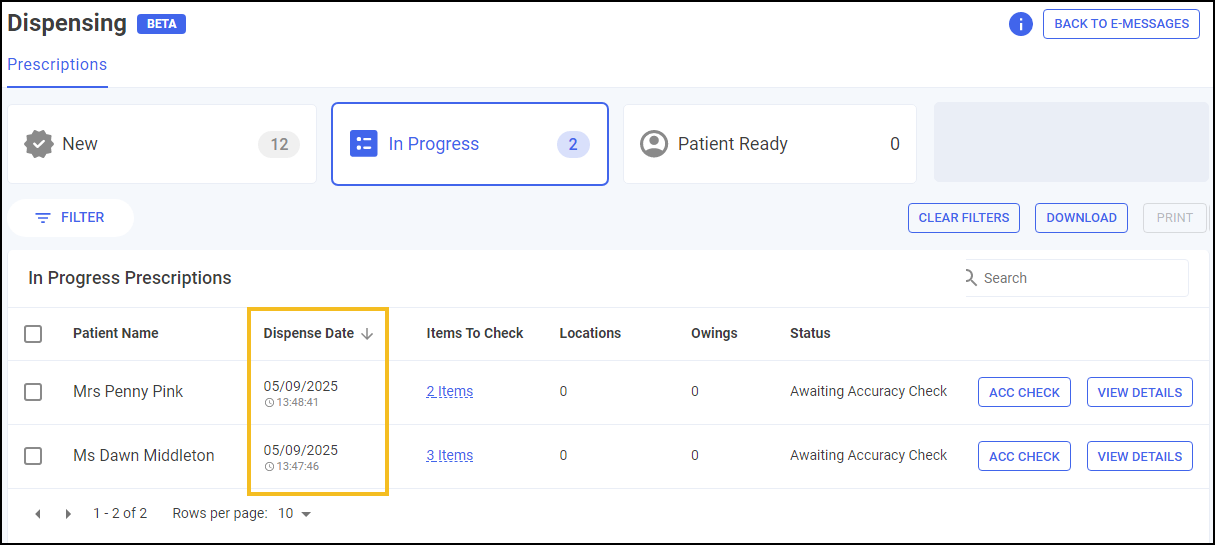
In Progress Prescriptions - The Prescriptions - In Progress screen now includes a Dispense Date column, which can be sorted to prioritise items that have been awaiting accuracy checks for the longest time.
 See
See -
Prescriptions - Patient Ready - We have made significant improvements to the Patient Ready screen to streamline prescription collection and token management:
-
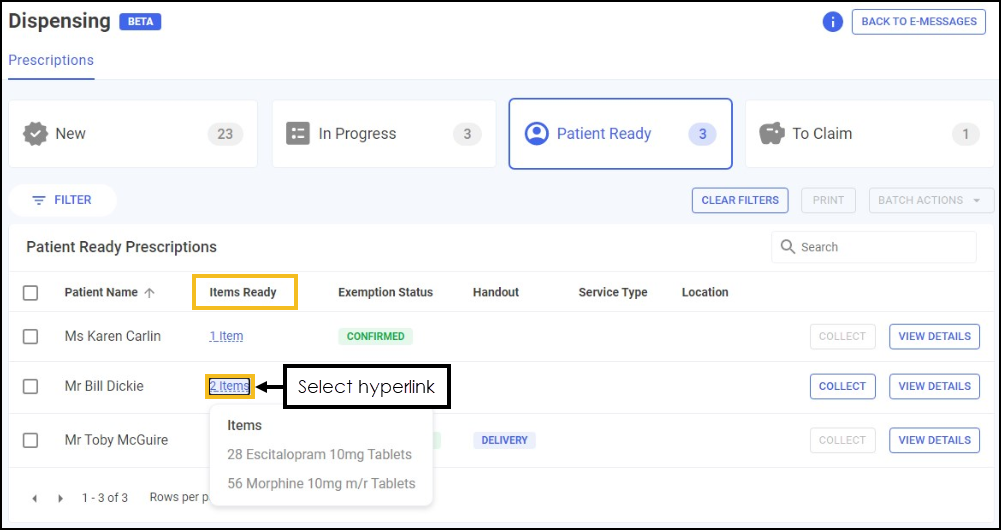
Patient Ready Items - The Patient Ready Prescriptions screen now includes an Items Ready column. Select the hyperlink to view a summary of the items that are ready for collection, allowing you to see at a glance which items are ready.
-
Print Individual Prescription Tokens - You can now select and print individual prescription tokens from the Patient Ready screen.

-
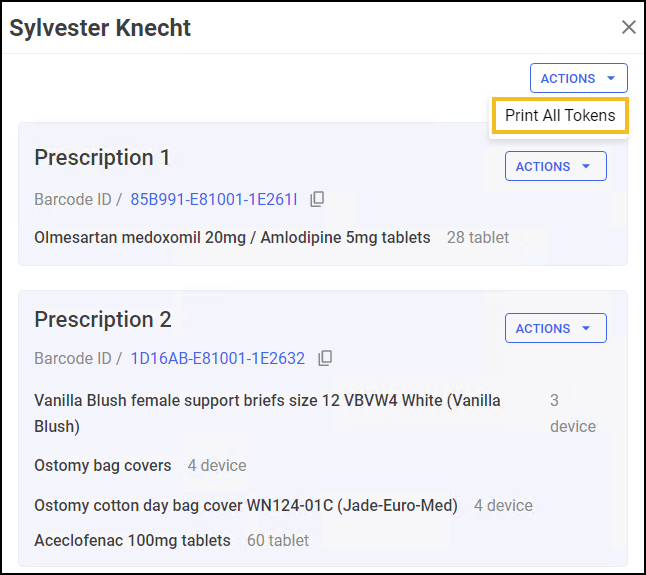
Print All Prescription Tokens - You can now print all prescription tokens for a patient with multiple prescriptions ready to collect in a single step.
See Viewing Patient Ready Prescriptions (England) for details. -
-
Pharmacy Manager Dashboard - The Intelligent Dashboard is updated with the following tiles:

-
Top Left - A tile with a link to the Cegedim Rx website to learn more about Pharmacy Services.
-
Top Right - A New World Of Dispensing tile now takes you directly to the New Dispensing screens (this replaces the The Dispensing Evolution has Begun tile).
-
Integrated Functionality
Online Doctor - We updated the handling of private prescription pricing for Online Doctor dispenses:
-
Private Prescription Price - The private prescription price is no longer printed on Online Doctor bag labels, and is now the default for all online doctor dispenses.
-
Private Prescription Cost - The private prescription cost is now set to £0 by default as the patient has already paid.
Beta Features
Beta features are released early for testing by a small number of users to gather feedback and improve them before a full rollout. You’ll be notified when a beta feature becomes available to you.
-
Pharmacy Services Contraception Label Prompts - When dispensing medication to female patients, a check is now performed to assess potential eligibility for a Pharmacy Contraception Service consultation. If eligible, an additional label displaying 'Potential Pharmacy Contraception Service Candidate' is automatically printed alongside the item labels. This label serves as a prompt to initiate a consultation - enabling you to discuss service availability, eligibility, and next steps.
Eligibility is determined automatically at the point of dispensing based on:
-
The patient’s gender (female),
-
A recorded history (including the current item) of any eligible contraception medication within the last 12 months,
-
And age criteria: under 55 for Progestogen-Only Pills (POP), under 50 for combined oral contraceptives (COC).
The label only prints for patients who meet all criteria, ensuring no eligible patient is missed. This automated check supports timely, consistent identification of candidates - helping you deliver the Pharmacy Contraception Service with minimal effort.

What This Means for You:
-
You’ll now automatically see a clear visual cue at the point of dispensing when a patient may be eligible for the Pharmacy Contraception Service.
-
This enhances service uptake, ensures consistency across your pharmacy, and supports your role in delivering NHS-funded community Pharmacy Services.
See Contraception Service (England only) for full details. -
-
Golden Tote - You can now create a bag and print out CRx Scan (Formerly Handout Manager) bag labels from Pick2Prescription when you complete a clinical check in Pick2Prescription and there are no local items to process.
Pharmacy Manager Release 17.1
Pharmacy Manager release 17.1 introduces the following features and improvements:
All Countries
-
Clinical Check:
-
Clinical Check - Pharmacist Directions - There is now a setting, enabled by default, in Pharmacy Details to save the label directions set by the pharmacist during a clinical check.
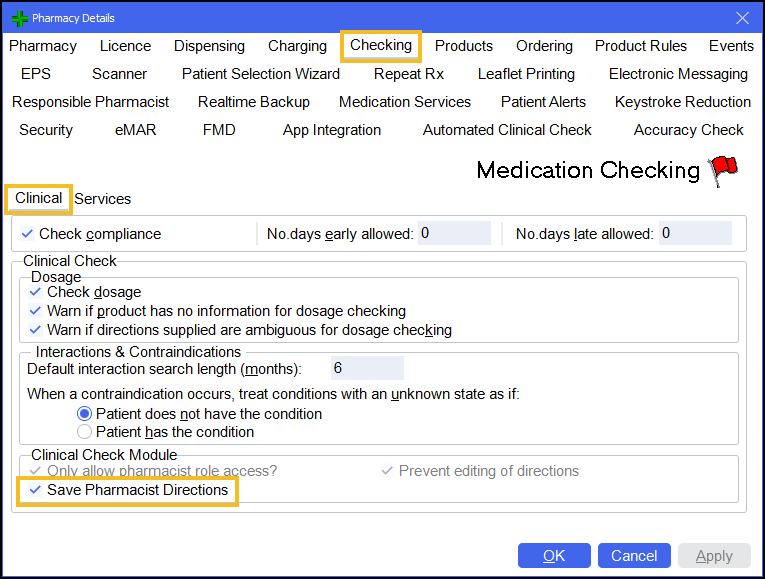
Directions are saved for future use as long as the following remain the same:
-
The patient
-
The prescribed item
-
The prescribed directions for the item
Note - Pharmacist Directions confirmed in clinical check do not affect directions saved for other patients or any Trusted Directions the system may have.See Pharmacy Details - CheckingTraining Tip - Resetting a clinical checked prescription removes the saved Pharmacist Directions. When a clinical check is complete the label directions are saved going forward for that patient, item, prescribed directions combination. -
-
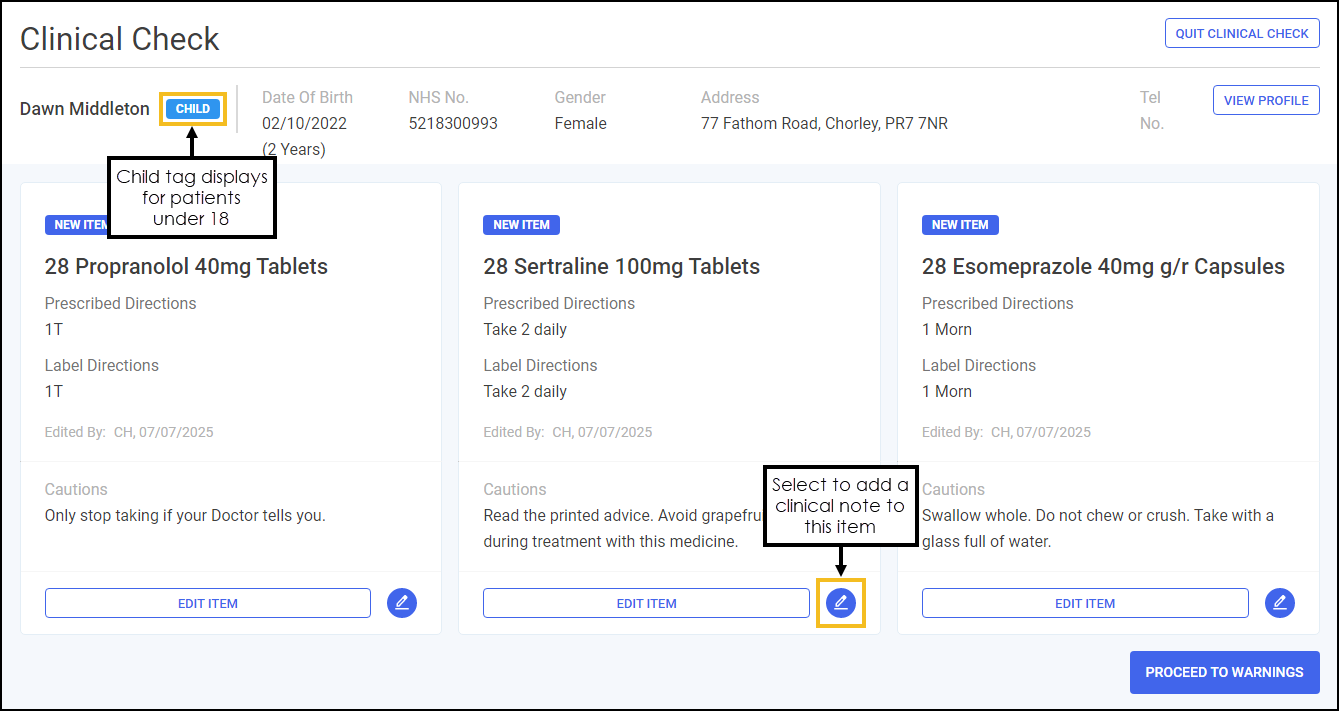
Clinical Check Module - We have updated the Clinical Check screen with the following improvements:
-
Child Tag - The Clinical Check screen now displays CHILD
 for patients under the age of 18 years old.
 -
Patient Age - A patient's age now displays next to the date of birth, with the age shown in years for patients over 1 year old, in months for patients under 1 year old, and in days for patients under 1 month old.
-
Clinical Note - You now have an option to add a clinical note against each item. This gives you an opportunity to communicate any questions you have to the patient during handout.
Note - During dispensing, an additional label is printed with any accompanying clinical notes.
-
-
-
Product Details - Tariff part details now display on the Product Details screen.
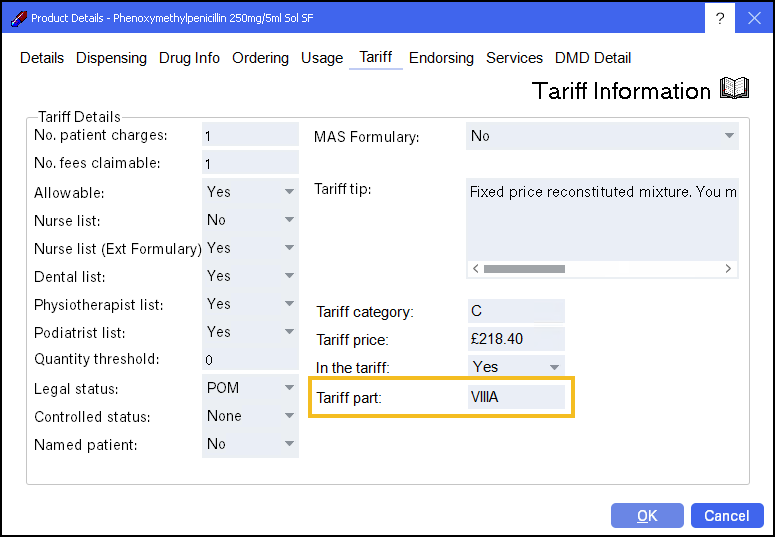 See Product File - Tariff for details.
England Only
-
New Prescriptions Workflow - Patient Ready List - We have added a Patient Ready screen to display prescriptions that are ready for collection in the new Dispensing workflow. You can mark prescriptions as collected from this screen, or if using a CRx Scan (Formerly Handout Manager) device, they are automatically collected when scanning a barcode.
Note - If a prescription is being edited on another device, the entry is unavailable to select and action.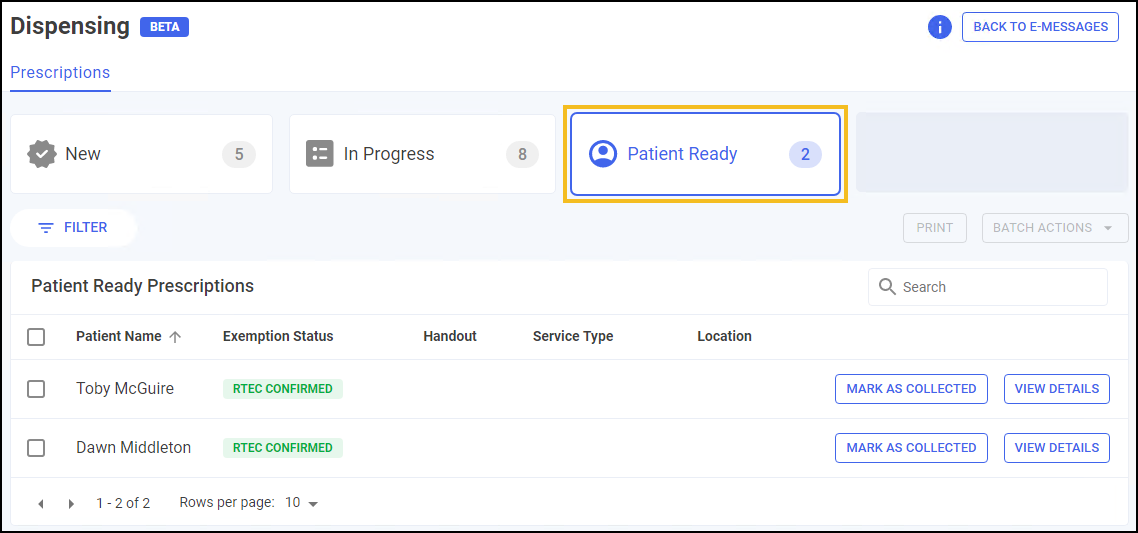
-
Endorsement Confirmation Not Required For Tariffed Items - A new Skip Endorsement For Tariffed Items option is now available in the Pharmacy Details - EPS - Endorsing tab.
When the option is enabled, endorsement confirmations no longer display for EPS prescriptions where an endorsement is not required by the NHSBSA, and the exemption does not require additional confirmation, for example if the patient is age or RTEC exempt.
Note - All items on the prescription must be in tariff parts VIIIA, IXA, IXB, or IXC for the endorsement to be skipped.Training Tip - You can add optional endorsements using Endorse on the Dispensary and eMessages screens if required. See Pharmacy Details - EPS for details.
-
Accuracy Check Auditing - You can now view an audit of a dispensed item from the Patient Details - History screen.
See Patient History Audit for details. -
Electronic Repeat Dispensing - Request Next Repeat On Notify - A new option has been added in Pharmacy Details - EPS - General tab to automatically download the next repeat iteration when an EPS R2 repeat dispensing script is fully notified.
See Pharmacy Details - EPS -
Reimbursements - The following are updated to reflect the NHS fee changes introduced 1 April 2025:
-
FP34 Report - The Details of other amounts authorised section is updated to reflect the updated service fees.
See Viewing the FP34 Report for details. -
Reimbursements - Activities & Refunds - The Activities and Refunds Recorded tile and Activities & Refunds table are updated to reflect the split of NMS Interventions and NMS Follow Ups.
See Viewing and Navigating the Reimbursements screen for details. -
Record Figures - The Record Figures table and entry screen are now updated.
See Viewing and Editing Recorded Figures and Recording your Prescription Figures for details.
-
Integrated Functionality
-
Online Doctor - Prescriptions can now be dispensed from the new dispensing screens, where you can perform clinical checks, accuracy checks, scan to shelf & handout the prescriptions.
See Online Doctor - Prescription Workflow for details.
Beta Features
-
CRx Scan (Formerly Handout Manager):
-
CRx Scan (Formerly Handout Manager) - Exemptions - If a patient is age-exempt from paying for prescription items, the exemption is now automatically selected on the Patient Exemption screen when handing out bags.
See Handing out Bags for details. -
After scanning all bags to handout, and selecting CONTINUE, the Items to Collect screen displays, it is at this point you have the option to remove items from a bag prior to handout.
See Part Collect Items for details. -
The Uncollected Bags screen is updated to two tabs:
-
Patient Ready Bags - This lists all uncollected bags within Pharmacy Manager whether assigned to a location or not.
-
Bag Label Required - This lists patient's where items were removed from a bag prior to handout. The items need a new bag label ready to be assigned a new shelf.
See Uncollected Bags for details. -
-
Pharmacy Manager Release 16.9
Pharmacy Manager release 16.9 introduces the following features and improvements:
All Countries
-
Private Prescription Costs - You now have the option to hide the private prescription cost on the bag label.
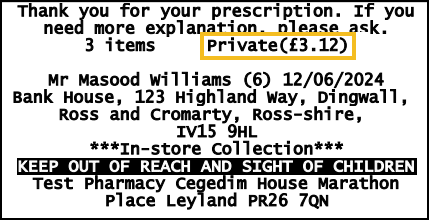 See Pharmacy Details - Charging for details.
-
New Monitored Dosage System - The following features are added to the new module:
-
Multiple Days - You can now select multiple days when setting a weekly medication schedule.
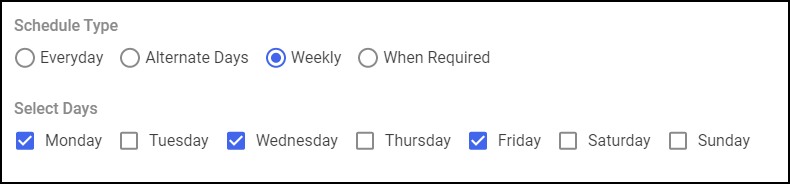 See Adding a Monitored Dosage System (MDS) Medication Schedule for details.
 -
MDS Reminders - There is now an MDS setting to enable MDS Reminders to enhance visibility of patients requiring processing.
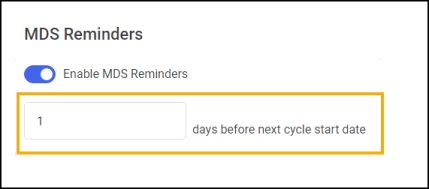 See
See -
Care Homes - The Care Homes screen now includes a Next Due column. This highlights the earliest Next Due date for patients within the care home, providing you with a quick view of which care home to action next without having to view the patient list.
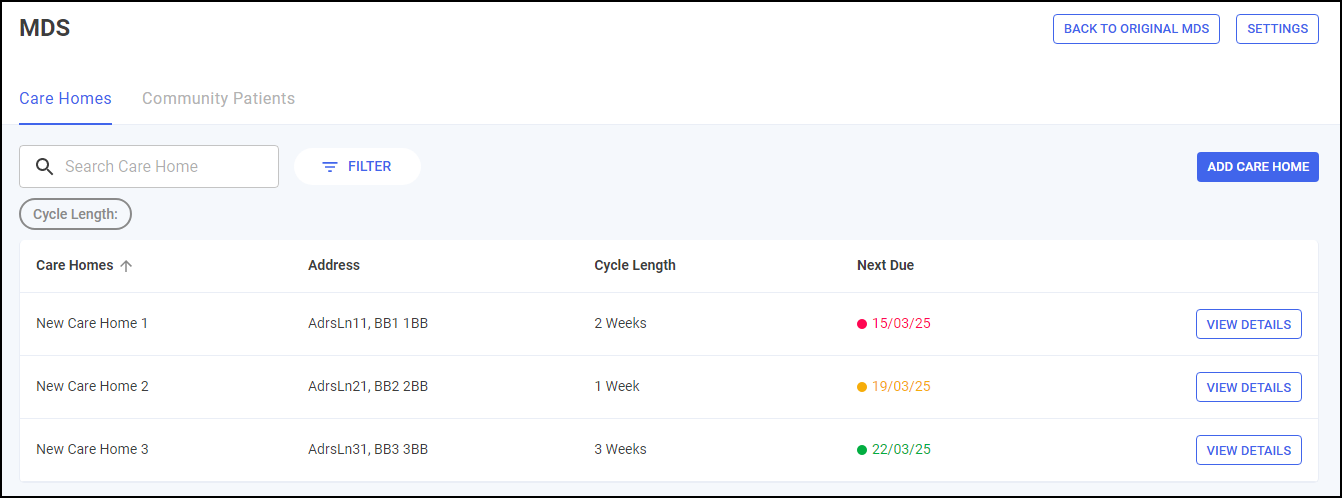
-
Printing Mid-Cycle Medication Administration Record (MAR) Charts:
-
When printing a Mid-Cycle MAR chart, all items with the same start date print on the same page.
-
You can now print Mid-Cycle MAR charts in landscape, if configured.
-
-
England Only
-
The following features are added to the Accuracy Check module:
-
Saving Accuracy Checks - You now have the option to save your progress during an Accuracy Check.
See Saving Accuracy Checks for details. -
Enable Clinical Check Warning - There is now a setting, enabled by default, in Pharmacy Details to prompt the user if an upfront clinical check has not been completed prior to dispense.
See Pharmacy Details - Accuracy Check for details. -
Scanning Errors - The warning text has been updated on the scanning errors for clarification.
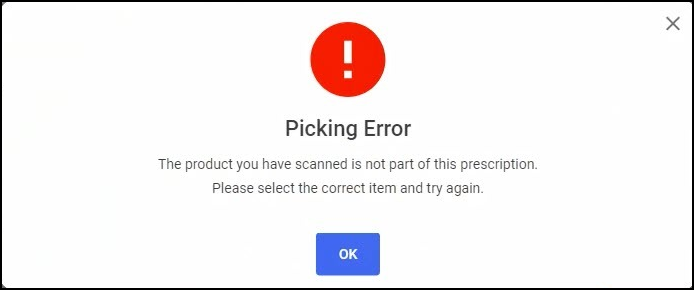
-
-
The following features are added to the CRx Scan (Formerly Handout Manager) module:
-
Dispense Notification - You now have an option to automatically send dispense notifications under any authenticated smart card.
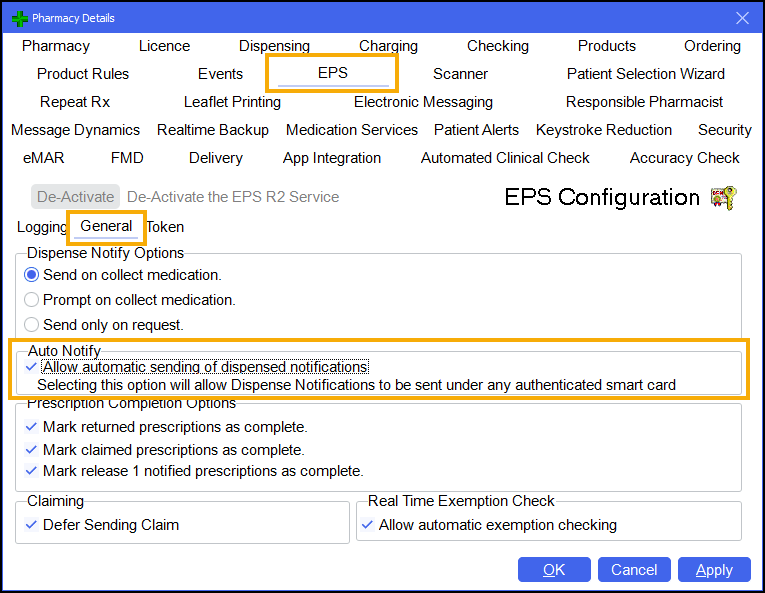 See Pharmacy Details - EPS for details.
 -
Uncollected Bags - We have introduced an Uncollected Bags screen so you can view, all available bags and, if assigned, their location.
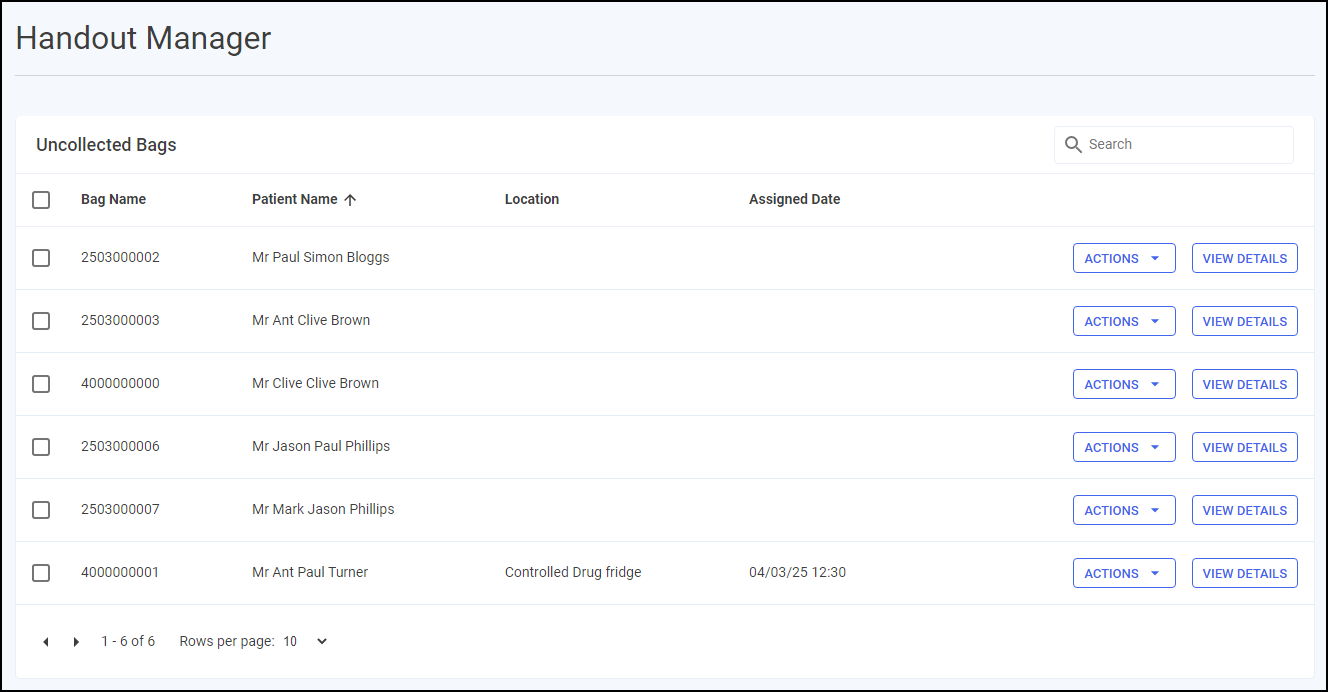 See Uncollected Bags for details.
 -
Location Label Text Size - The text size on the location labels, is increased making it easier to read.

-
-
Reimbursements:
-
Reimbursements screen - The Reimbursements screen is now updated.
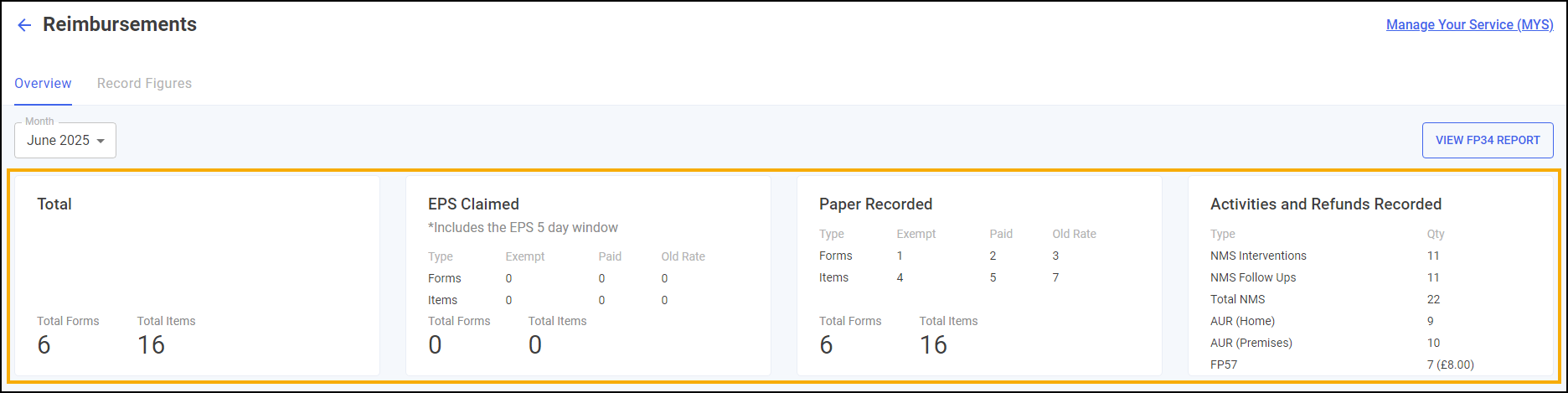
-
The labelling of the EPS, Paper and Activities tiles is improved.
-
The tables now display the whole month's data at once.
See Viewing and Navigating the Reimbursements screen for details. -
-
FP34 Report - The FP34 Report is updated to refine the data that displays.
See Viewing the FP34 Report for details.
-
Integrated Functionality
-
Online Doctor - You now have the option to Print Prescriptions in Scotland and Wales.
-
Ordering with Alliance - The way that Pharmacy Manager sends Alliance Healthcare messages has changed, this does not affect your ordering process.
Beta Customers
Pharmacy Manager Release 16.8
Pharmacy Manager release 16.8 introduces the following features and improvements:
All Countries
-
The following features are added to the Accuracy Check module:
-
Fridge and Controlled Drug Flags - Fridge and Controlled Drug items now display with the following flags in the Accuracy Check module:
-
Fridge

-
Controlled Drug

-
-
Extra Bag Configuration - There is now an option in Pharmacy Details to automatically place Fridge and Controlled Drug items that require safe custody into additional bags.
See Pharmacy Details - Accuracy Check for details. -
Manual Confirm All Items - There is now an option in Pharmacy Details to manually confirm all unchecked items. All manually checked items require approval on completion.
See Pharmacy Details - Accuracy Check and Manual Confirmation for details. -
Manually Adding Barcodes - There is now an option to manually add a barcode for a product, if one is missing from the product file.
See Manually Adding Barcodes for details.
-
-
Automated Clinical Check - There is now an option in Pharmacy Details to automate clinical check performed in the clinical check module only. With this enabled, prescriptions clinically checked on the Dispensary screen are not automatically checked in the future.
See Pharmacy Details - Automated Clinical Check for details. -
Clinical Check - The way that directions display in the clinical check module have changed. You can now view the Prescribed Directions and the Label Directions. Label Directions mirrors the prescribed directions unless trusted directions have been used or the directions have been edited.
-
Stock and Ordering Management - Ordering - The following features are added to the Ordering screen:
-
In Stock Figures - A new In Stock column displays the number of packs in stock.
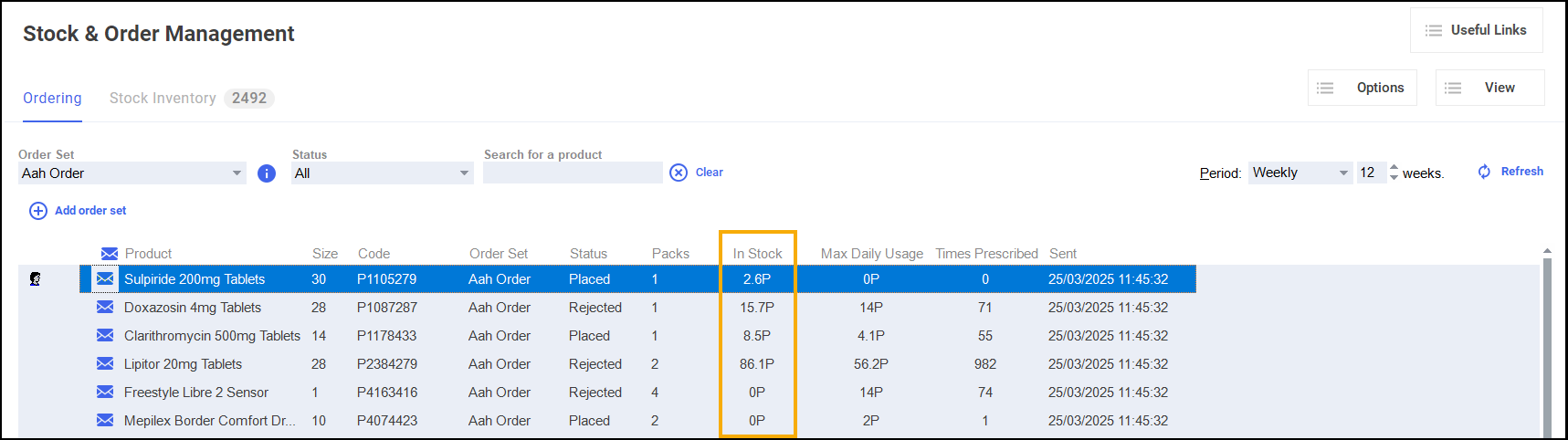
-
Usage Data - New Max Daily Usage and Times Prescribed columns display prescribing data based on the set period of time.
Max Daily Usage reports the maximum number of times the stock item was dispensed in a single day. Times Prescribed displays number of times the item was prescribed within a set period of time.
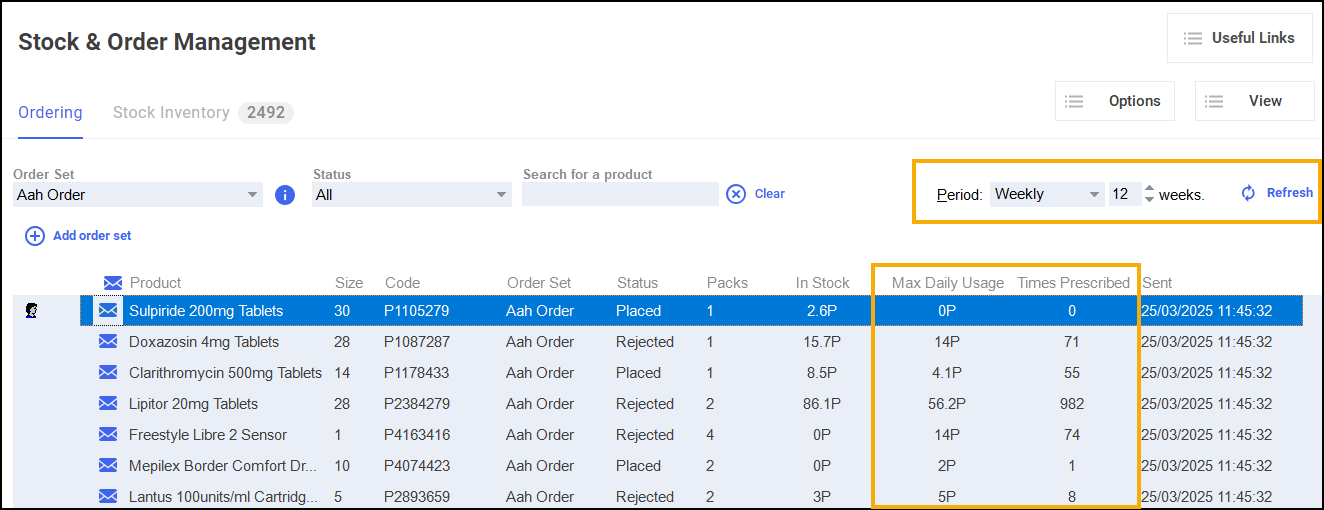
-
Usage Data - Show Monthly Data - A new Show Monthly Data option provides a summary of usage over the last six months for the selected item.
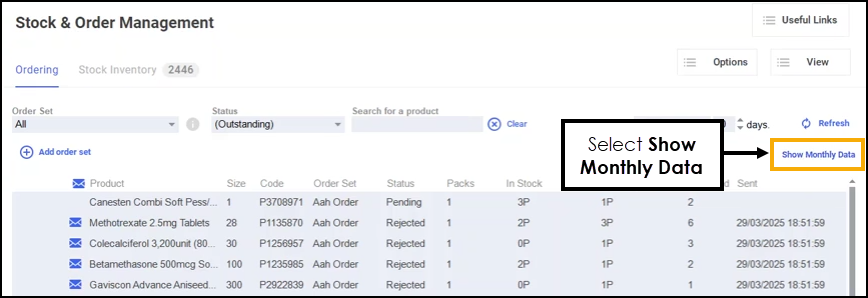
See Stock & Order Management - Ordering for details. -
Beta Customers
-
CRx Scan (Formerly Handout Manager) - The CRx Scan (Formerly Handout Manager) functionality in Pharmacy Manager helps you to manage your bagged prescriptions that are ready to hand out to patients in your pharmacy.
Changes in PM16.8:
-
Compatibility - CRx Scan (Formerly Handout Manager) is now compatible with the Accuracy Check module. This means that once you finish dispensing a prescription and Accuracy Check is enabled, the Bag Management screen no longer displays. Instead prescription items are sorted into bags during the Accuracy Check process.
-
Bag Assistance Labels - Bag Assistance labels can be printed immediately after the bag label. The assistance labels contain a list of items assigned to each bag. Speak to your Account Manager to enable this.
See An Introduction to CRx Scan (Formerly Handout Manager) for details. -
Pharmacy Manager Release 16.7
Pharmacy Manager release 16.7 introduces the following feature:
England Only
-
Accuracy Checking and In Progress Prescriptions - We have added a new function to the new Dispensing workflow. The In Progress screen provides a 'basket' view to monitor dispensed new prescriptions that require an accuracy check. The Accuracy screen enables you to check that you have picked the correct item from the shelf and have labelled it correctly. Once accuracy checked the prescription(s) displays on the eMessages screen with the status of In Progress - Awaiting Collection.
See In Progress Prescriptions (England) and Accuracy Checking Prescriptions (England) for details.
Older Releases
Pharmacy Manager Release 16.5
Pharmacy Manager release 16.5 introduces the following features and improvements:
All Countries
-
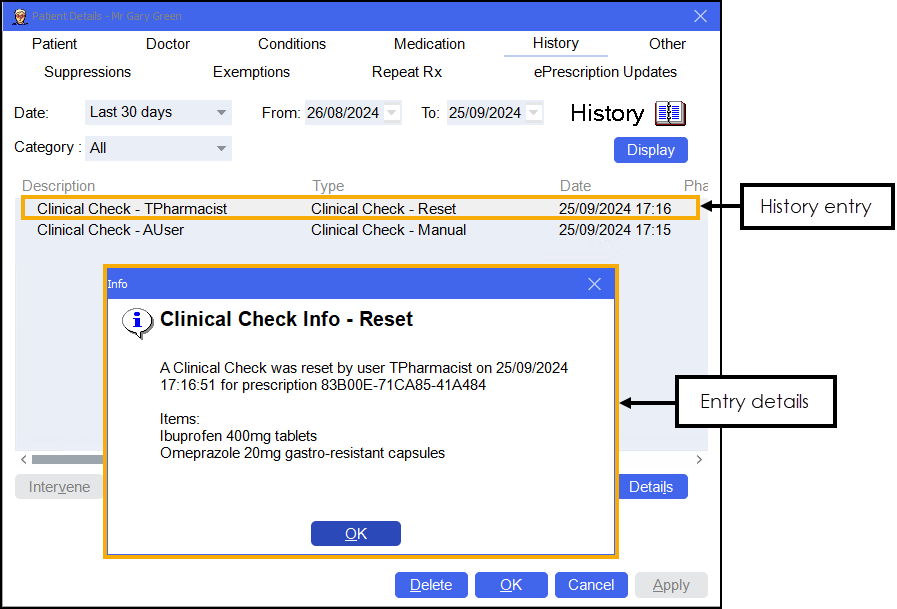
Clinical Check Patient History - The following changes are made to the auditing of clinical checks:
-
Manual Clinical Check - When a manual clinical check is completed an entry is made in the patient's history along with any acknowledgements made.
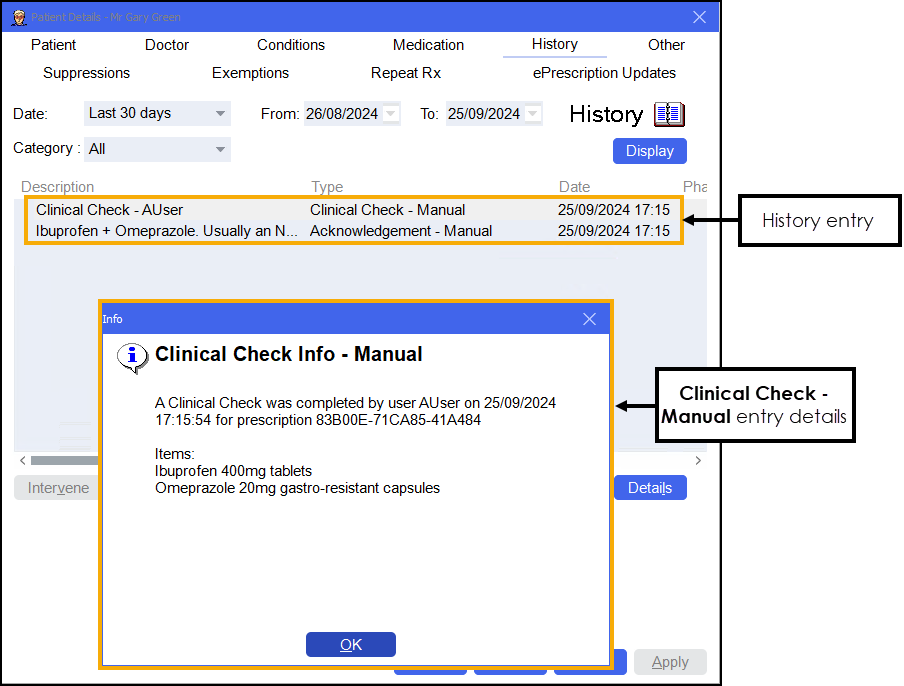
-
Automated Clinical Check - When an automated clinical check is completed an additional entry is made in the patient's history including any automatically acknowledged warnings.
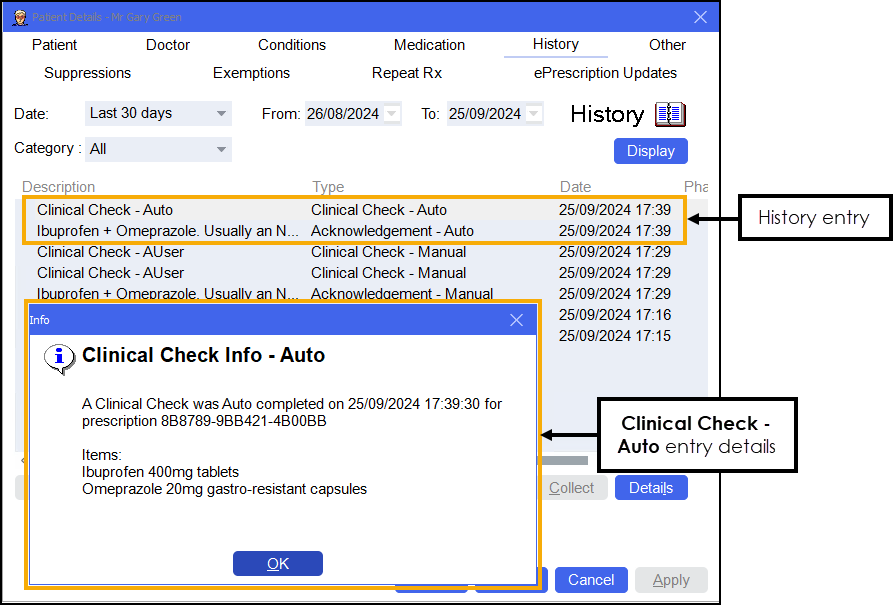
-
Reset Clinical Check - If a clinical check is reset the original entry remains and a new entry displays.
-
England Only
-
NHS App Integration - England only - Cegedim Rx are one of the early adopters for the new Prescription Tracking service as part of the Electronic Prescription Service (EPS). Pharmacy Manager collaborates with the NHS App to provide a greater visibility of a patient's prescription journey.
See NHS App Integration for details.
Scotland only
-
Useful Links Dashboard Tile - The link to Drug Tariff on the Useful Links tile is updated to https://www.publichealthscotland.scot/services/scottish-drug-tariff/.
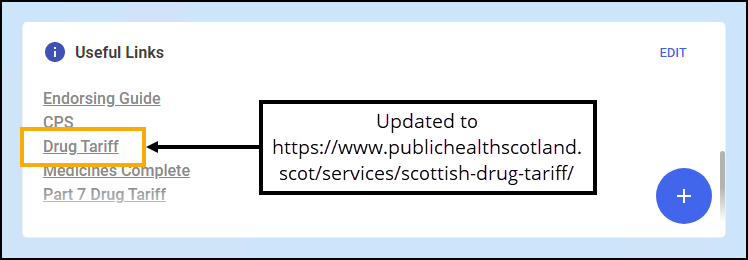 See Navigating the Pharmacy Manager Dashboard (Scotland) for details.
This release also includes background fixes and improvements to Pharmacy Manager.
Coming Soon
-
Monitored Dosage System (MDS) - We have introduced a new Monitored Dosage System (MDS) module for patients registered in nursing or retirement homes as well as patients living at home who require dosage monitoring.
See Monitored Dosage System (MDS) Module for details.Note - To enable the new Monitored Dosage System module, please contact your Account Manager or the Cegedim Rx Service Desk who can organise this for you. See Contacting Us for Support for details.
Pharmacy Manager Release 16.4
Pharmacy Manager release 16.4 introduces the following features and improvements:
England Only
-
Accuracy Checking and In Progress Prescriptions - We have added a new function to the new Dispensing workflow. The In Progress screen provides a 'basket' view to monitor dispensed new prescriptions that require an accuracy check. The Accuracy screen enables you to check that you have picked the correct item from the shelf and have labelled it correctly. Once accuracy checked the prescription(s) display on the eMessages screen with the status of In Progress - Awaiting Collection.
See Accuracy Checking Prescriptions (England) and In Progress Prescriptions (England) for details. -
Reimbursements - The EPS Items & Forms and Paper Items & Forms tables now include two new columns, Forms Totals and Items Totals:
 See Viewing and Navigating the Reimbursements screen for details.
 -
Expiring EPS - The Dashboard Expiring claim tile is renamed to Expiring EPS, this now displays all prescriptions expiring within the next 28 days regardless of status:
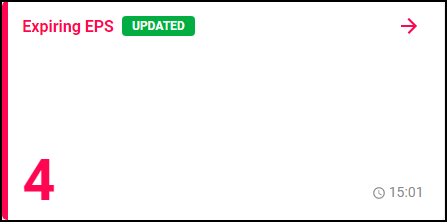 See Navigating the Pharmacy Manager Dashboard (England) for details.
 -
Batch Clinical Check Prompts - When performing a clinical check for a patient, you are now prompted if there are unselected prescriptions with a status of Requires Check. This enables you to batch check all prescriptions for a patient at the same time:
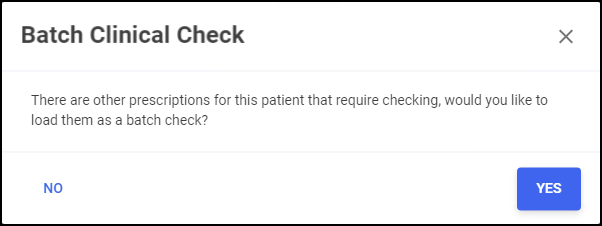 See Clinical Check - Manual (England) for details.
 -
Hypertension - The following changes are made for the Pharmacy Services Hypertension Case-Finding Service:
-
Individual Suspension - You can now stop the Hypertension eligibility label from printing for a patient, for example if the service is already delivered or the patient does not want it.
See Hypertension Case-Finding (England only) for details. -
Bulk Removal of Suspension Flag - This bulk operation removes the Hypertension label suspension flag from all patients, making them eligible for Hypertension prompting again:
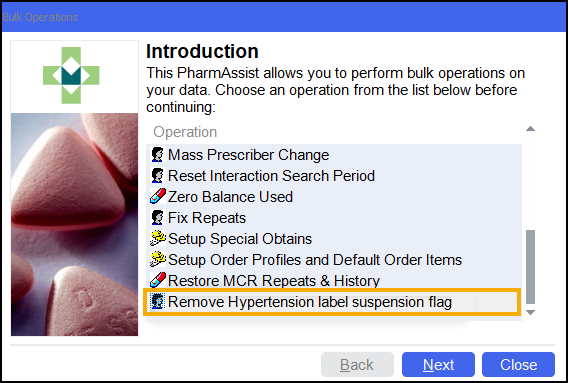 See Bulk Operation - Remove Service Label Suspension Flags for details.
-
-
NMS Catch up Report - The NMS Catch up Report now includes the patient's Mobile Number. You can easily export the New Medicine Service (NMS) report to review patients who have eligible new medicines for the first time within a set date range.
See New Medicine Service (NMS) Catch up Report for details. -
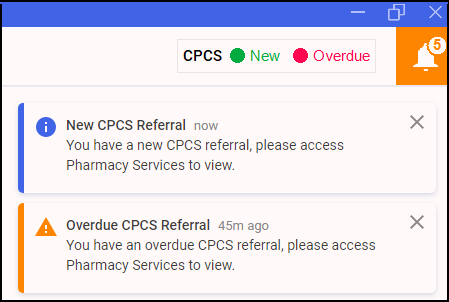
Pharmacy First Referrals - The New CPCS Referral alerts are now renamed to New Pharmacy First Referral:
-
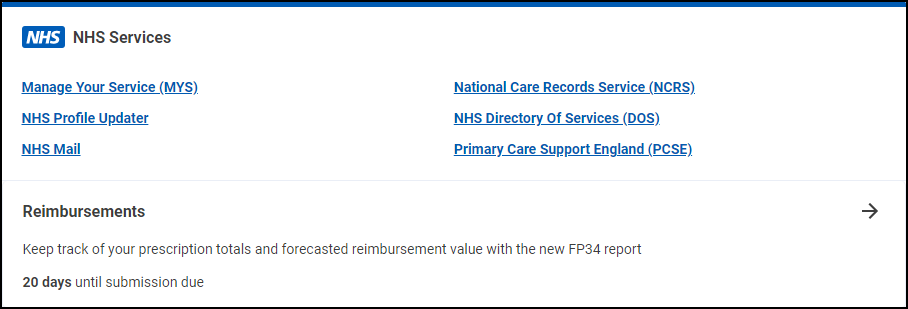
NHS Services Dashboard Tile - The NHS Services dashboard tile is updated:
-
NHS Profile Updater - Link is updated to https://www.nhs.uk/our-policies/profile-editor-login/.
-
Summary Care Record (SCR) - Summary Care Record (SCR) is renamed to National Care Records Service (NCRS) and link updated to https://portal.spineservices.nhs.uk/nationalcarerecordsservice/.
-
All Countries
-
Clinical Check - We have updated the look of the Clinical Check module, see below for details:
Scotland only
-
Useful Links Dashboard Tile - The link to Part 7 Drug Tariff in the Useful Links tile is updated to https://www.cps.scot/drugtariff/part7.
Coming Soon
We have introduced a new Monitored Dosage System (MDS) module for patients registered in nursing or retirement homes as well as patients living at home who require dosage monitoring.
Pharmacy Manager Release 16.3
Pharmacy Manager release 16.3 introduces minor background updates and improvements.
As we continue to work on the next stage of the Dispensing Evolution, which includes our brand new Accuracy Checking module and CRx Scan (Formerly Handout Manager) functionality, our journey to provide dispensing efficiencies giving you more time to deliver clinical services continues.
Just to remind you, recent Pharmacy Manager releases introduced some intelligent functionality proven to free up pharmacists’ time:
-
New Prescriptions Home Page and Clinical Check - Enabling you to view your new prescriptions, organise your workflow with our intuitive new filters and use our standalone Clinical Check module. This allows the pharmacist to perform a clinical check, set label directions and cautions and confirm any warnings and interactions, in our easy to navigate user interface, before the dispensing process. See Accessing New Prescriptions (England) for details.
-
Fast Labelling - This feature uses our business intelligence engine to pre-populate the product, directions and quantity when dispensing electronic prescriptions. By automating those repetitive data entry tasks on the dispensing page this has proven to be a huge time saver, up to 20 hours a month in some cases, and helps to drive up the daily prescription throughput. This precious time saved has enabled our pharmacies to better act as wellness hubs for their patients and deliver more key services. See Fast Labelling for details.
-
Automated Clinical Check - Again, taking advantage of our business intelligence engine we have delivered an automated clinical check feature. This learns what prescriptions you have clinically checked manually and when the same items for the same patient are received in the future, Pharmacy Manager marks them as checked automatically if there has been no change to directions, dosage or medication. Our customers have seen up to 50% of their electronic prescriptions automatically checked within three months of turning this functionality on, saving over 550 hours of time across our user base so far this year. To learn more see Clinical Check - Automated (England) for details.
-
App Integration (England only) - We now offer an integration with the BeWell and Healthera patient applications. This seamlessly integrates with the Pharmacy Manager Dispensing workflow and automatically updates registered patients as to where their prescription is in the workflow. This helps keep your patients informed without the burden of extra communication to them.
-
Dispensing Multiple Prescriptions - Enabling you to dispense multiple prescriptions for the same patient regardless of differences in prescribers, form types or drug schedules. See Group Dispensing for details.
Pharmacy Manager Release 16.2
Pharmacy Manager release 16.2 introduces the following features and improvements:
England Only
-
Available Reports - As reports EPS R2 Claims Total (FP34c) and NHS Totals (FP34) were replaced by the Reimbursement functionality in release 14.8, they are now no longer available from the reports list.
To view your Daily Claim Totals and FP34 Report, see Reimbursements for details.
All Countries
-
Dose Codes - You can now use dose codes when updating the directions in the Clinical Check module.
See -
Fast Labelling - User entered products are no longer suggested for fast labelling while dispensing. This ensures that the dm+d code is correct.
-
Dispensing Multiple Prescriptions - We have improved the way that we dispense multiple prescriptions in Pharmacy Manager. You can now dispense multiple prescriptions for the same patient that may have differing prescribers, form types or drug schedules. Pharmacy Manager does not group items into the same dispense. Instead, prescriptions display on the Dispensary screen in the order that they were selected. This change means that actions performed after dispensing no longer impact the other prescriptions they were dispensed with.
See Group Dispensing for details.
Pharmacy Manager Release 16.1
Pharmacy Manager release 16.1 introduces the following new features and improvements:
All Countries
-
Dose Codes - You can now use dose codes when updating the directions in the Clinical Check module.
See -
Fast Labelling - User entered products are no longer suggested for fast labelling while dispensing. This ensures that the dm+d code is correct.
England Only
-
Dispensing Multiple Prescriptions - We have improved the way that we dispense multiple prescriptions in Pharmacy Manager. You can now dispense multiple prescriptions for the same patient that may have differing prescribers, form types or drug schedules. Pharmacy Manager does not group items into the same dispense. Instead, prescriptions display on the Dispensary screen in the order that they were selected. This change means that actions performed after dispensing no longer impact the other prescriptions they were dispensed with.
See Group Dispensing for details.
Pharmacy Manager Release 16.0
Pharmacy Manager release 16.0 introduces the following features and improvements:
All Countries
-
Dashboard Tile - We have updated the Pharmacy Manager tile at the bottom of the dashboard:

England Only
-
Healthera Integration - The patient facing integration is now available for patients that use the Healthera application.
See Patient Facing Application Integration for details.
Scotland Only
-
Dashboard - The Uncollected MCR Prescriptions tile is renamed to Uncollected ePrescriptions:
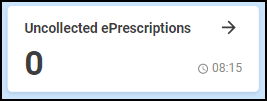 Note - Uncollected ePrescriptions currently only displays Medicines: Care & Review (MCR) prescriptions. This will be updated to include Acute Medication Service (AMS) prescriptions in a future release of Pharmacy Manager.
 -
AMS Prescriptions - The Confirm Prescription Signatory screen no longer displays when you finish an AMS prescription.
-
Instalment Dispensing AMS Prescription - The maximum number of days supply when dispensing an AMS prescription under the form type of GP10 (P), GP10 (N) and GP10 (NMP), has now increased to 84 days supply.
Pharmacy Manager Release 15.8
Pharmacy Manager release 15.8 introduces the following features and improvements:
All Countries
- Automated Clinical Check - Pharmacy Manager introduces automated clinical check on the Prescriptions screen. With this optional functionality turned on, a patient's prescription is automatically clinically checked upfront, pre-confirming the prescription prior to dispensing, providing it meets the criteria. When dispensing the prescription, warnings, contraindications and interactions are confirmed allowing you to quickly finish the dispense and print the labels. See Pharmacy Details - Automated Clinical Check and Clinical Check - Automated (England) for details.
-
Clinical Check Module Enhancements - The following enhancements have been made to the Clinical Check Module:
-
Filters - There is now a new filter of Auto Checked.
-
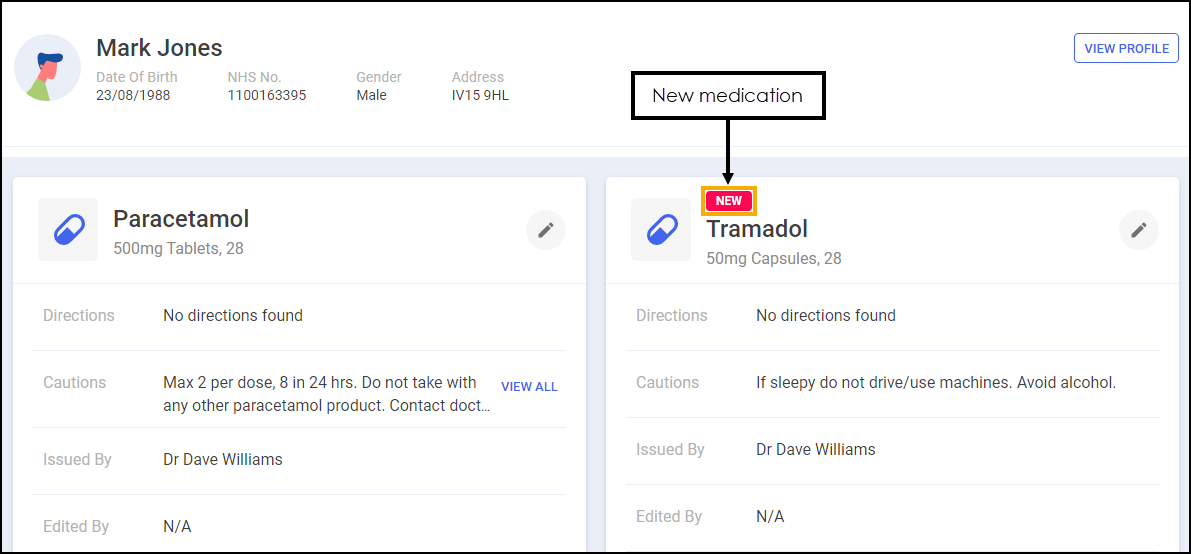
New Medication - Any new medication is highlighted on the Clinical CheckPrescription Details screen:
-
-
Hypertension Case-Finding Service - We have introduced the ability to identify suitable candidates for the Pharmacy ServicesHypertension Case-Finding Service within Pharmacy Manager.
See Hypertension Case-Finding (England only) for details.
England Only
-
Support for Additional EPS Prescription Types - Pharmacy Manager now supports EPS prescriptions from Welsh prescribers.
Pharmacy Manager Release 15.7
Pharmacy Manager release 15.7 introduces the following feature:
All Countries
-
Fast Labelling - We have introduced Fast Labelling to speed up the electronic prescriptions dispensing process.
See Fast Labelling for details. -
Clinical Check - The Clinical Check functionality on the Prescriptions screen has been updated to include the following two features:
-
Reset Clinical Check - You can now reset a clinically checked prescription, see Resetting a Clinically Checked Prescription (England) for details.
-
Prevent Editing of Directions - There is now an additional setting to prevent editing directions on the Dispensing screen after the clinical check has taken place. See Pharmacy Details - Checking for details.
-
Integrated Functionality
-
Pro Delivery Manager - We have now implemented an option to print a QR barcode on the delivery label. The QR barcode includes the patient's delivery details that can be scanned by delivery drivers. See Integrating Pro Delivery Manager with Pharmacy Manager for details.
We are also working hard to improve the infrastructure and security of Pharmacy Manager and are continuing to work on the next stage of the Dispensing Evolution which includes Automated Clinical Check.
Pharmacy Manager Release 15.6
Pharmacy Manager release 15.6 introduces the following feature:
Scotland Only
-
Prescribing medication during a Universal Claim Framework (UCF) Consultation - When medication is prescribed during a UCF consultation you are now provided with an approved list of medication for the service, where one is available.
See Medication Prescribed for details.
Pharmacy Manager Release 15.5
Pharmacy Manager release 15.5 introduces the following features and improvements:
England Only
-
Introduction of the National Care Records Service (NCRS) - Pharmacy Manager now integrates with the National Care Records Service (NCRS). The NCRS is an NHS Digital service that replaces the previous 1-click service to view a patient's Summary Care Record. This integration allows you to directly navigate to a patient's National Care Record to view additional information and assist with clinical support and patient care.
Further information as to the data available within the NCRS is available at https://digital.nhs.uk/services/national-care-records-service.See Accessing a Patient's National Care Records Service (NCRS) for details.A new audit report is also available, see Running the NCRS - Audit Report for details. -
Patient Facing Application Integration - Pharmacy Manager now provides the functionality to integrate with various patient facing applications (apps) in England. Once integration is activated, providing the patient is registered in Pharmacy Manager they can request repeat items and receive dispensing stage notifications through their chosen app. This can reduce the communication workload for your pharmacy.
See Patient Facing Application Integration for details.
Pharmacy Manager Release 15.4
All Countries
-
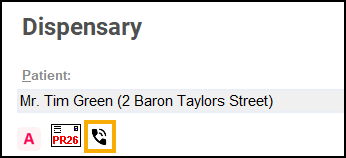
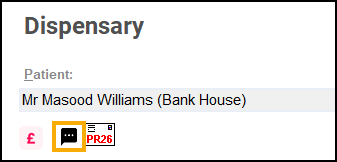
Message Dynamics - When dispensing to a Message Dynamics patient, the patient's preferred contact method displays under their name:
-
Preferred contact method of Landline:
-
Preferred contact method of SMS Texting:
See Message Dynamics for details on using Message Dynamics. -
-
Prescriptions Home Page - We are continuing to work on the next stage of the Dispensing Evolution which includes Fast Labelling and Intelligent Clinical Checking.
For more information on the Dispensing Evolution in Pharmacy Manager, see Accessing New Prescriptions (England).
England Only
-
Prescription Tokens - The logic behind printing the right hand side of tokens is improved.
-
Reimbursements - The FP34 report is updated in line with the recent discount deduction scale changes.
The new rate discount grouping and the weighted discount percentage, old rate versus new rate, display in the Drug and Appliance Costs section of the report:
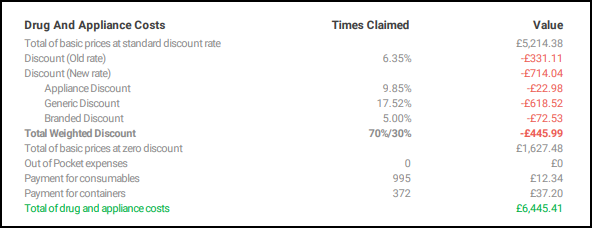
The weighted discount percentage automatically updates with your system date every three months, so you can be confident that you are seeing an up to date weighted discount.
-
Prescriptions Home Page - The following improvements have been made to the Prescriptions screen:
-
You can now open the Patient Details screen for a matched patient from the Actions menu, simply select ACTIONS - View Patient Record:
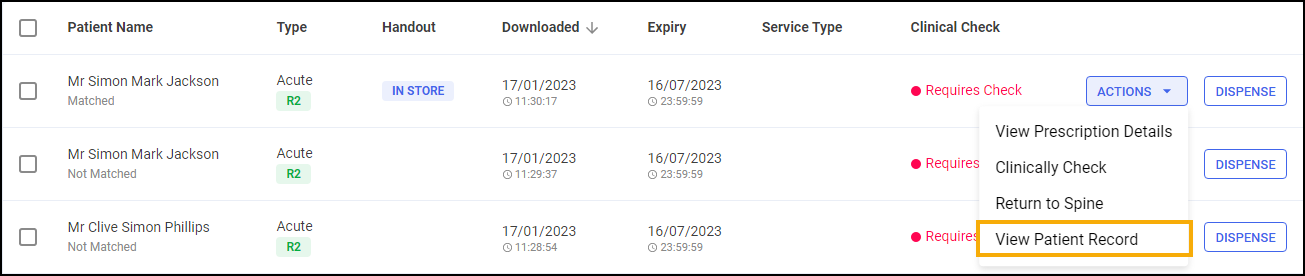
-
You can now clear all filters, simply select CLEAR:
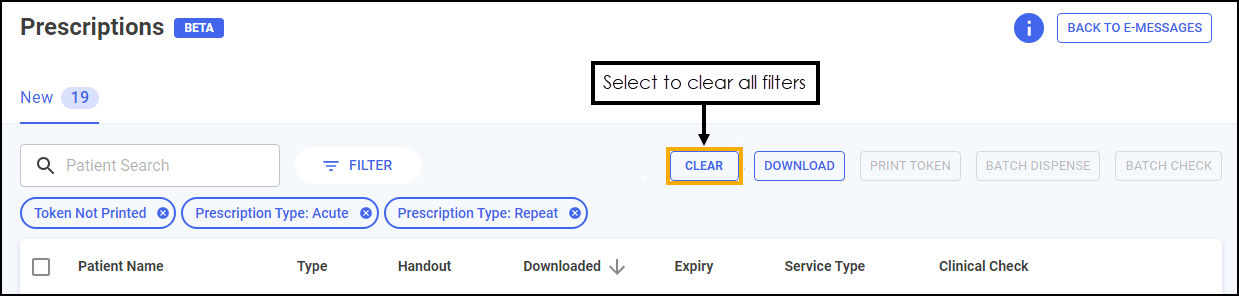
See Accessing New Prescriptions (England) for details on using the Prescriptions screen. -
Scotland Only
-
Prescriptions Home Page - We have introduced a new Prescriptions screen to view your new prescriptions with flexible filtering and scanning functionality. This includes a new clinical check module giving you the option to perform an upfront clinical check prior to dispensing.
See Accessing New Prescriptions (Scotland) for details.Note - The existing eMessages screen is available if required. Changes made on one are reflected on the other.
Wales Only
-
Prescriptions Home Page - We have introduced a new Prescriptions screen to view your new prescriptions with flexible filtering and scanning functionality. This includes a new clinical check module giving you the option to perform an upfront clinical check prior to dispensing.
See Accessing New Prescriptions (Wales) for details.Note - The existing eMessages screen is available if required. Changes made on one are reflected on the other.
Integrated Functionality
-
PharmDel Integration - Pharmacy Manager now integrates with PharmDel, a third party delivery application.
See PharmDel Integration for details.
Pharmacy Manager Release 15.2
Pharmacy Manager release 15.2 introduces the following features and improvements:
England Only
-
Scanning Prescriptions - We have introduced scanning functionality to the Prescriptions screen to help you easily locate your prescriptions.
See Scanning Prescriptions (England) for details.
Scotland Only
-
MCR First Iteration Cancellation Check - When dispensing the first iteration of a Serial (MCR) Prescription, on any day other than the day of download, Pharmacy Manager now checks to see if the MCR prescription has been modified by the prescriber:
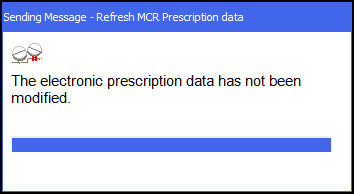 See Confirming the Dispensing Schedule for details.
Pharmacy Manager Release 15.1
Pharmacy Manager15.1 introduces the following features and improvements:
England Only
-
Enhanced Claim Amendment Functionality - When amending a prescription that has already been claimed you are now notified of the expiry date to send any subsequent notifications and claims. The expiry date of the eMessage also updates to ensure you do not miss the resubmission deadline.
See Amending a Claimed Prescription for details. -
Audit Grid - You can now print an audit grid on a Dispensing Token. See Audit Grid for details.
Integrated Functionality
-
CPCS Referrals (Pharmacy Services customers only) - Alerts now display on the Pharmacy Manager screen when a new Community Pharmacy Consultation Service (CPCS) referral arrives, or a CPCS referral status changes to Overdue:
Select the alert to view the referral in Pharmacy Services or to clear the alert simply select Close
 .
.
Pharmacy Manager Release 15.0
Pharmacy Manager15.0 introduces the following new features and improvements:
England Only
The New Prescriptions Screen & Clinical Check Module (3:50)
-
New Prescriptions Home Page - We have introduced a new Prescriptions screen to view your new 'ready to dispense' prescriptions with flexible filtering. This includes a new clinical check module giving you the option to perform an upfront clinical check prior to dispensing.
See Dispensing New Prescriptions (England) for details.Note - The existing eMessages screen is still available if required. Changes made on one are reflected on the other. -
EPS Exemption - The EPS exemption Prescribed free-of-charge HMP/prisoners/persons detained in other secure accommodation medication is reworded to HMP/prisoners/persons detained in other secure accommodation medication.
Note - This exemption should not be used to indicate contraceptives and must only be used to indicate HMP/prisoners/persons detained in other secure accommodation.Note - Item level exemptions such as Contraceptives and Free Supply, are handled automatically by Pharmacy Manager, and no longer require you to select an exemption. Any known patient level exemption should still be set, for example, Not exempt or Medical Exemption Certificate. -
Pharmacy ManagerDashboard - The Intelligent Dashboard is updated to include a What's New tile and a link to the Learning Zone. See Your Intelligent Dashboard for details:

Integrated Functionality
-
Robot Dispensing - When adding products for use with robot dispensing, Pharmacy Manager now supports barcodes that are 8, 12, 13 or 14 digits long. For example, you can now add a product using a GTIN-14 barcode:
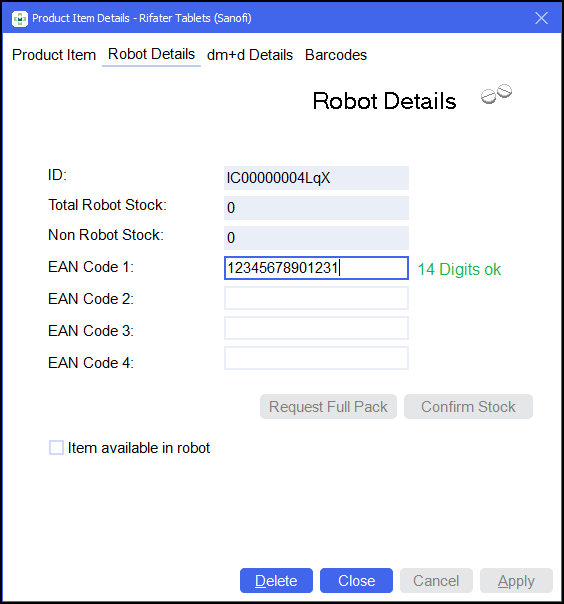
This release also includes background fixes and improvements to Pharmacy Manager.
Pharmacy Manager Release 14.9
Pharmacy Manager14.9 introduces the following feature:
England Only
-
CPCS Form Type - Community Pharmacist Consultation Service (CPCS) now has its own form type to allow you to seamlessly dispense any referrals received into Pharmacy Manager. Please be aware that due to the urgent nature of these supplies, if you do not have the required items in stock, you cannot create an owing. In these cases direct the referral to another pharmacy.
This release also includes background fixes and improvements to Pharmacy Manager.
Pharmacy Manager Release 14.8
Pharmacy Manager14.8 introduces the following features:
England Only
-
Electronic Repeat Dispensing - The default delay between requesting electronic repeats has been reduced from 30 seconds to 10 seconds.
See Electronic Repeat Dispensing for details. -
Reimbursements - This feature is designed to help with the submission of your total prescription figures to the Manage Your Service (MYS) Portal at the month end. It captures and populates your Electronic Prescription Service (EPS) totals automatically and provides tools to record paper prescription totals and other activities such as FP57 refunds, New Medicine Services (NMS) and Appliance Use Reviews (AUR) totals.
Note - This is currently being rolled out to customers, if you do not have this please contact your Account Manager.See Reimbursements for details.
Pharmacy Manager Release 14.7
Pharmacy Manager14.7 introduces the following feature:
All Countries
-
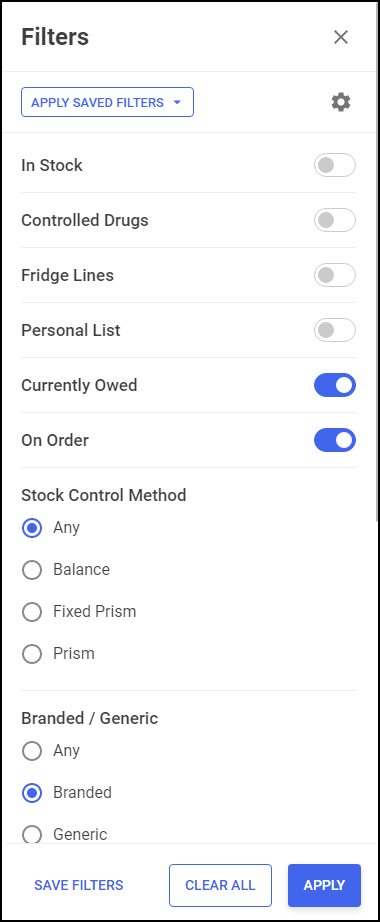
Stock & Order Management - The following options have been added to the stock inventory Filters screen:
-
Currently Owed - Displays items currently owed.
-
On Order - Displays items on order.
-
Branded / Generic - Display Branded, Generic or Any items.
See Filtering Products for details. -
Pharmacy Manager Release 14.6
Pharmacy Manager14.6 introduces the following features:
All Countries
-
Stock & Order Management
-
Stock Inventory - You can now save frequently used filters for future use.
See Filtering Products for details. -
Ordering - A new icon
 displays on the Ordering screen when there is a response from the wholesaler.See Stock & Order Management - Ordering and Order Responses for details.
-
-
Prescriber Details - Prescriber Type - The Physiotherapist and Podiatrist prescriber types are now updated to Physiotherapist (IP) and Podiatrist (IP) to indicate that they are independent prescribers.
-
Prescriber Type - You can now select a prescriber type of Other when adding a prescriber to cover any prescribers not available in the Type list. You can manually specify the prescriber type.
See Adding a New Prescriber for details.
Scotland Only
-
Introduction of Non-Medical Prescribers - Functionality has been implemented to fully support dispensing of AMS prescriptions from non–medical prescribers arriving from out of hours centres and GP practices:
Note - We are also prepared for receiving MCR prescriptions from non-medical prescribers for when this comes into scope.-
There is now a new form type of GP10 (NMP)
 available for selection from the Dispensary screen.Note - There are already two existing form types, GP10 (N) which supports nurse prescribing and GP10 (P) which supports pharmacist prescribing.
 -
Any electronic prescriptions received from non-medical prescribers the form type in which the prescription was prescribed automatically displays and if required a new prescriber is created where the Prescriber Type and NHS/Registration number automatically populates on the Prescriber Details screen.
Note - A non-medical prescriber is not saved as the patient's registered doctor in the patient's details. -
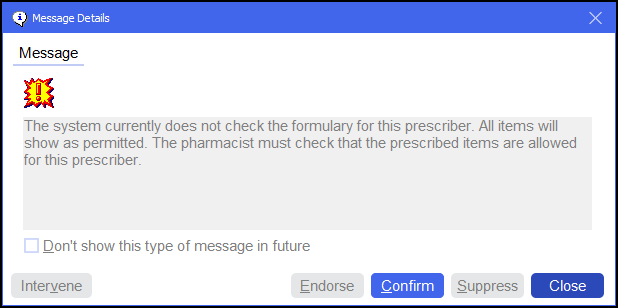
If a prescriber type has been selected where Pharmacy Manager does not do a formulary check a message displays in the Warnings section 'The system currently does not check the formulary for this prescriber. All items will show as permitted. The pharmacist must check that the prescribed items are allowed for this prescriber'. This must be confirmed before finishing the dispense:
Training Tip - The process of dispensing AMS and MCR prescriptions remains unchanged. -
-
Instalment Dispensing - Instalment Dispensing is permitted on the following form types, GP10, HBP, GP10 (N), GP10 (P), GP10 (NMP). However Instalment Dispensing on Medicines Care and Review (MCR) prescriptions is still out of scope.
-
Virtual AMS/MCR Prescriptions - The prescribers Professional Code, Professional Code Scheme and Type now display in the prescriber section of the virtual prescription.
-
Pharmacy First Scotland - Standard (MAS)Mandatory Notes - Consultation notes are now mandatory for a Pharmacy First Scotland - Standard (MAS) service.
See Recording a Pharmacy First Scotland - Standard (MAS) Consultation for details.
Pharmacy Manager Release 14.5
Pharmacy Manager14.5 introduces the following features:
All Countries
-
Populating Directions on Electronic Prescriptions - You can now choose to automatically populate directions when dispensing electronic prescriptions.
See Pharmacy Details - Keystroke Reduction for details. -
Stock & Order Management - Low Stock / Excess Stock / Dead Stock / Often Owed result screens:
-
Edit values - You can now select Edit to edit values on the results screens.
See Updating Editable Stock Values for details. -
Export to CSV or PDF - You can now export the data on the results screens to a CSV (Microsoft Excel) or a PDF.
See Stock Inventory Report for details.
-
Integrated Functionality
-
CPCS Referrals - Customers using Pharmacy Services can view their Community Pharmacy Consultation Service (CPCS) referral numbers from the Pharmacy ManagerDashboard.
See Viewing your Pharmacy First Referrals for details.
Pharmacy Manager Release 14.4
Pharmacy Manager14.4 introduces the following features:
All Countries
-
Message Dynamics - We have updated the Message Dynamics Communications screen to display To Send and Sent messages separately:
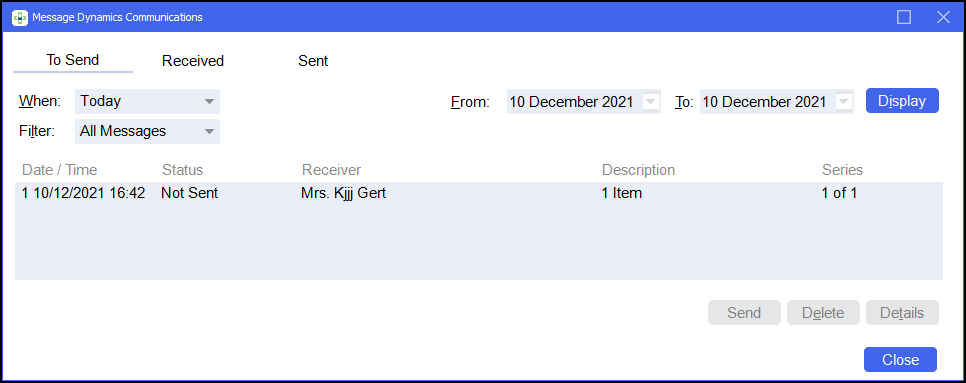 See Accessing Received Messages and Managing To Send, Received and Sent Messages for details.
 -
Stock & Order Management
-
Stock Inventory Filter - You can now filter for stock that has the status of In Stock.
See Filtering Products for details. -
Low Stock / Excess Stock / Dead Stock / Often Owed result screens - You can now search and filter stock items.
See Searching for Products and Filtering Products for details.
-
Scotland Only
-
MCR Collecting Item Cancellation Check - Prior to handing out an Medicines: Care & Review (MCR) prescription to a patient, on selecting Collect from the Pending screen, it is now a requirement that the system checks if the prescription has been cancelled by the prescriber since the time it was dispensed.
See Collecting a Serial (MCR) Prescription for details. -
Treatment Summary Report (TSR) Data - For new sites migrating to Pharmacy Manager when running the TSR report the data shown includes all dispensing activity regardless of which system the items were dispensed in.
Pharmacy Manager Release 14.3
Pharmacy Manager14.3 introduces the following features:
All Countries
-
Stock & Order Management Product Search - You can now search for items on the Ordering tab of the Stock & Order Management screen.
See Stock & Order Management - Ordering for details.
England Only
-
NMS Catch up Report - You can now export a New Medicine Service (NMS) report to review patients who have had eligible new medicines prescribed for the first time within a set date range.
Training Tip - You can use this report to review patients that may have been missed during the pandemic.The NMS Catch up Report details the following in a spreadsheet:
-
Database ID
-
Patient Number
-
Patient Name
-
NHS Number
-
DOB
-
Address
-
Phone Number
-
Email
-
Medication
-
Pack size
-
Dispensed quantity
-
Date of First Dispense
-
Date of Last Dispense
-
Consent status
-
Consent Date
See Data Exports for details. -
Robot Dispensing Customers Only
-
Stock & Order Management Robot Items - Robot items are now clearly identified by an
 on the Ordering tab of the Stock & Order Management screen. This helps you to book items into stock more efficiently.See Stock & Order Management - Ordering for details.
 -
Qualified Stock Adjustments - Only applicable for customers using Robots and have Qualified stock adjustments enabled. Pharmacy Manager now allows users to flag stock which is moved from Shelf stock into the Robot whilst recording a stock adjustment. This allows an automatic stock adjustment to be recorded before the stock is scanned into the Robot.
See Qualified Stock Adjustment Functionality for details.
Pharmacy Manager Release 14.2
Pharmacy Manager14.2 introduces the following features:
All Countries
-
Often Owed Tile – We have added an Often Owed tile to the Stock Inventory screen.
See Often Owed Tile for details. -
Handout Method Label Update - Printed labels display the chosen handout method:
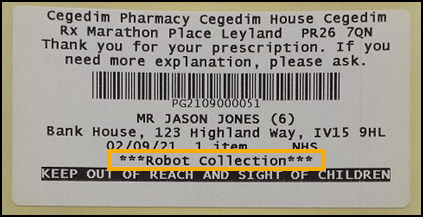 See Recommended Label Settings for Robot Collection for details on label settings.
Scotland Only
-
Dispensing of Schedule 2 & 3 Controlled Drugs on a UCF Service - When dispensing of Controlled Drugs is not permitted on the selected service the following message displays 'This product is not permitted to be prescribed on this service'.
Note - This is in readiness for when UCF services support the dispensing of Schedule 2 & 3 Controlled Drugs.See Recording a Universal Claim Framework (UCF) Consultation for details. -
Mandatory Recording of Consultation Notes - If this is indicated in the Service Definition Paramber (SDP) file, you will not be able to complete a consultation until Consultation Notes are entered.
-
Printing AMS and MCR Prescriptions - When dispensing AMS and MCR prescriptions you can now print the prescription from the Dispensary screen, select Print - Print Prescription or press Shift + Alt + P on your keyboard.
Note - This is not available for UCF, Pharmacy First Scotland - Standard (MAS) or manual dispensing.
Pharmacy Manager Release 14.1
Pharmacy Manager14.1 introduces the following features:
All Countries
-
Dead Stock Tile – We have added a Dead Stock tile to the Stock Inventory screen.
See Dead Stock Tile for details.
Scotland Only
-
Minor Ailment Service (MAS) - 'Pharmacy First Minor Ailment Service (MAS)' is renamed to 'Pharmacy First Scotland - Standard (MAS)'.
See Recording a Pharmacy First Scotland - Standard (MAS) Consultation for details. -
UCF Services - We have introduced a hierarchy structure for all Universal Claim Framework (UCF) including Pharmacy First Scotland. Some examples are shown below:
Group Service Name Epidemic / Pandemic Services and Vaccinations COVID-19 - LFD Supply COVID-19 - Pharmacy Supply Health Board Services Health Board Local Service Health Board Local Service - GP Notification Healthy Start Vitamins Pharmacy First Scotland Impetigo - Scot. GP Registered Impetigo - Scot. Resident, no GP Shingles - Scot. GP Registered Shingles - Scot. Resident, no GP Skin Infection- Scot. GP Registered Skin Infection - Scot. Resident, no GP Standard (MAS) UTI - Scot. GP Registered UTI - Scot. Resident, no GP See Recording a Universal Claim Framework (UCF) Consultation and Pharmacy Services Report for details. -
Patient Details History - Where the service name was previously shown in the Patient Details History screen, there is now a Pharmacy Service column that displays the service name. For all new consultations the description will no longer display either UCF or MAS as this is included in the Pharmacy Service column.
See ePharmacy Service Indicator in Patient History for details.
Integrated Functionality
The updates below are for customers on the advanced and ultimate package, contact your Cegedim Account Manager for details.
-
Robot Collection Label - When dispensing prescriptions for patients that have selected Robot Collection as their handout method, an additional QR barcode label is printed which enables the integration with the Robot Collection system:
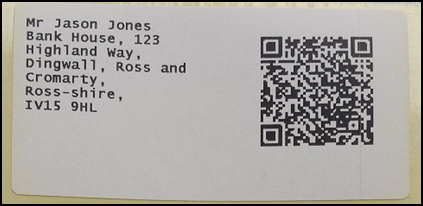 Important - Do not use this label to label letters as the QR code contains additional patient details, for example the patient’s NHS number.
To reprint this label, from the Patient Details screen select Address Label (z):
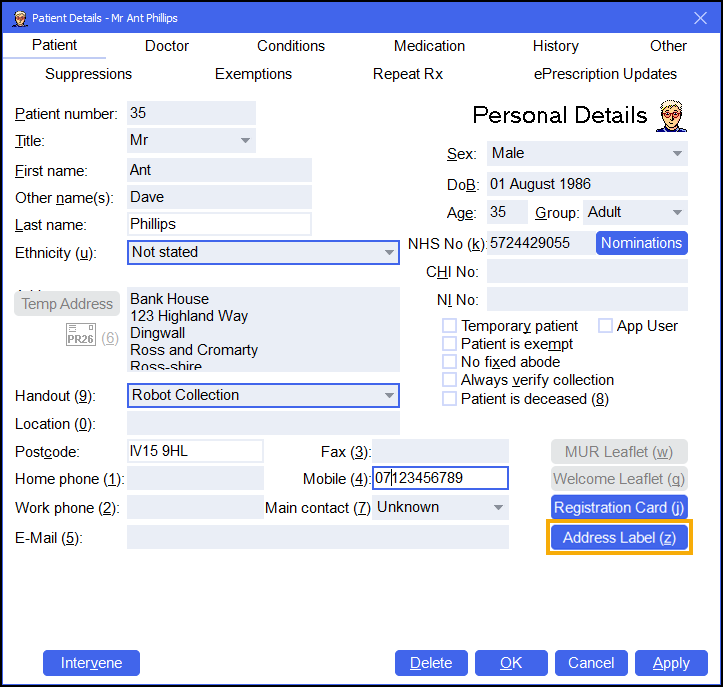
Integrating your Robot Collection Service with Pharmacy Manager (2:24)
See Video Tutorials for further Pharmacy Manager videos.
Pharmacy Manager Release 14.0
Pharmacy Manager14.0 introduces the following features:
All Countries
-
Address Search - We have updated the address search to provide a simple, faster and flexible search across all addresses in the UK:
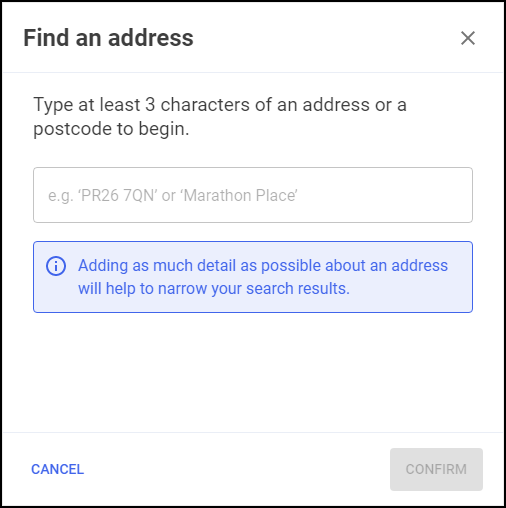
Please note the following:
-
There is now no requirement to enter a licence key to use the address search.
-
There is no limitation to postcodes, all UK addresses are available.
-
The Bulk Operation - Postcode Database has been removed from the system.
See Adding Addresses for details on the address search. -
-
Handout method selection - The Patient Details screen now displays a Handout Method drop-down, the options are:
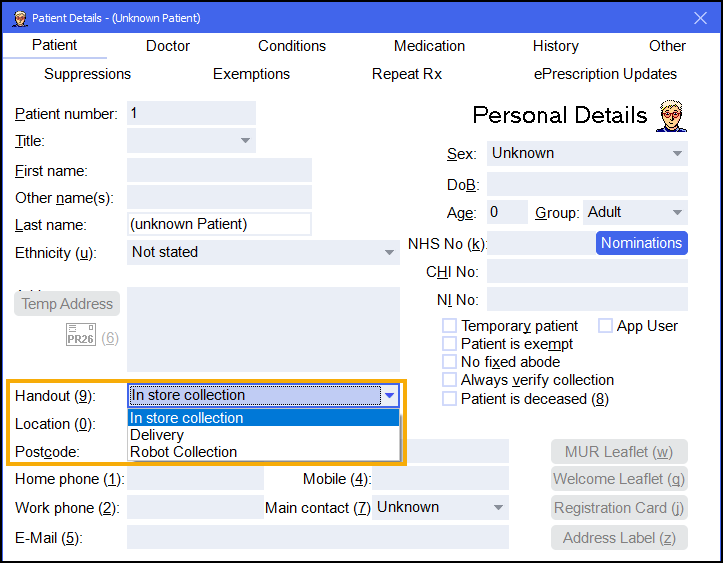
-
In store collection (Default)
-
Delivery (Automatically chosen if the previous checkbox Home Delivery Service Required was checked)
-
Robot Collection
-
-
Handout method icon - Depending on the handout method selected in Patient Details a relevant icon displays on the eMessages screen:
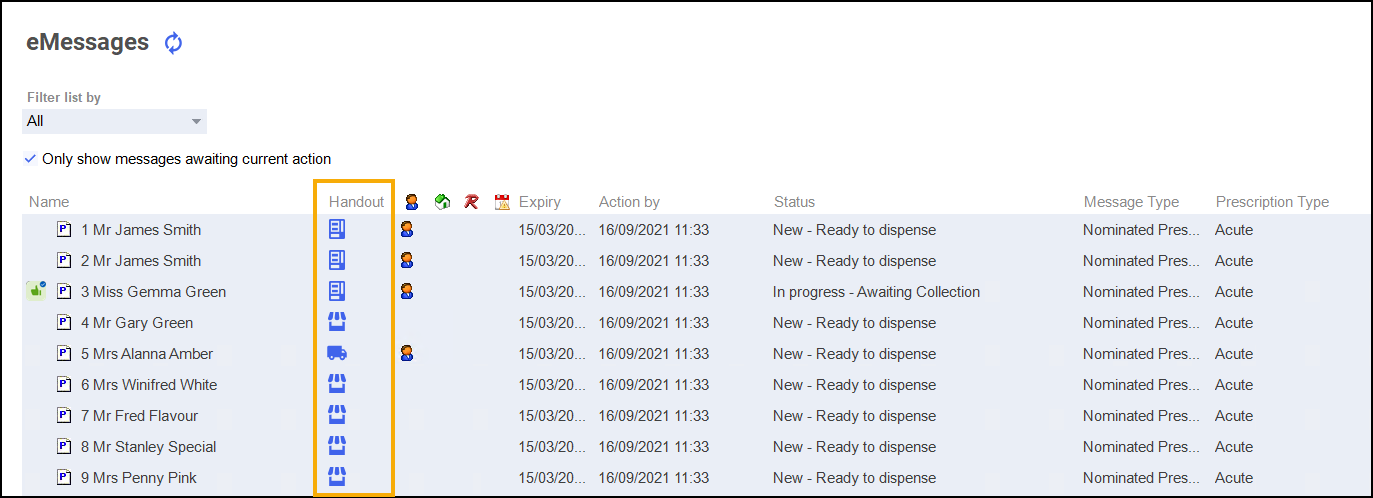
-
 - In Store Collection
 -
 - Delivery
 -
 - Robot Collection
-
-
Robot Collection Clinical Check - Where the handout method chosen is Robot Collection, if the prescription contains items that are Controlled Drugs or Fridge Items a warning displays:
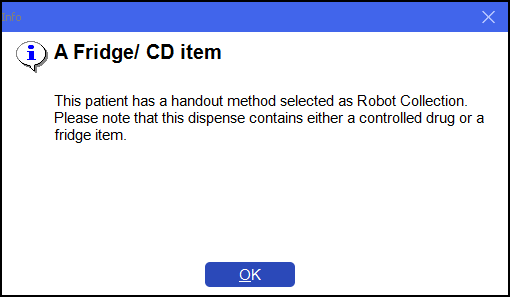
-
Mobile Number Validation - For patient's that have a handout method of Robot Collection a valid format mobile number is mandatory. A warning displays if the mobile number is not a valid format:
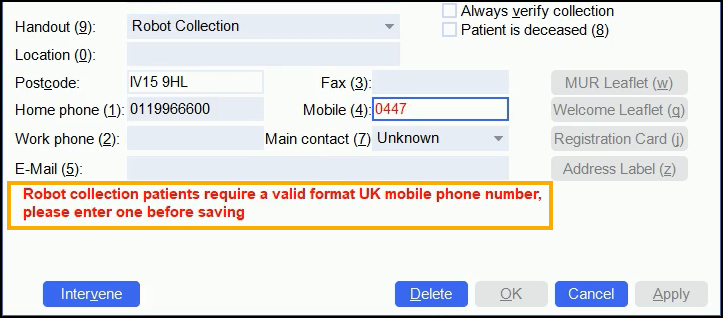
-
Patient Consent - On selecting Robot Collection as a handout method users are reminded to record the patient's consent to sharing their mobile number and to review annually:
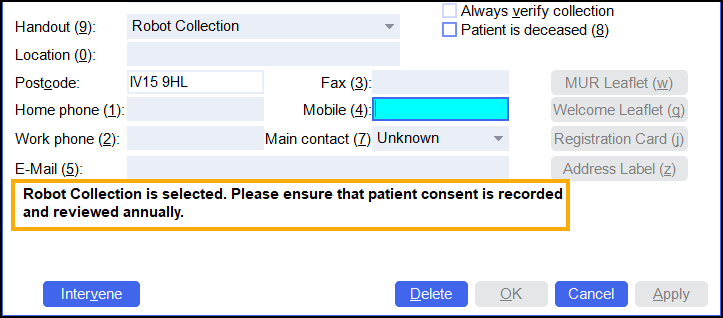
Scotland Only
-
Calculate MCR due date option - There is now an option in Pharmacy Details to set how the MCR due date is calculated.
Note - This is also known as CMS (Chronic Medication Service).See Calculating MCR Due Date for details. -
The View History screen Items tab now includes an MCR no. column that shows the iteration of the prescription:
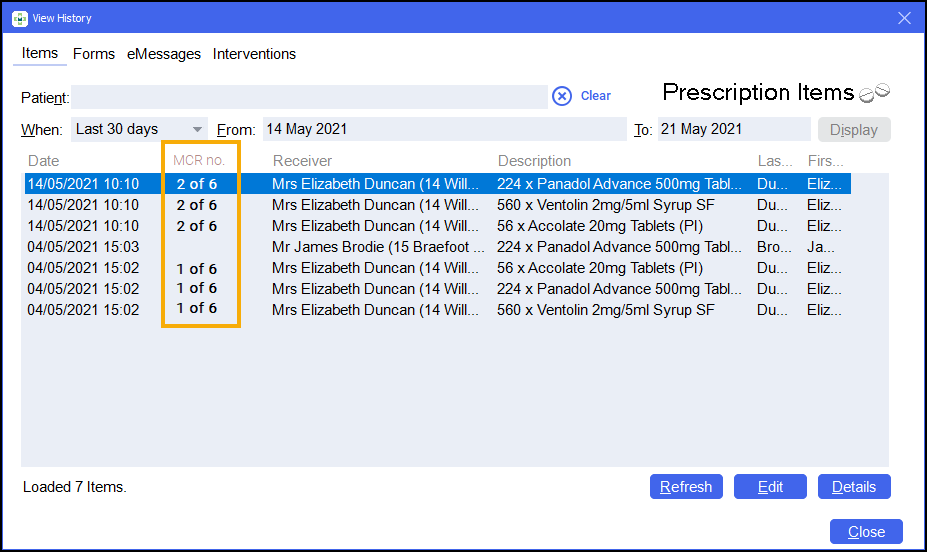
This is particularly useful for users to know exactly which iteration of the MCR they are editing.
- MCR Treatment Summary Report (TSR) - The MCR Treatment Summary Report (TSR) screen includes a check box to only show patients with completed MCR cycles that are ready to send:
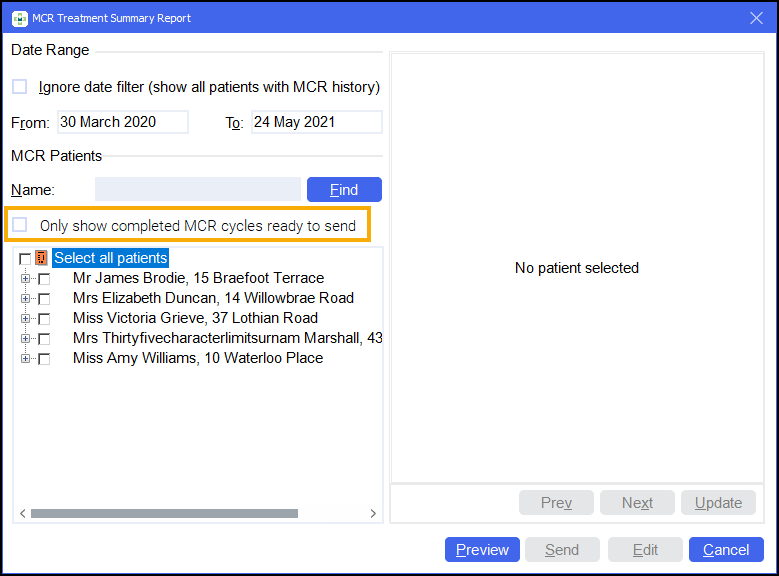 See MCR Treatment Summary Report (TSR) for details on running a Treatment Summary Report.
Pharmacy Manager Release 12.8 - June 2021
Pharmacy Manager12.8 introduces the following features:
All Countries
-
Excess Stock Tile – We have added an Excess Stock tile to the Stock Inventory screen.
See Excess Stock Tile for details. -
Low Stock Tile - The Low Stock tile now indicates when the tile was last updated.
See Low Stock Tile for details.
Scotland Only
- Dispensing an MCR prescription from the Repeats screen - A warning displays if you attempt to dispense to a patient who is not registered:
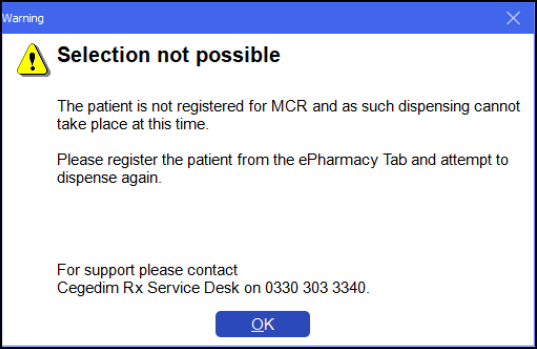
-
Claiming Report for MAS & UCF Services - There is now a new report for claiming for MAS and UCF Services.
See Pharmacy Services Report for details. -
Eligibility check is now in UCF Services - This is only initiated if the service requires an eligibility check.
See Recording a Universal Claim Framework (UCF) Consultation for details on UCF Services.
Pharmacy Manager Release 12.7 - May 2021
Pharmacy Manager 12.7 introduces the following features:
All Countries
-
Enhancement to Stock Adjustment Functionality – You are now asked to enter a stock adjustment reason when adjusting stock levels from the Stock Inventory screen.
-
Low Stock Tile – We have added a Low Stock tile to the Stock Inventory screen.
See Low Stock Tile. -
Updated Column Header Icon (eMessages Screen) – We have updated the Delivery column header icon on the eMessages screen.
-
MDS Community Patient Grouping – Care homes can now be set up as a Community Patient Group allowing organisation of community patients.
Scotland Only
-
Pharmacy First Phase 2 Enhancements (Allowed Outcomes) – We have introduced functionality that will limit outcomes to only those allowed on the specific UCF service.
Wales Only
-
National MAR Chart – We have introduced a national MAR chart for all MDS patients in Wales.
Pharmacy Manager Release v12.6 - April 2021
Pharmacy Manager v12.6 introduces the following features:
All Countries
Delivery Label Enhancements
You can now print additional bag labels for patients who require a delivery service.
Repeat Request Export
You can now produce a Repeat Request Export that contains the details of all repeat requests that have been sent by your pharmacy.
Custom Label Option
There is now a new option on the Patient Details - Other tab to print a custom label.
England Only
Nominate Newly Added Patients
You can now update a patient’s nomination details without their NHS number entered in Patient Details.
Scotland Only
Indicator in Patient History
We have added an indicator within Patient History to identify where medication has been dispensed in a MAS or UCF service.
Robot Sites Only
You are now asked to enter a stock adjustment reason when adjusting non Robot stock.
Pharmacy Manager Release v12.5 - March 2021
All Countries
Stock Inventory Screen
We have introduced the Stock Inventory screen, a new feature that helps you keep track of stock levels within your pharmacy. See Stock & Order Management - Stock Inventory for details.
Patient Search Improvements
You can now search for a patient by Date of Birth and by name within the View History screen. See Patient Search Improvements for details.
Marking a patient as an App user
You can now mark a patient as an App user. This will help you easily identify patients that use apps to manage their medication. See Marking a patient as an App user.
England Only
Serious Shortage Protocol (SSP) Electronic Claiming
In this release, we have implemented functionality in readiness for when users can claim SSP in electronic claims.
Pharmacy Manager Release v12.4 - February 2021
All Countries
Repeat Request Report
We have introduced a Repeat Request Report that outlines all repeat requests that have been sent by your pharmacy.
See Repeat Request Report for details.
Repeat Prescription Request - Enhancements
You can now preview a repeat prescription request email/ letter, and add additional comments to it before sending it to the GP.
See Quick Repeat Requests for details.
England Only
NHS Prescription Tracker - Enhancements
You can now access the NHS Prescription Tracker within Patient Details.
See NHS Prescription Tracker for details.
Pharmacy Manager Release v12.3 - January 2021
All Countries
Drug Information Screen
The Drug Information screen provides you with information relating to items being ordered/ not ordered on the Order Information screen.
See Drug Information Screen for details.
Patient Delivery Improvements
We have made improvements to how you mark and identify that a patient requires a delivery service.
See Patient Delivery Improvements for details.
Scotland Only
Pharmacy First Phase 2 Enhancements
In this release we begin to introduce some of the Pharmacy First Phase 2 enhancements. Further enhancements will be coming over subsequent releases. Enhancements in this release include:
-
Viewing Minor Ailment Service (MAS)/ Universal Claim Framework (UCF) details within Patient History - You can now view MAS/ UCF consultation details within Patient Details – History.
-
Ability to dispense items outside of the Pharmacy First Scotland approved list - Pharmacy Manager now warns the user if an item is selected that is not recognised by Pharmacy Manager as being on the Pharmacy First Scotland approved list, but allows you to continue with the dispense. See Dispensing an item outside of the Pharmacy First Scotland approved list for details.
-
Viewing MAS/ UCF details on the Patient History Report - You can now view MAS/ UCF consultation details within the Patient History Report. See Viewing MAS/ UCF details on the Patient History Report.
-
Text change – Text that previously read Consultation Only has been updated to Advice Only across all Pharmacy First services.
England Only
Sort and Filter Prescriptions by Prescription Type
You can now sort/filter prescriptions on the eMessages screen by prescription type.
See Sorting/filtering prescriptions by prescription type for details.
Definition update to exemption
The definition of Exemption value 0015 has been updated.
Exemption Z (0015) has been updated from Patient does not need to pay the prescription charge to Prescribed free-of-charge HMP/prisoners/persons detained in other secure accommodation medication.
Pharmacy Manager Release v12.1 - October 2020
Order Summary
We have introduced an order summary pop-up screen to the Dispensary screen. This will show you what items are being ordered after any items are dispensed.
See Order Summary for details.
Patient Information Leaflet (PIL)
We have expanded on the areas where an alternative PIL can be generated.
See Viewing and Printing Patient Information Leaflets (PIL) for details.
Repeat Prescription Request via Email - England Only
You can now send a repeat prescription request to a GP via email.
See Repeat Prescription Request via Email for details.
Updated EPS Expiring Warnings - England Only
We have updated the warning text that displays when an EPS prescription is at risk of expiring.
See Updated EPS Expiring Warnings for details.
NHS Prescription Tracker - England Only
We have introduced an NHS prescription tracker. This will allow you to view a prescription's status on the NHS Spine.
See NHS Prescription Tracker for details.
Pharmacy Manager Release v12.0 - September 2020
Prescription Type Descriptions - England Only
We have added a prescription type description to all EPS prescriptions.
MAS Form Printing - Scotland Only
We have made changes that enable MAS form printing at a system wide level.
Pharmacy Manager Release v11.9 - August 2020
Pharmacy Buyer
Pharmacy Manager is now integrated with Pharmacy Buyer. Pharmacy Buyer is a third party software tool that takes your Pharmacy Manager order and sends it to a range of wholesalers to find you the best value for the products you order.
Patient Information Leaflet (PIL)
We have expanded on the areas within Pharmacy Manager where a patient information leaflet (PIL) can be generated.
NHS Pharmacy First Scotland - PGD Consultations
We have improved the workflow when completing a PGD Consultation.
Pharmacy Manager Release v11.8 - July 2020
Patient Information Leaflet (PIL)
You can now easily generate and print a patient information leaflet (PIL) when dispensing a prescription.
Add an optometrist as a prescriber
You can now add an optometrist as a prescriber.
Dispense a prescription as an optometrist
You can now dispense a prescription as an optometrist.
Pharmacy Manager Release v11.7 June 2020
Select Robot Items
We have made enhancements to the Select Robot Items screen.
Registering a Patient for Repeat Rx
We have simplified the process behind registering a patient for Repeat Rx.
Registering a GP for Repeat Rx
We have simplified the process behind registering a GP for Repeat Rx.
Pharmacy Manager Release Guide v11.4 March 2020
General
- Background Backup - Pharmacy Manager can now be used while your backup runs. A progress bar displays on your Notification pane to enable you to monitor the process:
- Maximised Notification pane -
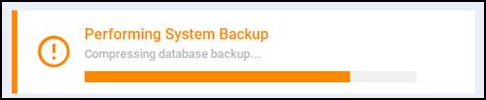
- Minimised Notification pane -

See Backing Up Pharmacy Manager for details. - Maximised Notification pane -
Dashboard
- Useful Links - The following links have been added to your Pharmacy Manager Dashboard:
- Scotland - A link to the EMC which launches https://www.medicines.org.uk/emc
- Wales - A link to the Drug Tariff which launches https://www.nhsbsa.nhs.uk/pharmacies-gp-practices-and-appliance-contractors/drug-tariff
- Customisable Links - From Pharmacy Manager Dashboard, you can now manage Useful Links for your pharmacy:
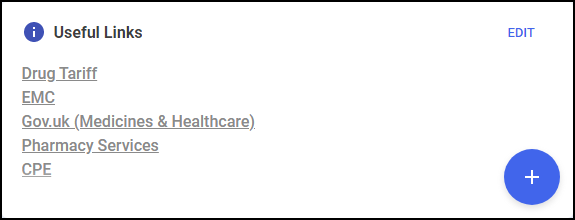
You can:
- Add your own links - Select Add
 , complete the Add Useful Link screen and select Save
 .
. - Edit your links - Select Edit
 , update the Link as required and select Save
  .
. - Removing your links - Select Edit and then Delete
 to remove the link.
 Re-order your links - Select Edit
and drag and drop your links into the desired order. See Managing Useful Links for details.
- Add your own links - Select Add
Dispensing with Robot - Automatic Quantity Matching
For customers that use a robot to dispense within their pharmacy, the quantity will be automatically populated on the Dispensary screen.
Fridge Temperature Export
To help you get accurate readings of the temperature that your fridge is kept at, you can now run a Fridge Temperature report. You can then and export it as a PDF, and download or print it.
England Only
Accessing a Patient’s Summary Care Record - To assist you in making informed clinical decisions for your patient, you can now access a patient’s Summary Care Record (SCR) from within Pharmacy Manager.
Running an SCR Audit Report - SCR access is audited and presented in a new audit report, available from the reporting tab of Pharmacy Manager. Only users with administration rights will be able to view this report.
Real Time Exemption Check (RTEC) - RTEC is now automatically enabled in your Pharmacy Manager system. RTEC automatically checks the exemption status of a customer when loading a prescription to dispense it.
FP10 Prescription Form - Update - The exemption boxes on the FP10 prescription form have been updated, which will make it easier for users to process patient exemptions.
Scotland Only
Changes in the naming of services - In line with Scottish guidance, we have renamed the CMS service (Chronic Medication Service) to MCR (Medicines: Care & Review) to align with a service relaunch. The functionality remains the same.
We have also amended the names of other ePharmacy services, to align with the latest specification from NHS Scotland. These changes are outlined below:
- eAMS has been renamed AMS
- eMAS has been renamed MAS
- eUCF has been renamed UCF
Pharmacy Manager Release Guide v11.3 (February 2020)
Pharmacy Manager release v11.3 introduces:
- Refresh Messages - The eMessages
 , Owings
  , Pending
  and Instalments
  screens now have a Refresh option
  , select to ensure you are looking at the latest messages:
- Pharmacy Notes - The Pharmacy Notes tile on your dashboard has been updated:
- With no Pharmacy Notes to display, 'Please click the + button to add a new note' displays:
- Adding a Pharmacy Note - The Add Note screen has been updated, enter your text into Description and select Pin Note to set it to always display on the Pharmacy Manager dashboard. Select Save to save.
- Editing a Pharmacy Note - The Edit Note screen has been updated, select Edit
 and the Edit Note screen displays, update as required and select Save
 , or, to remove the Note, select Delete:
- Fridge Temperatures - The Fridge Temperatures tile on your dashboard has been updated:
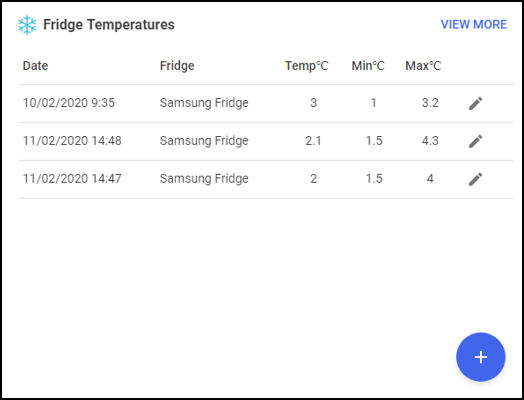
The Fridge Temperatures tile displays:
- Date - The date of a temperature recording
- Fridge - The name of the fridge for this reporting line
- Temp - The actual temperature as recorded
- Min C - The minimum temperature as recorded
- Max C - The maximum temperature as recorded
Adding a Fridge
With no fridge temperatures to display, 'You haven't added any fridges yet, click the + button to add a fridge' displays:
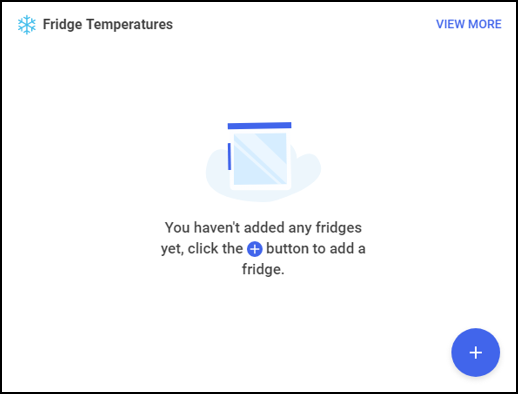
To add a Fridge:
- From the Pharmacy Manager dashboard - Fridge Temperature tile, select Add.
- The Add Fridge screen displays:
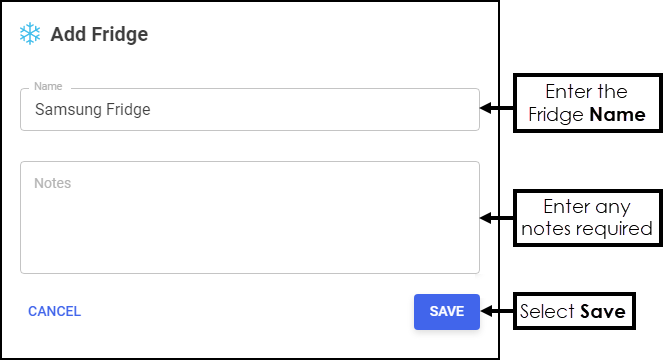
- Complete as required:
- Name - Enter the name of your fridge
- Notes - Enter any free text comments
- Select Save.
- From the Pharmacy Manager dashboard - Fridge Temperature tile, select Add
Recording your fridge temperatures:
- From the dashboard Fridge Temperatures tile, select Add
The Add Fridge Temperature screen displays:
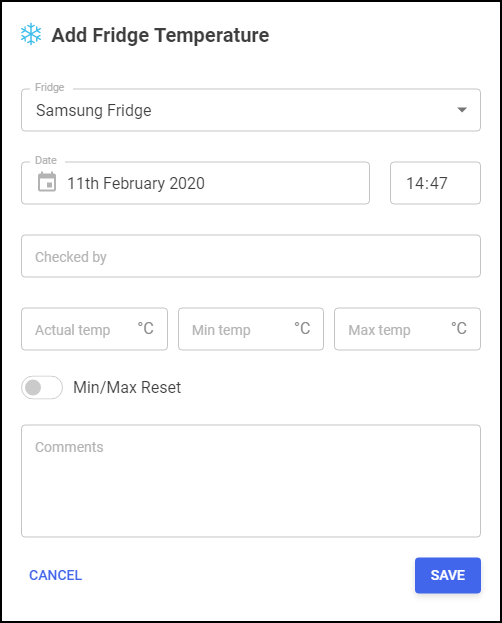
- Complete as follows:
- Fridge - Select the appropriate fridge if you have more than one
- Date – Enter the date of the reading
- Time – Enter the time of the reading
- Checked by – Enter the name of the person who checked the fridge
- Actual Temp – Enter the actual temperature
- Min Temp – Enter the minimum temperature
- Max Temp - Enter the maximum temperature
- Min/Max Reset – Select to indicate a reset
- Comments – Enter any comments required, for example, if there was a breakdown or door left open, you could record that here
- Select Save.
- From the dashboard Fridge Temperatures tile, select Add
Viewing the Fridge Temperatures log
- From the Pharmacy Manager dashboard - Fridge Temperatures tile, select the View More:
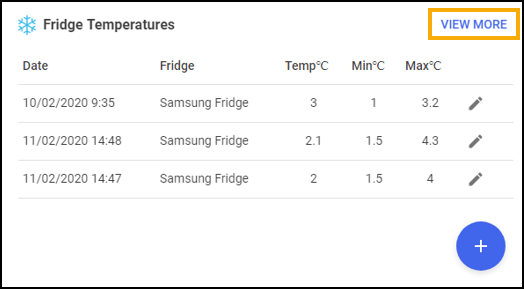
- The Fridge Temperatures log displays:
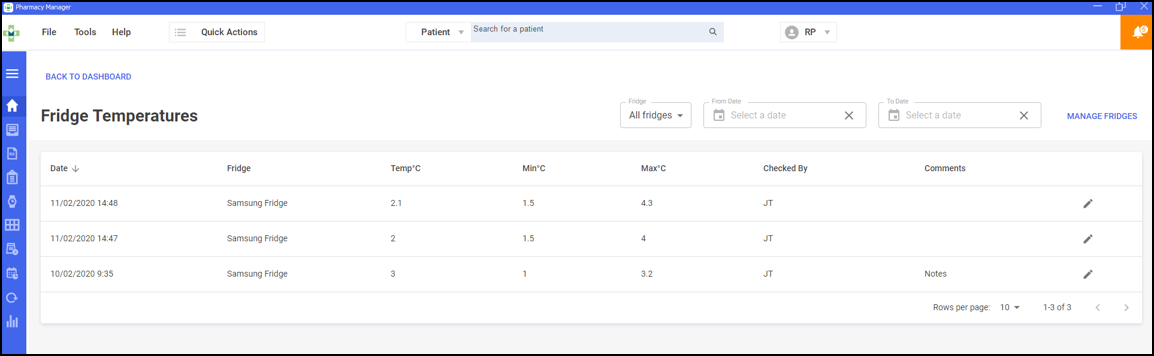
- If required, select:
- Fridge - Either leave All fridges selected or select a specific fridge
- From/To Date - Enter a date range
- Edit - To update an entry
- Manage Fridges
 - To edit or add further fridges
- Select Back to Dashboard to return to your Pharmacy Manager dashboard.
- From the Pharmacy Manager dashboard - Fridge Temperatures tile, select the View More:
- With no Pharmacy Notes to display, 'Please click the + button to add a new note' displays:
- Calendar - The Calendar tile on your dashboard has been updated:
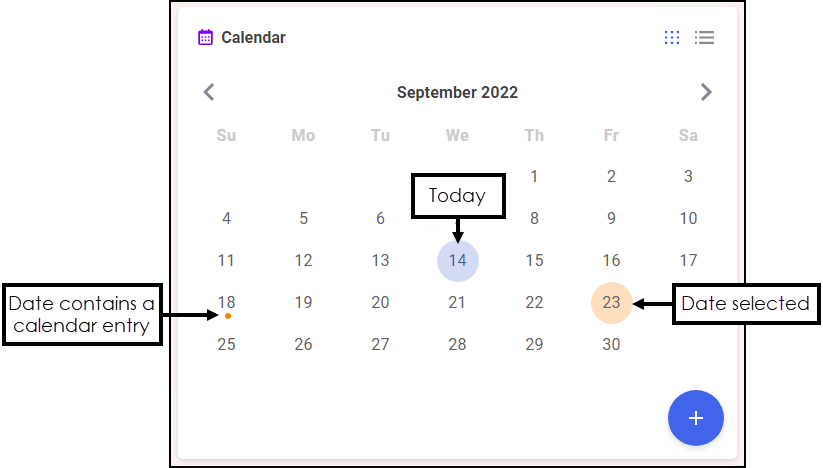
The Calendar tile gives you a pharmacy wide date book. This can be used for appointments and reminders by any member of staff with Pharmacy Manager access.
Adding to the Calendar
To add an entry to the calendar:
- From the Pharmacy Manager dashboard - Calendar, select Add.
- The Add Appointment screen displays:
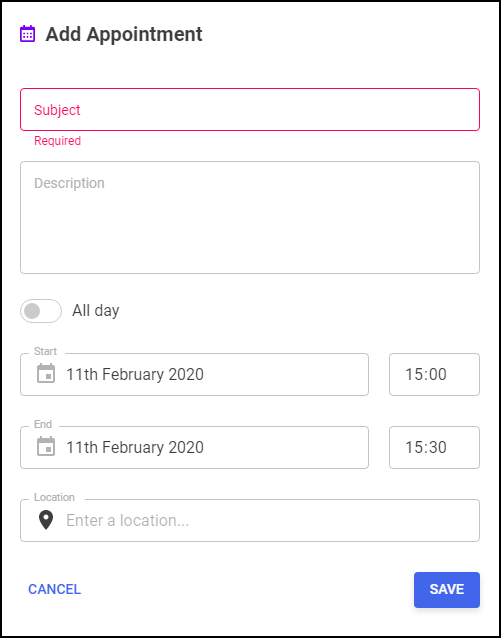
- Complete the details as required:
- Subject - Enter a name for this appointment, for example, John on annual leave
- Description - Enter any comments, for example, Locum booked
- All day - Select if appropriate
- Start - Select a date and if All Day is not selected, a start time
- End - Select a date and if All Day is not selected, an end time
- Location - Enter a location if appropriate
- Select Save.
To view an entry in the calendar:
- From the Pharmacy Manager dashboard - Calendar, highlight the day required and select Options
 .
. - If there is only one appointment for the day selected the appointment displays in full:
If there is more than one appointment booked for the day selected, a list of appointments displays:
Select the appointment required to see the full details.
Editing/Deleting an Appointment
To edit or delete an entry in the calendar:
- View the appointment required as above and select Edit
 .
. - The Edit Appointment screen displays:
- Either:
- Update as required and select Save , or
- Select Delete to remove the appointment
- Update as required and select Save
- From the Pharmacy Manager dashboard - Calendar, select Add
Scotland Only
- Minor Ailment Service (MAS) - Pharmacy Manager v11.3 release contains the following changes to the Minor Ailment Service:
- MAS - The Minor Ailment Service is now referred to as MAS throughout Pharmacy Manager.
- The Minor Ailment Service terms and conditions are due to be updated across Scotland in the near future. Pharmacy Manager v11.3 ensures you are ready for these changes which will be enabled once the changes come into force:
- Patient Eligibility - MAS will be available to all patients that are registered with a GP practice in Scotland, you will therefore no longer need to register patients for MAS.
- Eligibility Checks - A patient's eligibility check for MAS will be completed online. The ePMS will return either:
- Yes - Continue to complete your consultation, or
- No - You can record your consultation but payment is not necessarily made.
Pharmacy Manager Release Guide v11.2 (January 2020)
Pharmacy Manager release v11.2 introduces:
- Fridge Temperature Tile - A useful fridge monitoring tile displays on your Dashboard. It displays the actual, minimum and maximum temperatures for each day.See Using the Fridge Temperatures Tile for details.
-
Private Prescription Register (PPR) – To comply with guidance from Medicines, Ethics and Practice (MEP), Pharmacy Manager now records an Emergency Request within the Private Prescription Register.
See Processing Emergency Requests for details. - Private Prescriptions - Within the Private Prescription Data screen:
- The Data and Notes tabs have been merged into one screen.
- An optional Reason for Supply section has been added.
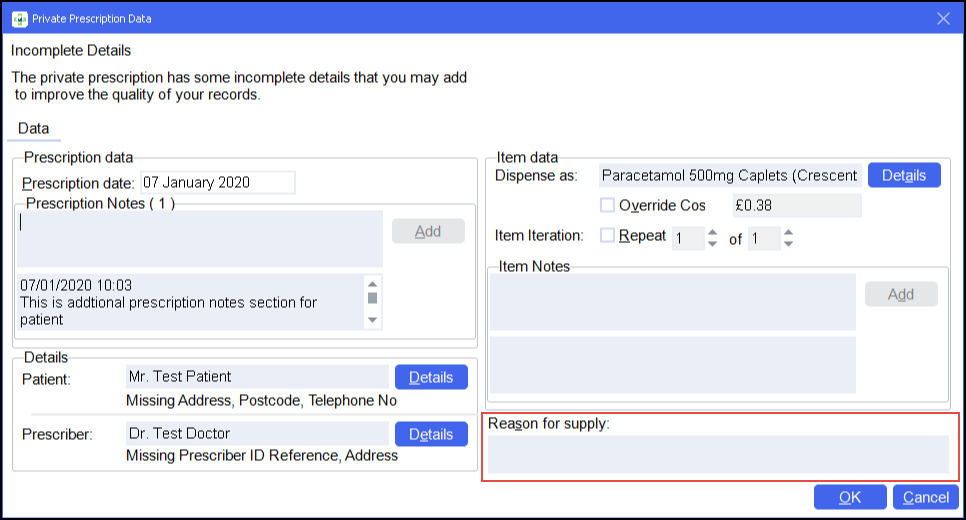
- Private Emergency Supply - Within the Private Prescription Data screen:
- Prescription Date is no longer mandatory.
- Item Notes are now mandatory.
See Processing Emergency Requests for details. - Responsible Pharmacist - The log in status of the Responsible Pharmacist (RP) can now be seen from any screen within Pharmacy Manager:
 - A green symbol indicates an RP is logged in.
 - A grey symbol indicates an RP is not logged in.
Select the arrow alongside the RP status symbol to access the following options:
- Open Responsible Pharmacist - Select to open the Responsible Pharmacist Details screen.
Change Pharmacist – Select to choose a different pharmacist as RP.
- Log as Absent – Select to record an RP as away.
Log Out – Select to record no RP is present.
See Responsible Pharmacist for full details. - Message Dynamics - You are now notified of any incoming messages from Message Dynamics in your Notification pane:

To access your messages:
Select the notification and the Message Dynamics Information screen displays:
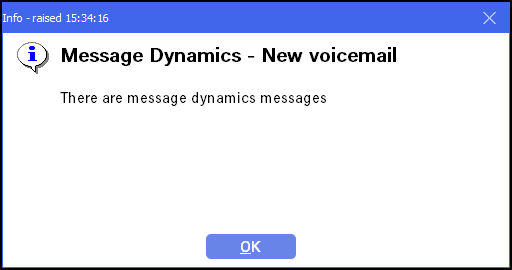
Select OK to display the Received Message Dynamics Communication screen:
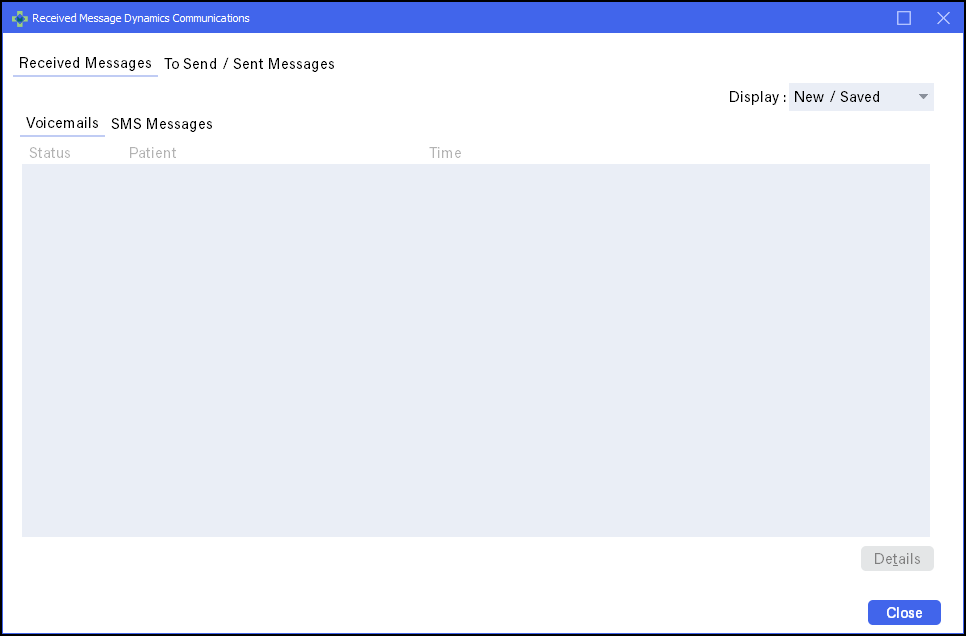 See for details.
- Reporting - To comply with GDPR and best practice, every report now has 'May contain sensitive data, please discard accordingly' at the bottom of every printed report.
-
Clear Filters – All screens with a filter facility now have a Clear filters
 option, select to clear any filters applied to a screen.
 - Branch Manager - Pharmacy Manager v11.2 introduces minor enhancements to the Branch Manager user interface in line with Pharmacy Manager.
- MDS Dispensing - If the details of an MDS Dispensing regime is updated and the current cycle is therefore moved to the next available start date, a warning message now displays:
Select OK to acknowledge the message.
- eMAR - To help prevent eMAR Reports being sent with errors, a preview of the report you are about to send displays before you can choose to send it:
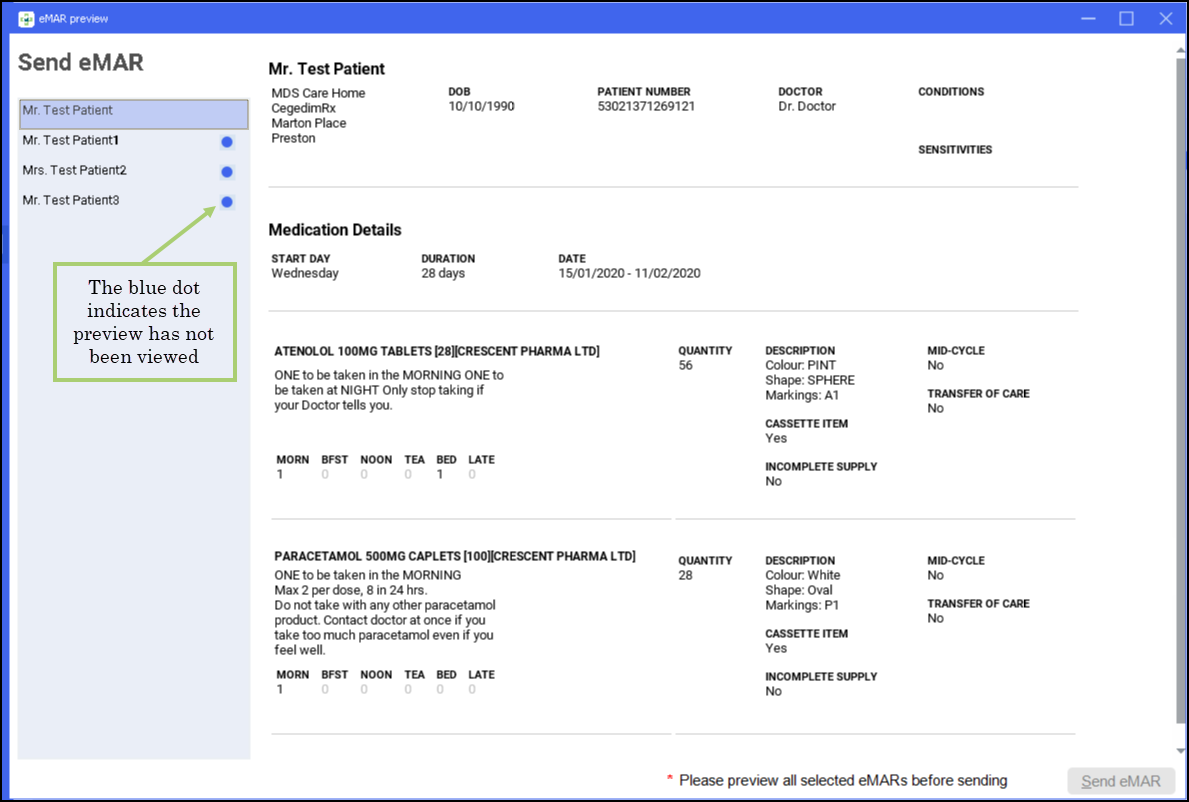
Simply check the details and select either:
- Send eMAR, to send the chart to the care home, or
- Close
 , to return to the MDS screen.
Scotland and Wales Only
Pharmacy Manager release v11.1 introduces an exciting new look and feel to Pharmacy Manager, including:
- An intelligent Dashboard, that links directly to your existing services and management features. The dashboard includes:
- Dynamic tiles.
- Real time notifications.
- Notes.
See Your Intelligent Dashboard for details. - A modernised user interface, giving a fresh new look with smarter functions.
- A new online Help Centre, incorporating:
- Fully searchable help topics coving all aspects of Pharmacy Manager.
- Printable Quick Reference Guides and crib sheets
- Short instructional videos
See for details.
Scotland Only
- Acute Medication Service (AMS) - You can now enter free text endorsements for Serious Short Protocol (SSP) AMS items, this brings it in line with Chronic Medication Service (CMS) and Universal Claim Framework (UCF) items.
Pharmacy Manager Release v11
Summary of changes
September 2019
Pharmacy Manager release v11 introduces an exciting new look and feel to Pharmacy Manager, including:
- An intelligent Dashboard, that links directly to your existing services and management features. The dashboard includes:
- Dynamic tiles.
- Real time notifications and alerts.
- Notes.
See for details. - A modernised user interface, giving a fresh new look with smarter functions.See Navigating Pharmacy Manager for details.
- A new online Help Centre, incorporating:
- Fully searchable help topics coving all aspects of Pharmacy Manager.
- Printable Quick Reference Guides and crib sheets
- Short instructional videos
See for details.
Release 10.7 - (August 2019)
- Handout and Scanning - You can now scan an item on dispensing to improve both picking accuracy and handout.