What's New?
Summary of Changes
Pharmacy Services release 12.0 contains the following new features and improvements:
Pharmacy First
-
Auto-populate Medication Details in Clinical Pathways - When dispensing medication under a Clinical Pathway PGD or Clinical Protocol, selecting a pack now automatically populates the Route, Quantity, Days Supply, and Dose Directions using the PGD Dose List. Data is based on the selected pathway, product, patient age, and weight. The details can be updated manually, if details cannot be auto-populated.
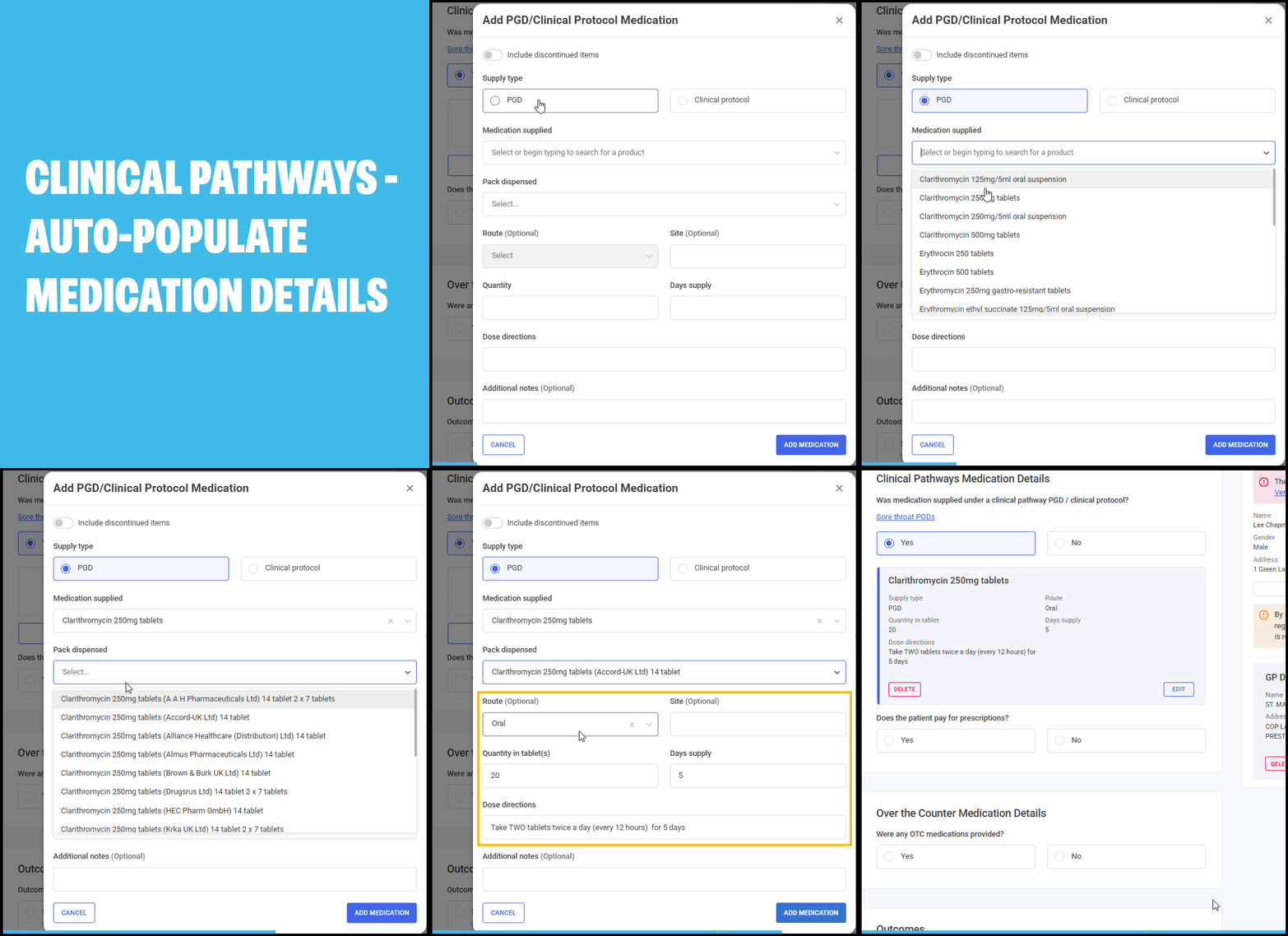
What this means for you:
Saves time and reduces errors by auto-filling key medication details. You no longer need to manually calculate or enter these values - simply select the pack, and Pharmacy Services does the rest. Entries can still be adjusted if needed. If data isn’t available, you can enter it manually with confidence.
All Services
-
Episode Deletion Reason - When deleting a service episode, you are now asked to select a reason for the deletion. A reason must be selected before the episode can be deleted.
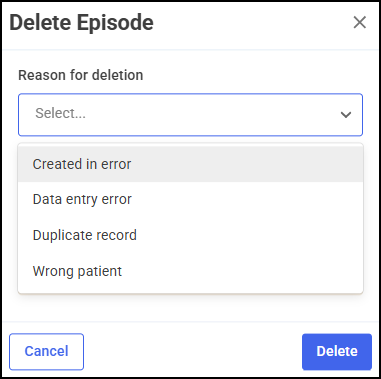
Select from one of the following options:
-
Created in error
-
Data entry error
-
Duplicate record
-
Wrong patient
Note - The Deleted tab for each service now also includes a Deletion Reason column, displayed after the Deleted By column. This shows the reason recorded at the time of deletion. Episodes deleted prior to this update display a blank value in this column.See Deleting Episodes for details. -
-
Button Text Formatting Update - We have made some minor cosmetic changes to text casing on buttons across all services, changing them from UPPERCASE to Title Case. This does not affect any functionality.
Vaccinations
-
Deactivation of NHS option in Vaccination Service - Due to the end of the supplier contract for the NHS Vaccination service, we have deactivated the NHS option when recording a new vaccination. Private vaccinations can still be recorded, and previously recorded NHS vaccines can still be edited.
 See Vaccinations Service - Clinical Screening for details.
Early Adopter Phase (EAP)
-
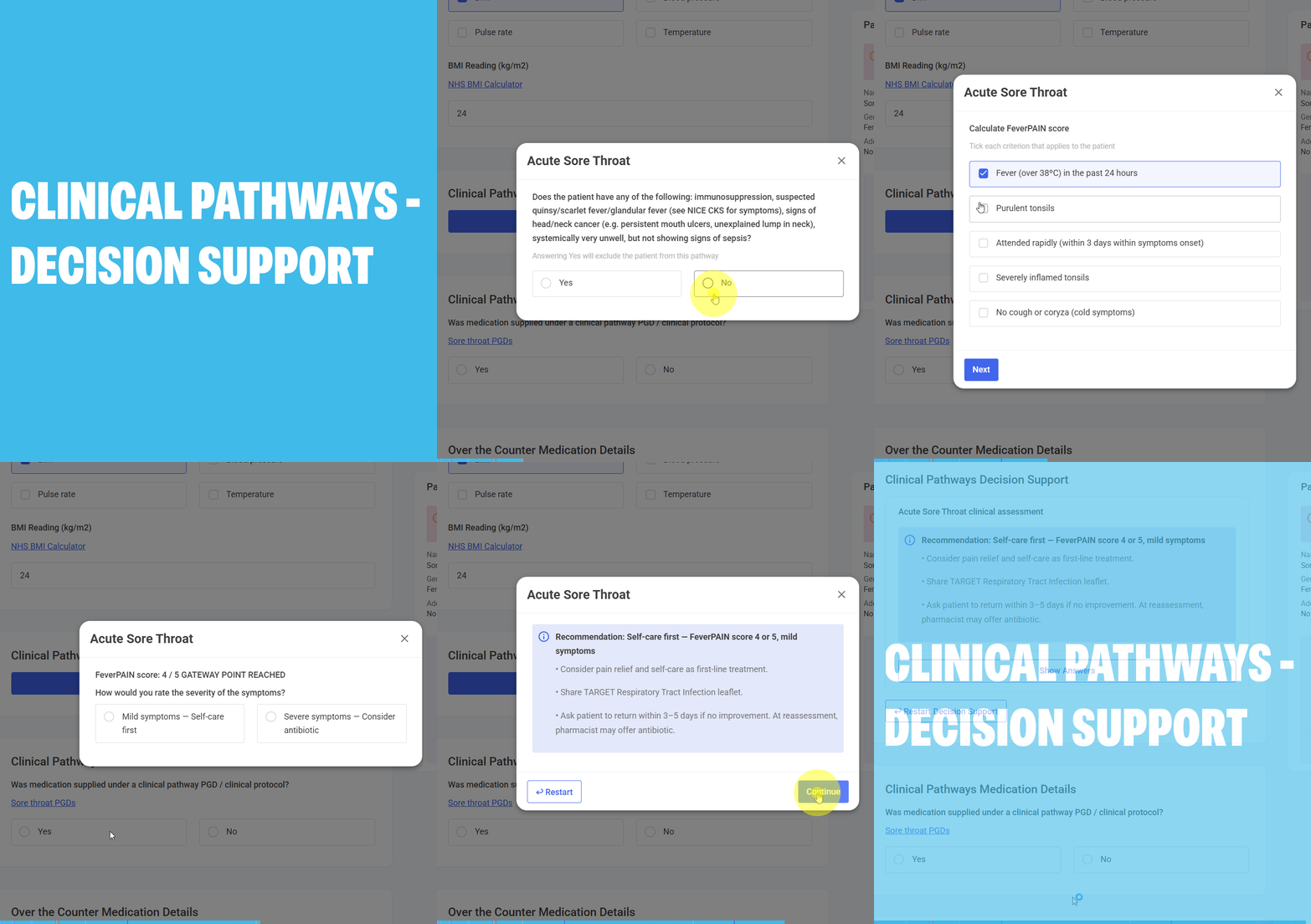
Clinical Pathways Decision Support - We have introduced an interactive clinical assistant to support the delivery of Pharmacy First - Clinical Pathways. This tool ensures every consultation meets the specific requirements of the national PGDs.
-
Launching Decision Support - Once you have completed the Examination Findings section, you can launch the decision support tool directly from the consultation.

-
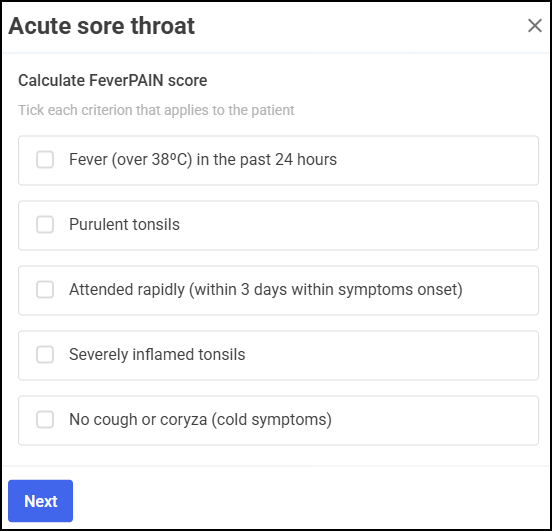
Guided Decision Logic - The tool replaces manual checklists with structured, step-by-step questions, including automatic calculation of clinical scores (such as FeverPAIN or Centor).
-
Clear Clinical Outcomes - Based on your answers, the system provides a definitive recommendation for Treatment, Referral, or Self-Care, which is then saved directly into the patient’s clinical summary.
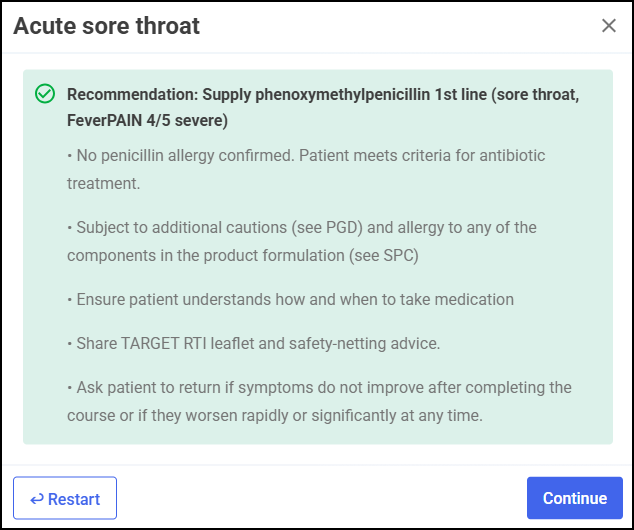
See Minor Illness/Clinical Pathways Consultation for details. -
This release also includes some background fixes and improvements to Pharmacy Services.


 Pharmacy Services 11.2 - June 2026
Pharmacy Services release 11.2 contains the following new features and improvements:
All Services
-
Dashboard Updates - We have introduced a new and improved Pharmacy Services Dashboard display and new functionality to start a new service available to your pharmacy.
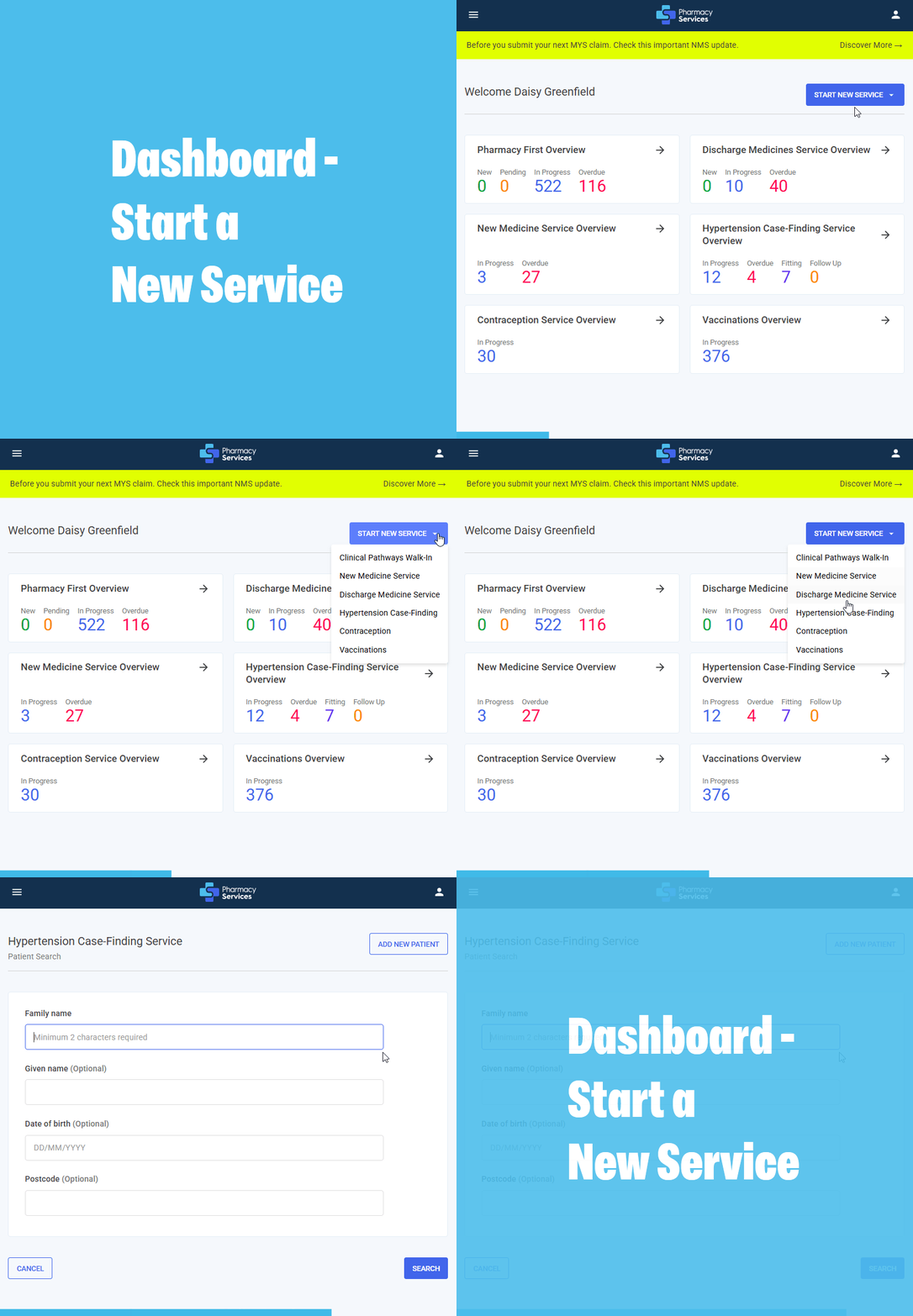 See Pharmacy Services Dashboard and Starting a New Service from the Dashboard for details.
Pharmacy First
-
Clinical Pathways - Optional Weight Selection - In Clinical Pathways, the Weight section can now be unticked, allowing you to continue and complete a referral without entering weight data when it is not required.
This release also includes some background fixes and improvements to Pharmacy Services.
Pharmacy Services 11.1 - May 2026
Pharmacy Services release 11.1 contains the following new features and improvements:
All Services
-
Patient Search Improvements:
-
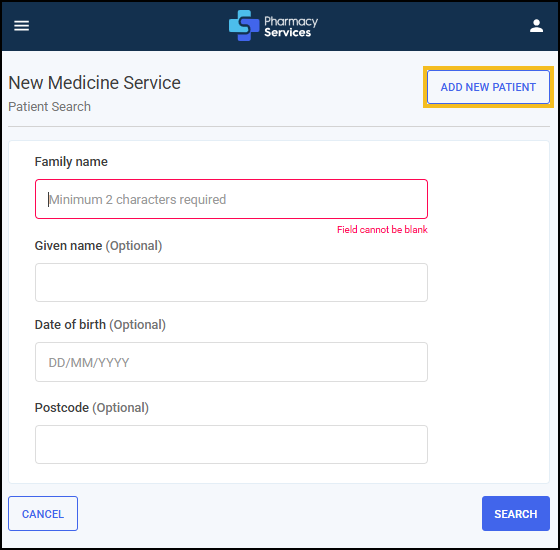
Add New Patient – New Option on Patient Search Screen - You can now choose to add a new patient directly from the Patient Search screen, before searching. If you are sure the patient is not already in the system, simply select ADD NEW PATIENT. Any details you enter will be automatically carried over to the PDS Search screen - no need to re-enter information. Saves time and streamlines the process.
-
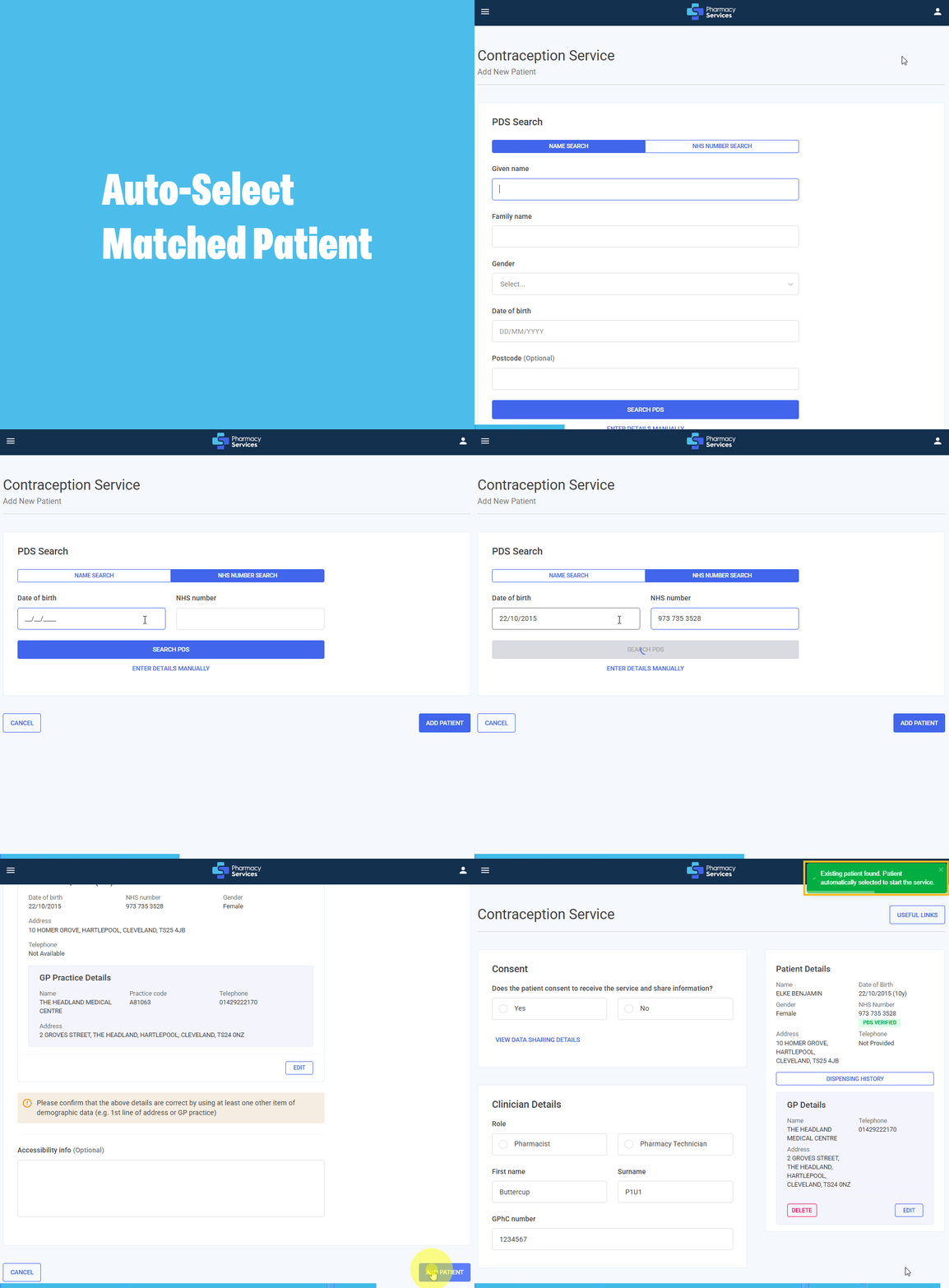
Auto-Select Matched Patient - When local and PDS patient data match exactly (name, date of birth, NHS number, address, gender), Pharmacy Services automatically selects the correct patient. No manual confirmation is required, and a notification advising 'Existing patient found. Patient automatically selected to start the service.' confirms the match and selection. Start the service instantly - no delays.
-
Patient Search Label Updates - The Patient Details screen is now named the PDS Search screen to better reflect the function.
-
Rename Surname to Family Name - Surname is now named Family Name on the Patient Search screen.
-
Warning & Prevention for Duplicate NHS Numbers - If a patient’s NHS number already exists locally, a warning displays when retrieving from PDS. You can then compare the data and choose to update the existing record. The Add New Patient option is no longer available on the Existing Patient Found screen - only Update Existing Patient is allowed. This helps prevent duplicates and keeps your records accurate and consistent.
-
Auto-Populate Names When Adding a New Patient - When you add a new patient, their Given Name and Family Name are automatically filled in all related forms - no re-typing needed, ensures accuracy and saves time.
What this means for you:
-
Add a new patient directly from the Patient Search screen - your details auto-populate across forms, saving time and reducing errors.
-
Pharmacy Services now auto-selects matching patients when data aligns exactly - no manual confirmation needed, just start the service instantly.
-
Key updates include clearer labels (Family Name, PDS Search) and smarter workflows to prevent duplicates and improve consistency.
-
Pharmacy First
-
Pregnancy Question in Clinical Pathway Walk-In Assessment - You’ll now be asked about pregnancy status in the clinical pathways walk-in Patient Assessment section.
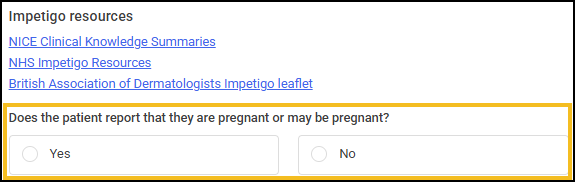
This helps you make informed decisions early and triggers the following actions when confirming a patient is or may be pregnant:
-
Pregnancy Status Now Auto-Updates - When you confirm a patient is or may be pregnant, the system automatically checks Yes in the Medical History and Clinical Checks sections. Saving you time and reducing errors.
-
Pregnancy Check for Shingles & UTI Clinical Pathways - When you confirm a patient is or may be pregnant, and they are being assessed for Shingles or Urinary Tract Infection (UTI), you are prevented from completing the pathway and a clear reason displays in the Outcomes section. This ensures safe, guideline-compliant care.
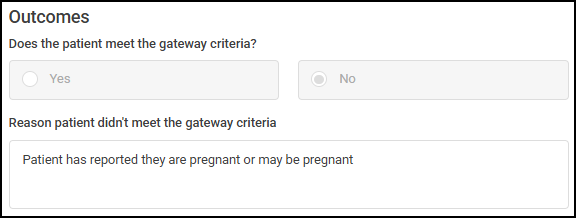
-
Alert for Under-16 Patients Who Are Pregnant - If a patient is under 16 and confirms they may be pregnant, you are prevented from completing the pathway and a clear reason displays - for safety and safeguarding.
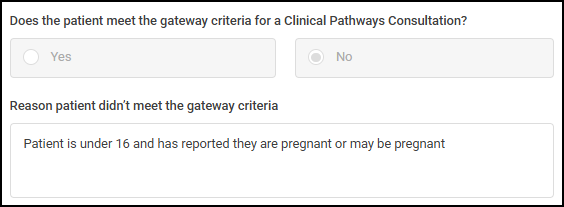
What this means for you:
-
You will save time with auto-filled pregnancy information.
-
The system flags unsafe pathways for example, Shingles or UTI in pregnancy, or for patients under 16, to keep patients safe.
-
You stay in control - with clear warnings and less manual work.
See Creating a Walk-In Pharmacy First Referral for details. -
-
Filter Completed Consultations by Consultation Date - The Consultation Date column replaces Referral Date on the Completed screen, and you can now filter completed consultations by date range for faster, more accurate searches.
-
Mandatory Weight Measurement for Ages 1–12 Years - It is now mandatory to enter a Weight in the Examination Findings section of Clinical Pathways for patients aged 12–143 months. The system auto-checks Weight, displays a reminder, and prevents completion if missing. Patients outside this age range are unaffected.
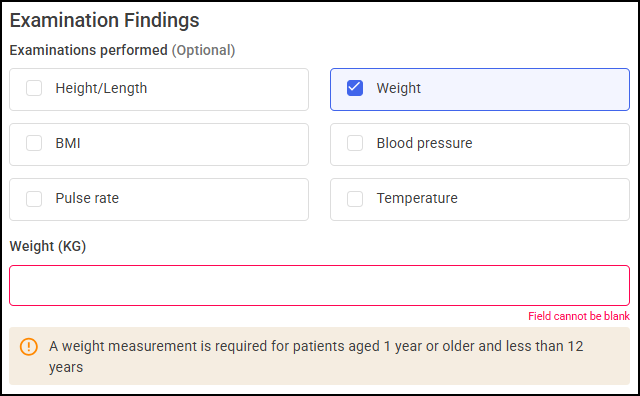 See Minor Illness/Clinical Pathways Consultation for details.
Contraception
-
Filter Completed Consultations by Consultation Date - Now easily find completed consultations within a specific date range using the new Consultation Date filter.
This release also includes some background fixes and improvements to Pharmacy Services.
Pharmacy Services 11.0 - April 2026
Pharmacy Services release 11.0 contains the following new features and improvements:
Vaccinations
-
Spring 2026 COVID-19 Vaccinations Campaign - The Pharmacy Services Vaccinations service has been updated for the Spring 2026 campaign, running from 13 April to 30 June. Eligible groups include adults aged 75+, care home residents, and immunosuppressed individuals aged 6 months and over. Updated vaccine brands and patient cohorts are now reflected in the system.
See Seasonal Vaccination Services – COVID-19 and Adult Flu for details. -
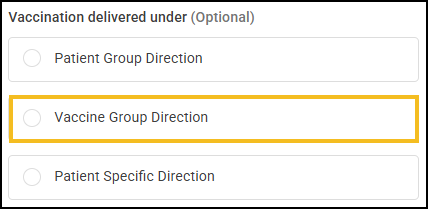
Vaccination Delivered Under - Now Optional - You no longer need to select a Vaccination delivered under option when recording a vaccination. The section is now optional, and ‘National Protocol’ has been removed. A new 'Vaccine Group Direction' option is now available, allowing you to record group-specific administration details accurately. Existing records remain unchanged.
 See Vaccinations Service - Delivery for details.
This release also includes some background fixes and improvements to Pharmacy Services.
Pharmacy Services 10.7 - March 2026
Pharmacy Services release 10.7 contains the following new features and improvements:
All Services
-
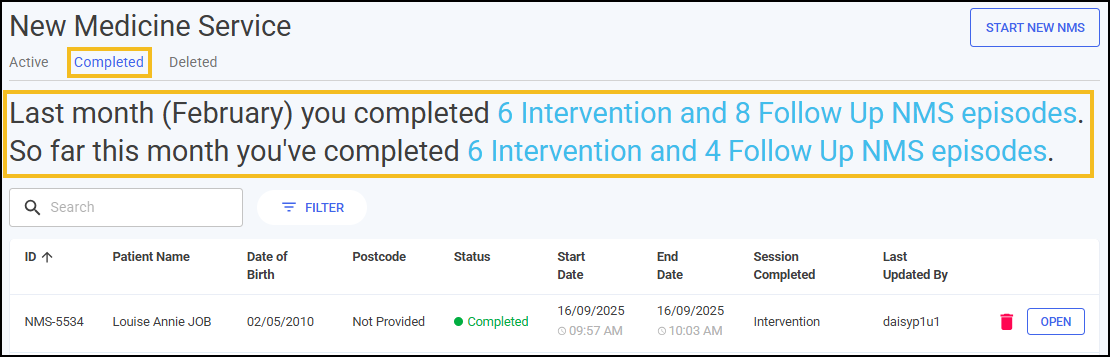
Completed Episodes Summary - The Completed screen now displays a summary of claimable episodes for the current month to date and the previous month, providing a clear overview of eligible episodes per service.
New Medicine Service (NMS)
-
Completed Episodes Summary - The NMS summary now updates the Intervention count immediately upon completion of an Intervention session, ensuring it is available for claim submission without delay.
Pharmacy First
-
Completed Episodes Summary - The Pharmacy First summary now uses the Consultation Date instead of the Completion date in the summary, ensuring alignment with Manage Your Service (MYS) portal.
-
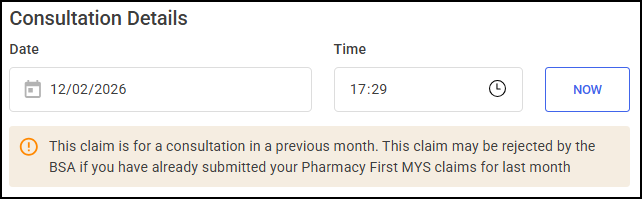
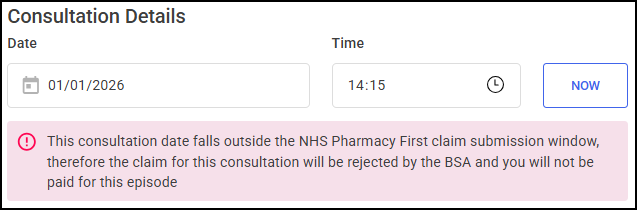
Warning Alerts for Non-Compliant BSA Claims - A new validation feature now alerts you if a BSA claim is for a consultation outside the NHS Pharmacy First claim window.
-
Yellow alert - Consultation in the previous month (risk of rejection). A message displays advising 'This claim is for a consultation in a previous month. This claim may be rejected by the BSA if you have already submitted your Pharmacy First MYS claims for last month'
-
Red error - More than one month old (claim will be rejected). A message displays advising 'This consultation date falls outside the NHS Pharmacy First claim submission window, therefore the claim for this consultation will be rejected by the BSA and you will not be paid for this episode'
What this means for you:
You are now alerted in real time if your claim is for a consultation that may not be eligible, helping you avoid rejected claims and unpaid episodes. Simply review the message, correct the date if needed, and proceed.
-
Contraception
-
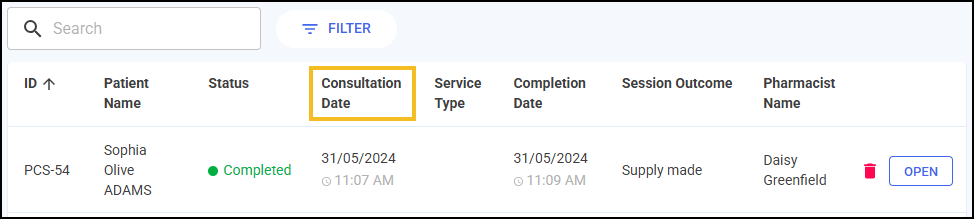
Start Date Column Renamed to Consultation Date - The Start Date column is now named Consultation Date on the Contraception Completed screen so it reflects that date of the consultation.
This release also includes some background fixes and improvements to Pharmacy Services.
Previous Releases
Pharmacy Services 10.6 - February 2026
Pharmacy Services release 10.6 contains the following new features and improvements:
Contraception
-
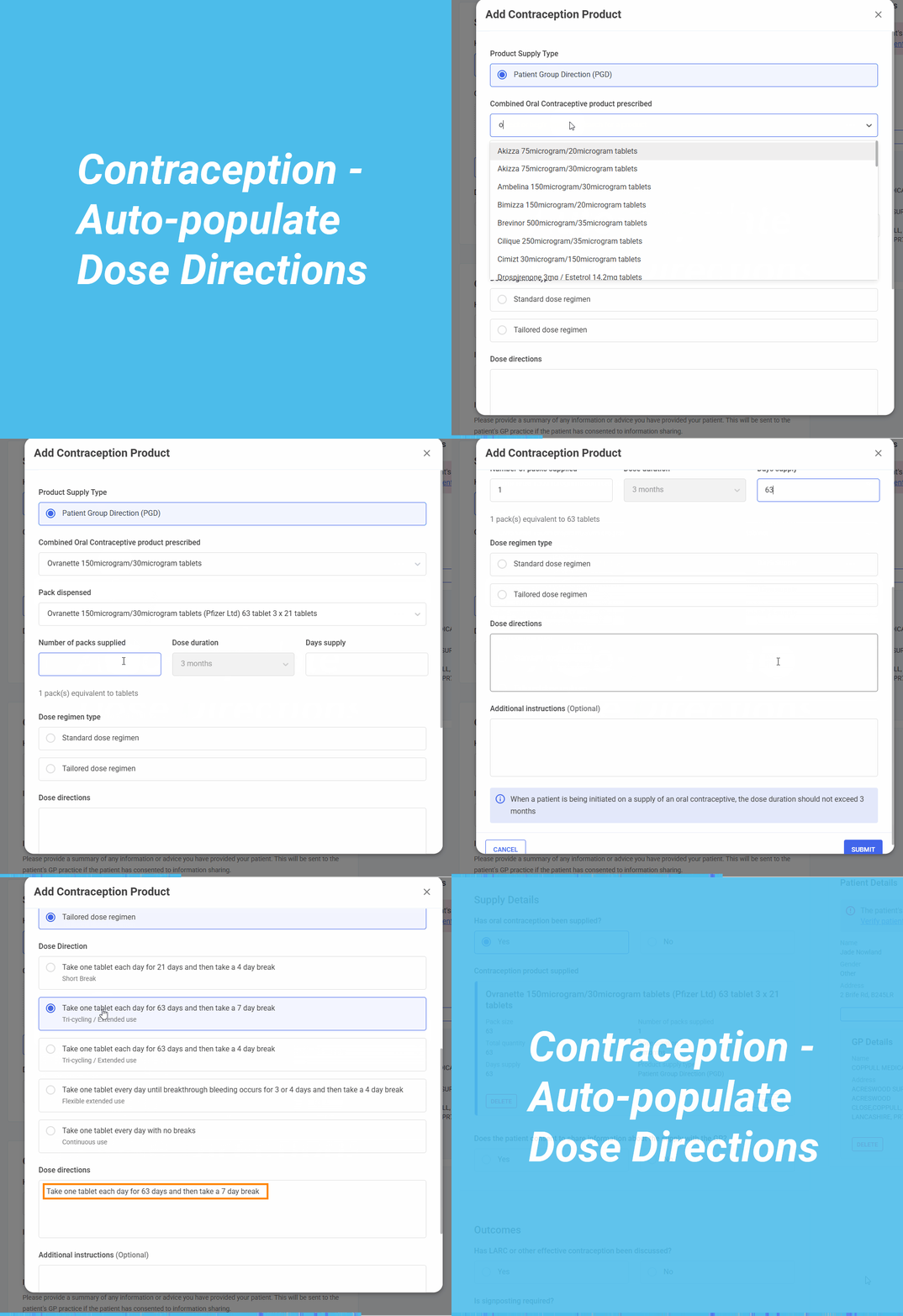
Auto-populate Dose Directions in Contraception Service Form - When selecting an oral contraceptive, the Dose directions section now auto-populates with the standard instruction, such as “Take one tablet daily at the same time each day.” This helps to ensure consistency and saves time.
For Combined Oral Contraceptives (COC), a Dose regimen type option displays, offering two choices:
-
Standard - Defaults to “Take one tablet each day for 21 days, then take a 7-day break.”.
-
Tailored - Offers alternative regimens, including shorter breaks, extended use, or continuous daily use.
Selecting any option updates the Dose directions section automatically. If you switch regimens or products, the section updates instantly - even if previously edited.
For Progestogen-only products, the dose directions still auto-populate based on the selected product, but no regimen type selection is available.
You can still edit the field for patient-specific needs, such as timing or reminders.
-
-
Safeguarding - The Safeguarding section now displays below the Consultation Details section in the Contraception service, and includes age-dependent safeguarding questions, with additional Fraser guidelines-based questions for patients under 16, and a modified set of questions for those under 18.
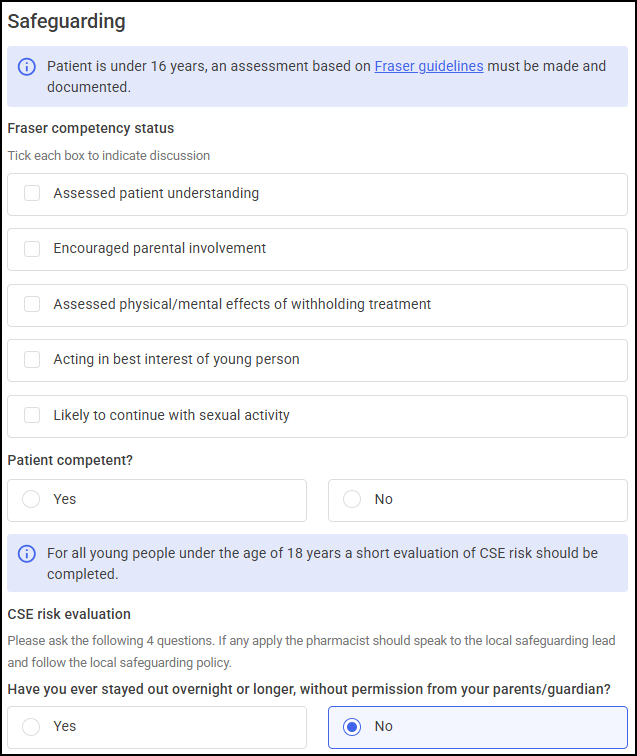 Note - Details recorded in the Safeguarding section are included in the service summary. See Fraser guidelines for details.
 -
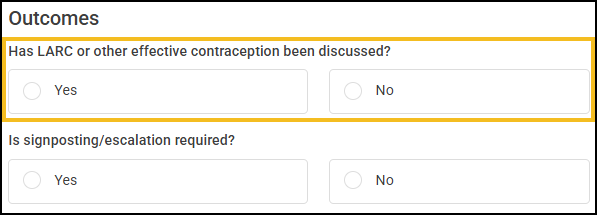
LARC update - The Outcomes section now includes the question Has Larc (Long-Acting Reversible Contraception) or other effective contraception been discussed?. This change streamlines the workflow and emphasises the importance of this step.
NMS
-
NMS Contact Attempts - NMS now supports the recording of failed contact attempts within the Intervention and Follow Up sessions. When a patient is unreachable, you can record a failed contact attempt for these sessions.
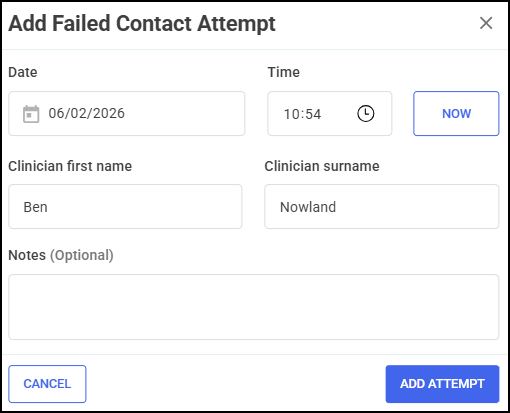
A summary of up to 10 recent failed contact attempts can display on the session tile for quick reference. Once three failed contact attempts have been recorded for a session, the NMS episode can be formally closed.
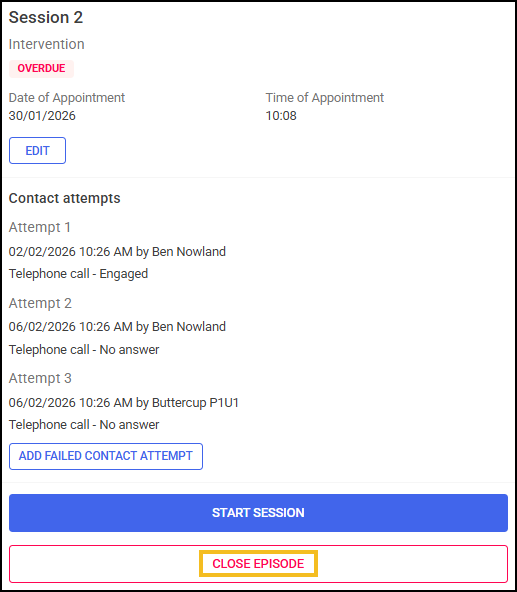
This enhancement improves tracking of patient engagement efforts and streamlines episode closure when appropriate.
See NMS - Adding Contact Attempts for details.
This release also includes some background fixes and improvements to Pharmacy Services.
Pharmacy Services 10.5 - January 2026
Summary of Changes
Pharmacy Services release 10.5 contains the following new feature:
South West London MMR Call/Recall Service
The following service is currently only available to pharmacies in South West London:
-
South West London MMR Call/Recall Service - The South West London MMR Call/Recall Service enables participating pharmacies to record measles, mumps, rubella (MMR) vaccination engagement in the community, aiming to encourage parents and guardians to vaccinate their children against these diseases.
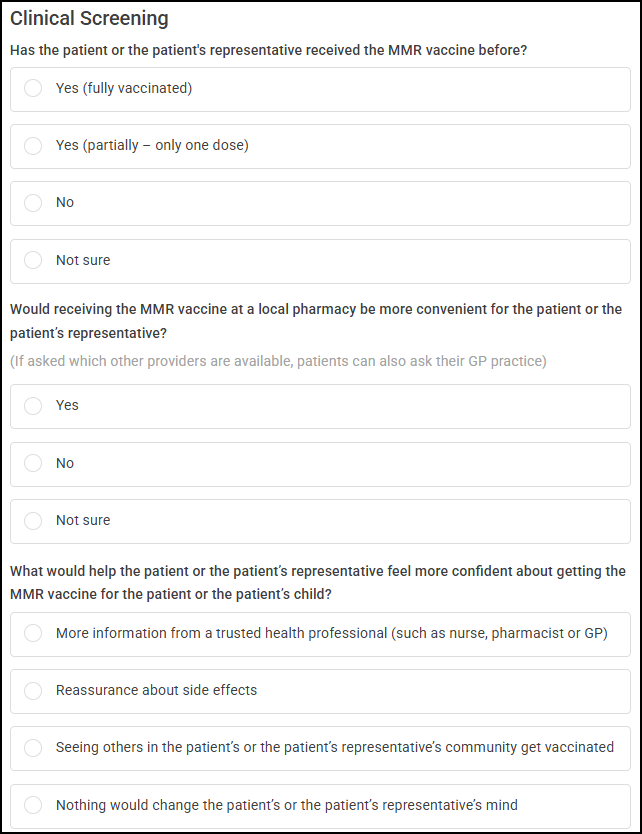
This release also includes some background fixes and improvements to Pharmacy Services.
Pharmacy Services 10.4 - December 2025
Summary of Changes
Pharmacy Services release 10.4 contains the following new feature:
Contraception
-
Dispensing Tokens - FP10 dispensing tokens are now available to download when completing a Contraception service and providing medication. The dispensing token contains essential information, including pharmacy details, patient information, medication details, and the patient's GP practice details.
See Completing a Contraception Service and Completing an Emergency Contraception Service for details.
Contraception, Hypertension Case-Finding Service and NMS
-
Deleting Services - You can now delete active and completed Contraception, Hypertension Case-Finding Service and NMS service episodes. Deleted episodes can be viewed in a new Deleted tab.

Pharmacy Services 10.3 - November 2025
Summary of Changes
Pharmacy Services release 10.3 contains the following new features and improvements:
Vaccinations
The following enhancements have been made to the Vaccinations Service:
-
Batch Management - Private Vaccines - You can now add private COVID-19 vaccines not available on the NHS to your inventory. These vaccines are identified by PRIVATE-ONLY VACCINE below the vaccine description, allowing you to manage and track private vaccines separately, providing greater flexibility and control over your vaccine inventory.
Note - Both NHS and private vaccines are available to select from when administering a private vaccine. -
Filtering Vaccinations - Flu and Covid vaccinations can now be filtered by NHS and private vaccination types.
See Searching for, Sorting or Filtering Vaccinations for details.
Pharmacy First
The following enhancements have been made to Pharmacy First:
-
Clinical Pathway Walk-In - Enhanced Image Display - You can now view Clinical Pathway Gateway Criteria diagrams in full screen. Click on the image to open the diagram in a new browser tab.
-
Medical History Pregnancy Wording Update - We have updated the wording in the Pharmacy First Medical History section to improve clarity. The option now reads "Patient reports they are pregnant or may be pregnant", replacing the previous "Pregnancy" label. This updated wording is also reflected in the Clinical Summary sent to the patient's GP.
This release also includes some background fixes and improvements to Pharmacy Services.
Coming Soon...
The following feature is currently in trial and will be available to all pharmacies soon. We will notify you as soon as it is released:
-
Deleting Services - You will have the ability to delete active and completed Contraception, Hypertension, NMS and Pharmacy First service episodes.
Pharmacy Services 10.2 - October 2025
Summary of Changes
Pharmacy Services release 10.2 contains the following new features and improvements:
Contraception
The following enhancements have been made to the Contraception Service:
-
Emergency Contraception - You can now provide Emergency Oral Contraception to your patients and record it in Pharmacy Services.
See Completing an Emergency Contraception Service for details. -
Service Type - A new Service Type column has been added to the Active and Complete Contraceptive Service screens, displaying the type of contraception service being provided.
-
Filtering Contraception Services - Completed Contraception Services can now be filtered by Service Type.
-
Method of Entry - The Method of entry to service options have been updated to improve clarity:
-
Patient identified in the pharmacy
-
Signposted from GP practice
-
Signposted from a sexual health clinic (or equivalent)
-
Onward referral from another pharmacy
-
Signposted from NHS 111
-
Self-referral
-
-
Consultation Details - Chaperone - The Consultation Details section now includes an option to record if a chaperone was offered to the patient.
-
Patient Weight and Height - The BMI Reading section has been replaced with a Patient Weight and Height section when providing Combined or Emergency Oral Contraception. The BMI reading is calculated when a Weight and Height is entered.
-
Outcomes - The Outcomes section now includes an option to record potential safeguarding concerns identified during the consultation, as well as confirmation of adherence to local safeguarding policies.
-
Product Supply Type - The Product Supply Type option for Independent Prescriber (Rx) has been removed, and Patient Group Direction (PGD) is now selected by default.
New Medicine Service (NMS)
-
Addition of Depression - Depression is now an eligible condition for the NMS service, with an updated list of associated medications.
Vaccinations
The following enhancements have been made to the Vaccinations Service:
-
Private GP Notifications - GP Notifications are now sent to a patient's GP via NHSMail when completing consultations for private Flu and Covid vaccinations.
-
Multiple Vaccination Records - When adding multiple flu and Covid vaccinations in a single Pharmacy Services session, details entered in the following fields are retained and automatically populated in the next vaccination, reducing the need for repeated data entry.
-
Admin Clerk Details (Clinical Screening)
-
Responsible Clinician
-
Responsible Drawer
-
Drawn Up By
-
Vaccinator
Note - You can override the automatically populated details if required, and your changes are retained for any subsequent vaccinations in this session. -
This release also includes some background fixes and improvements to Pharmacy Services.
 in the top right corner and follow the on-screen prompts.Pharmacy Services 10.1 - October 2025
Summary of Changes
Pharmacy Services release 10.1 contains the following new features and improvements:
Pharmacy First
-
Clinical Pathways - Patient Assessment - The integrated Clinical Pathways gateway criteria diagrams have been updated to reflect recent NHS changes.
See Creating a Walk-In Pharmacy First Referral and Minor Illness/Clinical Pathways Consultation for details.
Vaccinations
The following enhancements have been made to the Vaccinations Service:
-
Eligibility Age Warnings - A warning message now displays when selecting an NHS Eligible Patient Group that does not correspond with the patient's age. For example, if a patient is five months old and you select Individuals aged 6 months and over who are immunosuppressed.

-
NHS Vaccinations Only - It is now possible to configure your store to only administer NHS vaccinations and disable private vaccinations if required. The Vaccine Type section on the Clinical Screening screen defaults to NHS and the option to select Private is not available. Additionally, a message displays advising 'This site can deliver NHS vaccinations only, as per your configuration.'.
Note - You must request this setting option from the Cegedim Rx Service Desk on 0330 303 3340.
This release also includes some background fixes and improvements to Pharmacy Services.
in the top right corner and follow the on-screen prompts.Pharmacy Services 10.0 - September 2025
Summary of Changes
Pharmacy Services release 10.0 contains the following new features and improvements:
Vaccinations Service
Vaccinations Service - Our new advanced Vaccinations Service makes it faster, easier, and more efficient to manage both your Flu and COVID-19 clinics, automatically sends data straight to the NHS vaccination programme and updates your patient's GP records at the same time with no manual paperwork.
All Services
User Settings - Password Tab Removed - The User Settings screen no longer displays a Password tab. You can change your password from the Log in to your account screen.
Pharmacy First
-
Clinical Pathways - Patient Assessment - We have added a new Resources section, providing helpful links relating to the Clinical Pathway selected in the Presenting Complaint section.
See Creating a Walk-In Pharmacy First Referral and Minor Illness/Clinical Pathways Consultation for details. -
GP Connect: Update Record - When the Pregnancy option is selected in the Medical History section of a Minor Illness/Clinical Pathways episode, the pregnancy status is no longer sent to a patient's GP via GP Connect: Update Record. Instead, the pregnancy status is included in the GP Notification Email.
This release also includes some background fixes and improvements to Pharmacy Services.
in the top right corner and follow the on-screen prompts.Pharmacy Services 9.3 - July 2025
Summary of Changes
Pharmacy Services release 9.3 contains the following new improvement:
All Services
-
Announcements Banner - We have added a new announcements banner to the Pharmacy Services Dashboard. The banner displays a brief summary of the announcement, but you can click on the banner for more details.

This release also includes some background fixes and improvements to Pharmacy Services.
Pharmacy Services 9.2 - April 2025
Summary of Changes
Pharmacy Services release 9.2 contains the following new improvement:
New Medicine Service (NMS)
-
NMS Completed - The Completed Episodes screen now provides a summary of the claimable Intervention and Follow Up episodes completed last month and so far in the current month.
 This improvement is made in line with the new simplified payment structure for NMS. See https://cpe.org.uk/our-news/contract-changes-nms-fees/ for details.
This release also includes some background fixes and improvements to Pharmacy Services.
Pharmacy Services 9.1 - March 2025
Summary of Changes
Pharmacy Services release 9.1 contains the following new features and improvements:
All Services
-
GP Connect: Access Record - You can now view key medical information from a patient's record using GP Connect: Access Record when delivering clinical services in Pharmacy Services.

VIEW GP RECORD
 now displays on the right hand side of every clinical service in the Patient Details section.
  Important - Pharmacies must complete the NHS National Data Sharing Arrangement (NDSA) to use GP Connect messaging. See https://digital.nhs.uk/services/gp-connect/national-data-sharing-arrangement-for-gp-connect for details on signing the NDSA, or to verify GP Connect usage.See this useful guide on GP Connect: Access Record https://digital.nhs.uk/services/gp-connect/gp-connect-in-your-organisation/gp-connect-access-record for more details.See Viewing GP Records via GP Connect: Access Record for details.
-
Validation Errors - When selecting NEXT
 or COMPLETE
  at the bottom of a screen, you are now directed to any incomplete mandatory fields, highlighted in red.
Pharmacy First
-
Urgent Medicines Supply - Outcomes and Referral Details - You are now required to select an Outcome when completing an Urgent Medicines Supply service.

Selecting Non-urgent signposting to another service or Urgent escalation to another service displays a Referral Details section which you must also complete.
 See Urgent Medicine Supply Consultation for details.
-
Booking and Referral Standard (BaRS) - Patient Informant Details - When included in the BaRS referral sent from a GP, the Patient Informant Details section now displays email addresses.

-
Minor Illness/Clinical Pathways - Route/Site Administration - You can now choose to add a Route or Site of administration for any medicines supplied during a Pharmacy FirstMinor Illness/Clinical Pathways consultation. The GP Notification includes these details ensuring full compliance with the Professional Records Standards Body (PRSB) data standard for information sharing with GP practices.
 Note - Route populates automatically where there is only one possible route of administration.See Minor Illness/Clinical Pathways Consultation for details.
Pharmacy FirstMinor Illness/Clinical Pathways and Contraception Services
-
Blood Pressure Reading - You must now enter an Anatomical site when recording a patient's blood pressure in a Minor Illness/Clinical Pathways or Contraception consultation. This ensures full compliance with the Professional Records Standards Body (PRSB) data standard for information sharing with GP practices. Select either:
-
Left arm, or
-
Right Arm

-
Contraception Service
GP Notification - The GP Notification now indicates oral administration as the route of administration when supplying medication during a Contraception consultation. This ensures full compliance with the Professional Records Standards Body (PRSB) data standard for information sharing with GP practices.

New Medicine Service (NMS)
-
Active Episodes - The Active Episodes screen now displays patient's postcodes and telephone numbers where available.
 Training Tip - Select a patient's name to display their date of birth.
Hypertension Case-Finding Service
-
New Design - We have redesigned the Hypertension Case-Finding Service screens to align with the new style of Pharmacy Services.
See Hypertension Case Finding Service for details.
Pharmacy First, NMS, Hypertension Case-Finding Service and Contraception Services
-
Completing an Episode - You are now directed to the Active Episodes screen when completing an episode, previously you were directed to the Completed Episodes screen.
This release also includes some background fixes and improvements to Pharmacy Services.
Pharmacy Services 9.0 - February 2025
Summary of Changes
Pharmacy Services release 9.0 contains the following new features and improvements:
All Services
-
PDS Search - A new Personal Demographics Service (PDS) search option enables you to search for a patient's PDS record using their name, date of birth and gender, making it quicker and easier to add a patient record to the system without needing their NHS number.

-
Context Sensitive Help - To optimise the online help you receive when selecting the link to Help from the Side Navigation Bar, you are now directed to the relevant topic in the Pharmacy Services Help Centre. For example, selecting the Help link whilst performing a New Medicine Service (NMS), directs you to the NMS help topics making it quicker and easier to find the answer you need.

Pharmacy First
-
Clinical Pathway Walk-Ins - The Pharmacy First Referrals screen now includes a new Start a Clinical Pathways Walk-In option, enabling you to quickly create a Clinical Pathway referral for walk-in patients at your pharmacy.
 See Creating a Walk-In Pharmacy First Referral for details on the new workflow.
 -
Add a Referral - The Pharmacy First overview screen now includes a new Add a Referral option, enabling you to quickly enter a manual referral, for example, if you receive a referral via email.
 See Creating a Manual Pharmacy First Referral for details on the new workflow.
 -
Integrated Clinical Pathway Gateway Diagrams - Clinical Pathway specific NHS gateway diagrams now display under Patient Assessment when selecting a Clinical Pathway condition. You can view the relevant diagram without needing to access an external PDF to determine if a patient meets the Clinical Pathway eligibility criteria.

-
Age and Gender Validation for all Clinical Pathways - When selecting a Clinical Pathway condition, Pharmacy Services now automatically validates if the patient meets the age and gender eligibility criteria for the selected pathway.
 See Minor Illness/Clinical Pathways Consultation for details.
New Medicine Service (NMS)
-
New Design - We have redesigned the NMS screens to match the new style of Pharmacy Services.
Pharmacy Services 8.6 - November 2024
Summary of Changes
Pharmacy Services release 8.6 contains the following new improvement:
Flu Vaccination
-
GP Notification - When a Flu Vaccination is administered, the following vaccine details are now included in the notification sent to the GP:
-
Vaccine name
-
Batch No
-
Expiry Date
-
Vaccine Route
-
Site of Administration
-
Pharmacy Services 8.5 - November 2024
Summary of Changes
Pharmacy Services release 8.5 contains background and stabilisation changes, but does not change the look or how you use Pharmacy Services.
Pharmacy Services 8.4 - October 2024
Summary of Changes
Pharmacy Services release 8.4 contains background and stabilisation changes, but does not change the look or how you use Pharmacy Services.
Pharmacy Services 8.3 - October 2024
Summary of Changes
Pharmacy Services release 8.3 contains background and stabilisation changes, but does not change the look or how you use Pharmacy Services.
Pharmacy Services 8.2 - October 2024
Summary of Changes
Pharmacy Services release 8.2 contains the following new improvement:
Pharmacy First, Hypertension Case-Finding Service and Contraception Services
-
Integration with GP Connect: Update Record - When completing a Pharmacy First, Hypertension Case-Finding Service or Contraception Service, if a patient is Personal Demographics Service (PDS) verified an electronic notification is sent to their registered GP practice to update the patient's GP record once accepted. If the GP practice rejects the message for any reason, Pharmacy Services now automatically attempts to resend the message via NHSMail.
See this useful guide on GP Connect: Update Recordhttps://digital.nhs.uk/services/gp-connect/gp-connect-in-your-organisation/gp-connect-update-record for more details.
This release also includes some background fixes and improvements to Pharmacy Services.
Pharmacy Services 8.1 - September 2024
Summary of Changes
Pharmacy Services release 8.1 contains the following new improvement:
New Medicine Service (NMS)
-
Method of Consultation - Pharmacist Location - For engagement, intervention, or follow-up sessions delivered over the phone or video, you must now select a Pharmacist Location as either In branch or Remote.
 Note - Pharmacist Location details are recorded in the session summary, see Viewing NMS Episodes for details.See NMS Session 1 - Engagement, NMS Session 2 - Intervention and NMS Session 3 - Follow Up for details.
This release also includes some background fixes and improvements to Pharmacy Services.
Pharmacy Services 8.0 - August 2024
Summary of Changes
Pharmacy Services release 8.0 contains the following new features and improvements:
Pharmacy First
-
Booking and Referral Standard (BaRS) - Minor Illness/Clinical Pathways referrals sent by GPs to your pharmacy, now display automatically on the Pharmacy First - Referrals screen and can be identified by the reference ID, for example, 'PF-BARS-105'.

-
BaRS Referrals - Patient Informant Details - When included in the BaRS Referral sent from a GP, a Patient Informant Details section displays on the Referral Details and Referral Summary screens once a referral is completed. The details include the Name, Relationship and Phone Number of the informant(s).

-
BaRS Referrals - Birth Sex - When included in the BaRS Referral sent from a GP, a patient's Birth Sex now displays on the Patient Details section of a BaRS Referral as well as the patient's Gender.

Flu Vaccination
-
Vaccine Type - You are now prompted to record the Vaccine Type as NHS or Private prior to selecting an Eligible Patient Group.
Note - The Eligible Patient Group section does not display when selecting Private.See Flu Vaccination Service - Eligibility for details. -
Default Private Vaccine - You can now save a default vaccine for private patients.
See Flu Vaccination Service - Delivery for details. -
Administered by Role - You can now select Pharmacist or Pharmacy Technician as the administering clinician's role, or the role of the clinician who made the decision not to administer the vaccination.
 See Flu Vaccination Service - Delivery for details.
This release also includes some background fixes and improvements to Pharmacy Services.
Pharmacy Services 7.3 - May 2024
Summary of Changes
Pharmacy Services release 7.3 contains the following new features and improvements:
All Services
-
Privacy Policy - The Side Navigation Bar now displays a link to the Cegedim Rx Privacy Policy:
 See https://www.cegedim-healthcare.co.uk/product-privacy-policy for further details on the policy.
Coming Soon
Pharmacy First
-
Booking and Referral Standard (BaRS) - Minor Illness/Clinical Pathways referrals sent by GPs, to your pharmacy now display automatically on the Pharmacy First - Referrals screen and can be identified by the reference ID for example, 'PF-BARS-105':
-
BaRS Referrals - Patient Informant Details - When included in the BaRS Referral sent from a GP, a Patient Informant Details section displays on the Referral Details and Referral Summary screens once a referral is completed. The details include the Name, Relationship and Phone Number of the informant(s):
-
BaRS Referrals - Birth Sex - When included in the BaRS Referral sent from a GP, a patient's Birth Sex now displays on the Patient Details section of a BaRS Referral as well as the patient's Gender:
This release also includes some background fixes and improvements to Pharmacy Services.
Pharmacy Services 7.2 - April 2024
Summary of Changes
Pharmacy Services release 7.2 contains the following new features and improvements:
Pharmacy First
-
GP Connect: Update Record - Information regarding allergies, sensitivities, and the duration of symptoms recorded during Minor Illness/Clinical Pathways consultations is now included in the electronic notification sent to a patient's registered GP practice and in the GP Notification PDF.
-
Pharmacy First Completed - The Completed screen now provides a summary of completed claimable consultations from the last month:

Hypertension Case-Finding Service
-
GP Connect: Update Record - When selecting Unable to upload file, indicating that you are unable to upload an ABPM report, a message displays advising 'If no ABPM report is uploaded, the GP will still be notified of the patient's ABPM readings via an electronic message, but will not be sent the full ABPM report. If you are unable to upload a file to Pharmacy Services, please consider sending the ABPM report to the GP via another method (e.g. NHSMail or physical copy)':
 See Hypertension - ABPM Follow Up for details.
This release also includes some background fixes and improvements to Pharmacy Services.
Pharmacy Services 7.1 - April 2024
Summary of Changes
Pharmacy Services release 7.1 contains the following new features and improvements:
Pharmacy First, Hypertension Case-Finding Service and Contraception Services
-
Integration with GP Connect: Update Record - When completing a Pharmacy First, Hypertension Case-Finding Service or Contraception service, if a patient is Personal Demographics Service (PDS) verified
 an electronic notification is now sent to a patient's registered GP practice automatically to update the patient's GP record once accepted:
 Note - If a patient's details have not been PDS verified, service details are sent to the patient's registered GP by NHSMail as normal.Important - Pharmacies must complete the NHS National Data Sharing Arrangement (NDSA) to use GP Connect messaging. See https://digital.nhs.uk/services/gp-connect/national-data-sharing-arrangement-for-gp-connect for details on signing the NDSA, or to verify GP Connect usage.See this useful guide on GP Connect: Update Record https://digital.nhs.uk/services/gp-connect/gp-connect-in-your-organisation/gp-connect-update-record for more details.
Hypertension Case-Finding Service
-
Patient Details Tooltip - A tooltip now displays on the Hypertension Case-Finding Service - Active Episodes screen to display extra patient details. Select a patient name to display the patient's Date of Birth (DOB), Postcode and Telephone number where available:
 See Hypertension Case Finding Service for details.
-
This release also includes some minor Manage Your Service (MYS) defect fixes to reduce the number of claim failures requiring manual intervention.
Pharmacy Services 7.0 - January 2024
Summary of Changes
Pharmacy Services release 7.0 contains the following new features and improvements:
Pharmacy First
-
Pharmacy First - Pharmacy First is a new advanced service which replaces the Community Pharmacist Consultation Service (CPCS). Pharmacy First Referrals include seven new clinical pathways as part of the Minor Illness/Clinical Pathways service:
Welcome to Pharmacy First (2:23)
See Pharmacy First for details. -
Minor Illness/Clinical Pathways - This service has been expanded to enable community pharmacy to complete episodes of care for seven common conditions following specific clinical pathways. This enables the management of common infections through offering self-care, safety-netting advice and, if appropriate, supplying specific over the counter (OTC) and prescription only medicines (POM) via Clinical Protocol and Patient Group Directions (PGDs). Patients may access this service either by referral or when they are identified as suitable by the pharmacist:

The seven conditions are:
-
Acute Otitis Media
-
Impetigo
-
Infected insect bites
-
Shingles
-
Sinusitis
-
Sore throat
-
Uncomplicated urinary tract infections
See Minor Illness/Clinical Pathways Consultation for details. -
Pharmacy Services 6.0 - December 2023
Summary of Changes
Pharmacy Services release 6.0 contains the following new features and improvements:
All Services
-
PDS Verification - You can now verify a patient's details through the Patient Demographic Service (PDS) from all Pharmacy Services:

Contraception Service
The following improvements have been made to the Contraception Service:
-
Initiate Oral Contraception - We have updated the Contraception Service allowing clinicians to initiate supplies of oral contraception to their patients:

-
Product Supply Type - You can now select from one of the following product supply types when adding a Contraception product:

-
Patient Group Direction (PGD)
-
Independent Prescriber (Rx)
-
-
Outcomes - You are now required to enter a clinical summary of the Contraception Service consultation with your patient in the Outcomes section:

New Medicine Service (NMS)
-
MYS Portal - NHS Reporting - NMS statistics are now automatically submitted to the Manage Your Service (MYS) portal for NHS reporting purposes.
Note - The MYS integration for NMS does not currently support automated claims for payment. You are still required to manually enter your NMS totals each month on your FP34 submission.
Early Adopter Phase (EAP)
PFS Referrals
-
New Design - The two Community Pharmacist Consultation Service (CPCS) services, Minor Illness/Clinical Pathways and Urgent Medicines Supply have been redesigned matching the new style of Pharmacy Services.
See Minor Illness/Clinical Pathways Consultation and Urgent Medicine Supply Consultation for details.
Pharmacy Services 5.5 - September 2023
Pharmacy Services release 5.5 contains background and stabilisation changes, but does not change the look or how you use Pharmacy Services.
We are working hard to improve the infrastructure and security of Pharmacy Services and are continuing to work alongside the NHS to meet the requirements of the Primary Care Access Recovery Plan. This will introduce new features such as read/write access to patient GP records, integrated GP Community Pharmacist Consultation Service (CPCS) referrals and the new Common Conditions Service.
Pharmacy Services 5.4 - September 2023
Pharmacy Services release 5.4 contains the following new features and improvements:
Hypertension Case-Finding Service
-
Consultation Session - The following improvements have been made to the Consultation Session:
-
Clinic Blood Pressure Check - Acute Symptoms - If a patient is identified with Very High Blood Pressure, you are now prompted to check for acute symptoms such as headache, palpitations, new onset confusion, chest pain, signs of heart failure or acute kidney injury:
 See Hypertension - Very High Blood Pressure for details.
 -
Method of Entry - You can now add a Referrer case reference when selecting one of the following method of entry options:

-
Referred by GP practice
-
Referred by COVID vaccination centre
-
Referred by optician
-
Referred by dentist
-
See Hypertension Consultation for more details. -
-
Ambulatory Blood Pressure Monitor (ABPM) Fitting Advice - The patient advice when fitting an ABPM device is now updated to include the following text 'Provide instructions on what to do when a reading is being recorded and set up to record two measurements per hour taken during the person’s usual waking hours (for example between 08:00 and 22:00)':
 See Hypertension - ABPM Fitting for details.
-
ABPM Follow Up Session - The following improvements have been made to the ABPM Follow Up Session:
-
Add ABPM Readings Screen - On the ABPM Follow Up session, you now only need to enter an Average ABPM Reading over at least seven hours. The requirement to add average daytime and night-time ABPM readings is removed:

-
ABPM Readings Chart - An additional category of Very High Blood Pressure has been added to the ABPM Readings chart:

-
ABPM Very High Blood Pressure - Acute Symptoms - If a patient is identified with Very High Blood Pressure or Stage 2 Hypertension, you are now prompted to check for acute symptoms. If the patient reports acute symptoms, a message displays advising you to give the patient a record of their results and urgently refer them to their local A&E, via 999, where necessary:

-
ABPM Stage 2 Hypertension - Acute Symptoms - If a patient is identified with Stage 2 Hypertension, you are now prompted to check for acute symptoms. If the patient reports acute symptoms, they should be advised to see their registered GP practice or another healthcare within 7 days and you should call the GP during opening hours and while the patient is still in the pharmacy:

See Hypertension - ABPM Follow Up for details. -
-
Date & Time of Referral - When you are advised to refer a patient to their registered GP practice or another healthcare provider, you must now enter a date and time a patient was referred:
 Training Tip - The date and time of the referral are recorded on the summary of the Hypertension Case-Finding Service episode. See Viewing Hypertension Case Finding Services for details.See Hypertension - ABPM Follow Up for details.
Flu Vaccination
-
Daily Extract - A daily Flu Vaccination extract now runs replacing the need for you to send a GP Notification via NHSMail at the end of each Flu Vaccination service.
Pharmacy Services 5.3 - August 2023
Pharmacy Services release 5.3 contains the following new features and improvements:
Hypertension Case-Finding Service
-
MYS Portal - We have undertaken background development to ensure Hypertension Case-Finding Service claims can be automatically submitted to the Manage Your Service (MYS) Portal from 1st September 2023.
-
Method of Entry - You can now select from the following extra method of entry options:
-
Patient self referral
-
Referred by COVID vaccination centre
-
Referred by optician
-
Referred by dentist
See Hypertension Consultation for more details. -
-
Clinician Details - The Pharmacist Details section is now named Clinician Details and has been moved to the bottom of the Hypertension Case-Finding Service screens. You can now also select the clinician role as either a Pharmacist or a Pharmacist Technician:

-
Healthy Living Advice - The Healthy Living Advice section is now mandatory when recording a Normal Blood Pressure rating in either the initial Consultation session, or the ABPM Follow Up session:

Weight management has been removed from the Healthy Living Advice section.
See Hypertension - Normal Blood Pressure and Hypertension - ABPM Follow Up for details. -
Pulse Reading - You must now enter a pulse reading on the Add Blood Pressure Readings screen:
 See Hypertension Consultation for details.
 -
ABPM Pulse Reading - You must now enter an average pulse reading on the Add ABPM Readings screen when completing an ABPM Follow Up session:
 See Hypertension - ABPM Follow Up for details.
 -
Irregular Pulse Detected - The pulse reading value now displays on the tile when detecting an irregular pulse in the initial Consultation session:
 See Hypertension - Irregular Pulse for details.
Pharmacy Services 5.2 - June 2023
Pharmacy Services release 5.2 contains the following new feature:
New Medicine Service (NMS)
-
NMS Completed - The Completed Episodes screen now provides a summary of completed claimable episodes from the last and current month:
 See Viewing NMS Episodes for more details.
This release also includes some background fixes and improvements to Pharmacy Services.
Pharmacy Services 5.1 - June 2023
Pharmacy Services release 5.1 contains the following new features and improvements:
Hypertension Case-Finding Service
The following video tutorial demonstrates a quick overview of the Hypertension Case-Finding Service. Select Fullscreen  to watch the video in full screen.
A Quick Overview of the Hypertension Service (4:42)
-
The Hypertension Case-Finding Service allows you to identify people over the age of 40 who have previously not been diagnosed with hypertension, and to refer those with suspected hypertension for appropriate management:
 See Hypertension Case Finding Service for details.
PFS Referrals and ContraceptionService
-
Renaming SCR to NCRS - References to Summary Care Record (SCR) in the PFS Referrals and ContraceptionServices screens now refer to National Care Records Service (NCRS).
See Pharmacy First and Contraception Service for details.
Pharmacy Services 5.0 - June 2023
Pharmacy Services release 5.0 contains the following new features and improvements:
All Services
-
PDS Retrieval - Telephone number - A Personal Demographics Service (PDS) lookup is now performed to automatically retrieve a patient's telephone number if it is missing from their record.
NMS, Flu Vaccination & Contraception Services
-
Adding a New Patient - A Personal Demographics Service (PDS) lookup is now performed to automatically retrieve the patient's details when adding a new patient in Pharmacy Services. If a PDS lookup is not successful, a patient's NHS number cannot be verified and does not display on the patient banner:

New Medicine Service (NMS)
-
Referred Back to the Prescriber - GP Feedback Form - When adding a medication review to either the NMS Intervention or Follow Up session, and referring the patient back to the prescriber:
-
The Patient's Registered GP Details section now displays:

-
A GP Feedback Form is also automatically sent to the patient's registered GP by NHSMail when completing the session:

See NMS Session 2 - Intervention and NMS Session 3 - Follow Up for details. -
-
NMS Summary screen - Next Session - The appointment details of the next session now display on the summary screen session tile. If required, you can edit the appointment date and time from the session tile:
 See NMS Session 1 - Engagement or NMS Session 2 - Intervention for more information.
This release also includes some background fixes and improvements to Pharmacy Services.
Pharmacy Services 4.0 - April 2023
A Quick Overview of the Contraception Service (3.35)
Pharmacy Services release 4.0 contains the following new features and improvements:
All Services
-
Side Navigation Bar - We have redesigned the Side Navigation Bar making it easier to navigate services, access User Settings and log out of Pharmacy Services:
 Training Tip - NEW
 highlights new services on your Side Navigation Bar.See Navigating the Dashboard and User Settings for more details.
Contraception Service
-
The Contraception service allows you to record the details of oral contraceptive products and prescriptions provided to patients by your pharmacy:
 Important - The Contraception service is available for all pharmacies to use from 24 April 2023.See Contraception Service for more details.
- ContraceptionService - GP Notification - When completing a Contraception service, a GP notification is now sent automatically via email to the patient's GP practice if the patient has consented to share information with their GP Practice:
 See Completing a Contraception Service for more information.
 -
MYS Portal - Contraception service claims are now automatically submitted to the Manage Your Service (MYS) portal.
New Medicine Service (NMS)
-
Method of Consultation - Telephone - You must now select a Pharmacist Location when recording that the Intervention or Follow Up session was delivered by telephone:
 See NMS Session 2 - Intervention or NMS Session 3 - Follow Up for more information.
This release also includes some background fixes and improvements to Pharmacy Services.
Pharmacy Services 3.2 - February 2023
Pharmacy Services release 3.2 contains the following new features and improvements:
PFS Referrals
-
Manual Referral - PDS Retrieval - If you have the patient's Date of Birth and NHS Number when you are creating a manual referral, you can now populate the patient's details from the Personal Demographics Service (PDS):
 See Creating a Manual Pharmacy First Referral for more information.
New Medicine Service (NMS)
-
Duplicate Medication - A message now displays advising the medicine has already been chosen, if you attempt to add duplicate medications to an NMS at the Engagement phase:
 See NMS Session 1 - Engagement for more information.
NMS and Flu Vaccination Services
-
Dispensing History - You can now view a patient's Pharmacy Manager dispensing history from the Patient Details section of an NMS or Flu Vaccination episode:

Select DISPENSING HISTORY
 to display the Dispensing History screen:
 Training Tip - Up to six months of a patient's Pharmacy Manager dispensing data displays.
All Services
-
Analytical Cookies - Anonymised analytical data is now gathered and used to improve Pharmacy Services. You will be prompted to accept the terms before you can use Pharmacy Services:
 Note - You are only prompted to accept the terms once, unless you use a different internet browser or clear the browser's cookies.See Hotjar Support for more information about Hotjar and how it works.
Pharmacy Services 3.1 - December 2022
Pharmacy Services release 3.1 contains the following new feature:
-
GP Details - You can now add, edit or delete a patient's GP details from the Patient Details section of an NMS or Flu Vaccination episode:
-
Add - Select ADD GP PRACTICE
 if the patient's GP details are missing:
The GP Practice Search screen displays:

Enter the patient's Practice Name, Address and Postcode and select SEARCH
 . Select the GP practice required.
 -
Edit - Select EDIT
 to edit the patient's GP details:
The GP Practice Search screen displays:
Enter the patient's Practice Name, Address and Postcode and select SEARCH
. Select the GP practice required. -
Delete - Select DELETE
 to delete the patient's GP details:
The Delete Confirmation screen displays:

Select DELETE
to delete the patient's GP details.See Flu Vaccination Service and New Medicine Service for more information.
-
Pharmacy Services 3.0 - December 2022
Pharmacy Services release 3.0 contains the following new features and improvements:
New Medicine Service (NMS)
A New Medicine Service (NMS) consultation is a free NHS scheme offered to patients who have been prescribed a new medicine to treat a long term condition for the first time. It provides an opportunity for a patient to receive help and advice about their newly prescribed medicine from their local pharmacy:

The NMS is split into the following stages:
Flu Vaccination Service
-
Service Consent - You are now prompted to record the patient's consent prior to starting the Flu Vaccination Service Eligibility section. To view the Consent for Service Delivery details:
-
From the Flu Vaccination Service - Eligibility screen select VIEW DATA SHARING DETAILS
 to display the data sharing details:
See Flu Vaccination Service - Eligibility for more details. -
All Services
-
Patient Banner - A Patient Demographic Service (PDS) verification status now displays on the patient banner:

Pharmacy Services 2.2 - October 2022
Pharmacy Services release 2.2 contains the following new features and improvements:
All Services
-
Pharmacy Intelligence Hub Integration - Episode ID codes now display in a new ID column on all of the Pharmacy Services overview screens. Matching episode ID codes display in Pharmacy Intelligence Hub, meaning that you can easily identify episodes and communicate them between your pharmacy, Head Office and Service Desk without having to disclose any confidential patient information:
 See the Pharmacy Intelligence Hub Help Centre for more information (opens in a new window).
 -
GP Notification - If a GP Notification fails to send to the patient's registered GP, RETRY SENDING
 displays so you can attempt to resend it electronically:
 Important - If a GP Notification fails to send electronically, you must securely send a PDF (printable)version of the report to the patient's registered GP, for example, via NHSmail or post.
Flu Vaccination Service
-
Adding a New Patient - A Personal Demographics Service (PDS) lookup is now performed to automatically retrieve the patient's NHS number when adding a new patient in Pharmacy Services. If a PDS lookup is not successful, an NHS number cannot be verified and does not display on the patient banner.
Note - The NHS Number section has been removed from the Add New Patient screen as you can no longer add an NHS number manually. -
MYS Portal - NHS Flu Vaccination claims are now automatically submitted to the Manage Your Service (MYS) Portal.
This release also includes some background fixes and improvements to Pharmacy Services.
Pharmacy Services 2.1 - September 2022
Pharmacy Services release 2.1 contains the following new features and improvements:
All Services
-
Patient Banner - A patient's GP practice now displays on the patient banner across all services:

Flu Vaccination Service
-
Adverse Effect Report - You can now report an adverse effect on a completed Flu Vaccination episode:
 See Reporting an Adverse Effect on a Completed Episode for more information.
 - Flu Vaccination - GP Notification - When completing a Flu Vaccination episode, a GP notification is now sent automatically via email to the patient's GP practice:
See Flu Vaccination Service - Delivery for more information.
-
MYS Portal - NHS Flu Vaccination claims are now automatically submitted to the Manage Your Service (MYS) Portal.
-
Searching and Filtering Flu Vaccinations - You can now search and filter for Flu Vaccination episodes in the Active Episodes and Completed Episodes screens:
 See Searching for, Sorting or Filtering Flu Vaccinations for more information.
 -
Vaccine Route - The option to record a Vaccine Route of Nasal has been removed.
Pharmacy Services 2.0 - August 2022
Pharmacy Services release 2.0 contains the following new features and improvements:
Dashboard
A new intelligent dashboard displaying overview tiles that link directly to your existing services.
Flu Vaccination Service
The Flu Vaccination Service is designed to assist you in recording the details of a Flu Vaccination provided by your pharmacy:

Pharmacy Services 1.5 - July 2022
Pharmacy Services release 1.5 contains the following new features and improvements:
Minor Illness/Clinical PathwaysPFS Referrals
The following changes have been made to Minor Illness/Clinical Pathways PFS Referrals:
-
Minor Illness/Clinical Pathways Referral - GP Notification - A summary of the consultation can now be sent from Pharmacy Services to the patient's GP practice via email:

Urgent Medicines Supply PFS Referrals
The following changes have been made to Urgent Medicines Supply PFS Referrals:
-
Urgent Medicines Supply Referral - Controlled Drugs - You can now identify Controlled Drugs by a coloured label:
-
Schedule 1, 2 & 3 Controlled Drugs now display a red label
 and cannot be supplied on the Urgent Medicine Supply CPCS service, however you should still add the medications as not supplied and claim for the consultation:
 Note - The reason for no emergency supply automatically defaults to Item not able to be supplied under emergency supply regulations.
 -
Schedule 4 & 5 Controlled Drugs display an orange label
 and can be supplied, but are restricted to a maximum five days supply:
-
-
Urgent Medicines Supply Referral - GP Notification - When completing an Urgent Medicines Supply referral a GP Notification is sent electronically via Fast Healthcare Interoperability Resources (FHIR). If a referral is not accepted by a GP practice, an email is now sent to your store advising a GP Notification has been rejected by a patient's GP practice:

You must download the consultation summary to a PDF (printable) version and send it manually to the patient's correct GP practice after confirming the correct details with the patient.
See Urgent Medicines Supply for details.
Pharmacy Services 1.4 - June 2022
Pharmacy Services release 1.4 contains the following new features and improvements:
-
Creating a Manual Referral - No Fixed Abode - If a patient does not have an address you can now select No Fixed Abode:
 See Creating a Manual Pharmacy First Referral for more information.
 -
Recording an Incident - The Incident Report document is now automatically sent to the Pharmacy Services team.
Training Tip - You can still select Download to download the Incident Report document if you require a copy for your records.See Reporting a Clinical Incident for more information.
 -
Medication Not Supplied - Other Reason - The free text field is now mandatory when selecting Other as the reason why medication was not supplied to the patient.
See Urgent Medicines Supply for more information.
Pharmacy Services 1.3 - May 2022
Pharmacy Services release 1.3 contains the following new features and improvements:
-
CPCS Referral Details - The following changes have been made to the Referral Details screen:

-
New Improved Layout - The details of a referral now display on two tiles to improve viewing on a mobile device:
-
Patient Details tile - Displays the patient's details.
-
Clinical Summary tile - Displays a clinical summary of the referral.
-
-
Forwarding a Referral - Following feedback, the option to forward a referral from the Referral Details screen has been removed. If you cannot complete a CPCS Referral you can select UNABLE TO COMPLETE
 .See Minor Illness/Clinical Pathways and Urgent Medicines Supply for more information.
-
Pharmacy Services 1.2 - April 2022
Pharmacy Services release 1.2 contains the following new features and improvements:
-
Urgent Medicines Supply - The following changes have been made to Urgent Medicines Supply Referrals:
-
Exemption Category - You must now add an exemption reason in Exemption Category when a patient is exempt from paying for prescriptions:

-
Medication Not Supplied - Other Reason - You must now enter details in the free text field when selecting Other as the reason why medication was not supplied to the patient:

See Urgent Medicines Supply for more information. -
-
Creating a Manual Referral - You can now select the referral originator from the following list:
-
Ambulance Service
-
Emergency Department
-
GP Practice
-
GP Practice (online)
-
NHS 111 Online
-
NHS 111 Service
-
Urgent Treatment Centre
See Creating a Manual Pharmacy First Referral for more information. -
Pharmacy Services 1.1 - March 2022
Pharmacy Services release 1.1 contains the following new features and improvements:
- CPCS Referrals - The following changes have been made to PFS Referrals:
- Patient GP Details check - You can now perform a GP Practice Search when adding a manual referral, or editing a patient's GP details from the Consultation screen of an existing referral, either:
- Select GP PRACTICE SEARCH
 if the patient's GP details need adding, or
 - Select EDIT GP PRACTICE
 to check the patient's GP details are accurate and edit as appropriate.
- Select GP PRACTICE SEARCH
- NHS Case ID and Disposition Code removal - You do not require an NHS Case ID or an NHS 111 Disposition Code when you select GP as the Referral Origin.
The GP Practice Search screen displays:
Note - The GP Practice Search functionality replaces the previous GP ODS Code functionality.See Creating a Manual Pharmacy First Referral, for more details. - Patient GP Details check - You can now perform a GP Practice Search when adding a manual referral, or editing a patient's GP details from the Consultation screen of an existing referral, either:
-
Log in as a Locum - Locum users can now log in to Pharmacy Services using a pharmacy Locum account:
 See Logging in to Pharmacy Services for more information.
-
Automatic Account Lockout - If you enter your Username and/or Password wrong five times, you are now automatically locked out of Pharmacy Services. The system sends an email to the email address set up in User Settings to notify you of this, and to try again after five minutes.
in the top right corner and follow the on-screen prompts.